
Our Community is getting an upgrade! To get everything ready for the relaunch, we’ll be placing the site in read-only mode starting September 21st.
We really appreciate your understanding while we get things set up behind the scenes. Catch up on all the exciting details about the move here.
Need help or have questions? Drop us a line at [email protected]

Archives of Support Questions (Read Only)
- Cloudera Community
- Board Archive
- Archives of Support Questions (Read Only)
- Re: Ambrai-server 2.1 Installed, while #ambari-ser...
- Subscribe to RSS Feed
- Mark Question as New
- Mark Question as Read
- Float this Question for Current User
- Bookmark
- Subscribe
- Mute
- Printer Friendly Page
- Subscribe to RSS Feed
- Mark Question as New
- Mark Question as Read
- Float this Question for Current User
- Bookmark
- Subscribe
- Mute
- Printer Friendly Page
Ambrai-server 2.1 Installed, while #ambari-server setup issse !
- Labels:
-
Apache Ambari


Created 07-18-2016 03:45 PM
- Mark as New
- Bookmark
- Subscribe
- Mute
- Subscribe to RSS Feed
- Permalink
- Report Inappropriate Content
- [root@centosbase ~]# sudo yum -y install ambari-server
- Loaded plugins: fastestmirror
Setting up Install Process
Loading mirror speeds from cached hostfile
* epel: mirror.wanxp.id
Resolving Dependencies
--> Running transaction check
---> Package ambari-server.x86_64 0:2.1.0-1470 will be installed
--> Finished Dependency Resolution
Dependencies Resolved
================================================================================================================================================================================================ Package Arch Version Repository Size ================================================================================================================================================================================================ Installing: ambari-server x86_64 2.1.0-1470 Updates-ambari-2.1.0 326 M
Transaction Summary ================================================================================================================================================================================================ Install 1 Package(s)
Total download size: 326 M Installed size: 350 M Downloading Packages: ambari-server-2.1.0-1470.x86_64.rpm | 326 MB 00:04 Running rpm_check_debug Running Transaction Test Transaction Test Succeeded Running Transaction Installing : ambari-server-2.1.0-1470.x86_64 1/1 cp: cannot stat `/var/lib/ambari-server/resources/views/*.jar': No such file or directory Verifying : ambari-server-2.1.0-1470.x86_64 1/1
Installed: ambari-server.x86_64 0:2.1.0-1470
Complete!
-
[root@centosbase ~]# ambari-server setup
-
Using python /usr/bin/python2.6 Setup ambari-server Checking SELinux... SELinux status is 'disabled' Customize user account for ambari-server daemon [y/n] (n)? Adjusting ambari-server permissions and ownership... Checking firewall status... Checking JDK... [1] Oracle JDK 1.8 + Java Cryptography Extension (JCE) Policy Files 8 [2] Oracle JDK 1.7 + Java Cryptography Extension (JCE) Policy Files 7 [3] Custom JDK ============================================================================== Enter choice : 1 JDK already exists, using /var/lib/ambari-server/resources/jdk-8u40-linux-x64.tar.gz Installing JDK to /usr/jdk64/ Successfully installed JDK to /usr/jdk64/ JCE Policy archive already exists, using
-
/var/lib/ambari-server/resources/jce_policy-8.zip Installing JCE policy... Completing setup...
-
Configuring database...
-
Enter advanced database configuration [y/n] (n)?
-
Configuring database...
ERROR: Unexpected OSError: [Errno 17]
-
File exists For more info run ambari-server with -v or --verbose option
Created 07-21-2016 04:15 PM
- Mark as New
- Bookmark
- Subscribe
- Mute
- Subscribe to RSS Feed
- Permalink
- Report Inappropriate Content
thank you Artem i am doing it for personal test.
Now i able to install ambari and setup as well on other virtuwal machine.
Any ways thanks for your guidance, future it will help me.


Created 07-18-2016 05:02 PM
- Mark as New
- Bookmark
- Subscribe
- Mute
- Subscribe to RSS Feed
- Permalink
- Report Inappropriate Content
As you are using some advanced database configuration. Can you please check is database schema installed properly
Created 07-20-2016 02:40 AM
- Mark as New
- Bookmark
- Subscribe
- Mute
- Subscribe to RSS Feed
- Permalink
- Report Inappropriate Content
Thank for your reply
I am not using Advanced Database configuration , while configuring by default database getting an error and please find error .
Created on 07-19-2016 03:25 PM - edited 08-19-2019 02:06 AM
- Mark as New
- Bookmark
- Subscribe
- Mute
- Subscribe to RSS Feed
- Permalink
- Report Inappropriate Content
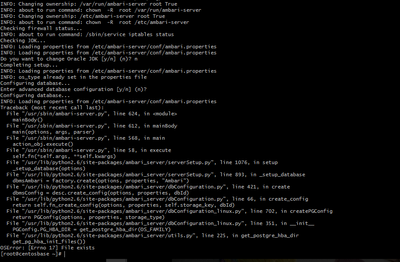
Please find error as below
[root@centosbase ~]# ambari-server setup -v Using python /usr/bin/python2.6 Setup ambari-server Checking SELinux... INFO: about to run command: /usr/sbin/sestatus SELinux status is 'disabled' INFO: Loading properties from /etc/ambari-server/conf/ambari.properties Customize user account for ambari-server daemon [y/n] (n)? n INFO: Loading properties from /etc/ambari-server/conf/ambari.properties INFO: Cleaning bootstrap directory (/var/run/ambari-server/bootstrap) contents... Adjusting ambari-server permissions and ownership... INFO: Setting file permissions: /var/log/ambari-server/ 644 root True INFO: about to run command: chmod -R 644 /var/log/ambari-server/ INFO: about to run command: chown -R root /var/log/ambari-server/ INFO: Setting file permissions: /var/log/ambari-server/ 755 root False INFO: about to run command: chmod 755 /var/log/ambari-server/ INFO: about to run command: chown root /var/log/ambari-server/ INFO: Setting file permissions: /var/run/ambari-server/ 644 root True
Created 07-20-2016 08:34 AM
- Mark as New
- Bookmark
- Subscribe
- Mute
- Subscribe to RSS Feed
- Permalink
- Report Inappropriate Content
Could some help me on this issue , i am facing this issue since two days. Is any support team Hortonworks is there ?


Created 07-20-2016 12:48 PM
- Mark as New
- Bookmark
- Subscribe
- Mute
- Subscribe to RSS Feed
- Permalink
- Report Inappropriate Content
I would start from scratch, clean up everything,
yum erase ambari*
rm -rf any ambari dir
rm -rf /usr/lib/python2.6/site-packages/ambari*
Created 07-20-2016 01:26 PM
- Mark as New
- Bookmark
- Subscribe
- Mute
- Subscribe to RSS Feed
- Permalink
- Report Inappropriate Content
- I have cleaned every thing, after clean also same
$sudo ambari-server setup -v
Using python /usr/bin/python2.6 Setup ambari-server Checking SELinux... INFO: about to run command: /usr/sbin/sestatus SELinux status is 'disabled' INFO: Loading properties from /etc/ambari-server/conf/ambari.properties Customize user account for ambari-server daemon [y/n] (n)? INFO: Loading properties from /etc/ambari-server/conf/ambari.properties INFO: Cleaning bootstrap directory (/var/run/ambari-server/bootstrap) contents.
.
.
.
Enter advanced database configuration [y/n] (n)? Configuring database... INFO: Loading properties from /etc/ambari-server/conf/ambari.properties Traceback (most recent call last): File "/usr/sbin/ambari-server.py", line 624, in <module> mainBody() File "/usr/sbin/ambari-server.py", line 612, in mainBody main(options, args, parser) File "/usr/sbin/ambari-server.py", line 568, in main action_obj.execute() File "/usr/sbin/ambari-server.py", line 58, in execute self.fn(*self.args, **self.kwargs) File "/usr/lib/python2.6/site-packages/ambari_server/serverSetup.py", line 1076, in setup _setup_database(options) File "/usr/lib/python2.6/site-packages/ambari_server/serverSetup.py", line 893, in _setup_database dbmsAmbari = factory.create(options, properties, "Ambari") File "/usr/lib/python2.6/site-packages/ambari_server/dbConfiguration.py", line 421, in create dbmsConfig = desc.create_config(options, properties, dbId) File "/usr/lib/python2.6/site-packages/ambari_server/dbConfiguration.py", line 66, in create_config return self.fn_create_config(options, properties, self.storage_key, dbId) File "/usr/lib/python2.6/site-packages/ambari_server/dbConfiguration_linux.py", line 702, in createPGConfig return PGConfig(options, properties, storage_type) File "/usr/lib/python2.6/site-packages/ambari_server/dbConfiguration_linux.py", line 351, in __init__ PGConfig.PG_HBA_DIR = get_postgre_hba_dir(OS_FAMILY) File "/usr/lib/python2.6/site-packages/ambari_server/utils.py", line 225, in get_postgre_hba_dir get_pg_hba_init_files()) OSError: [Errno 17] File exists
Created 07-20-2016 03:48 PM
- Mark as New
- Bookmark
- Subscribe
- Mute
- Subscribe to RSS Feed
- Permalink
- Report Inappropriate Content
consider opening a case with Hortonworks support, looks like you can't avoid having a webex with support.
Created 07-21-2016 08:27 AM
- Mark as New
- Bookmark
- Subscribe
- Mute
- Subscribe to RSS Feed
- Permalink
- Report Inappropriate Content
Dear Artem,
Thank you for your update on the issue.
Could you please let me know process for "Opening a case with Hortonworks support " and is i need to take premium service ?
Your concerns are appreciated.
Created 07-21-2016 03:43 PM
- Mark as New
- Bookmark
- Subscribe
- Mute
- Subscribe to RSS Feed
- Permalink
- Report Inappropriate Content
you have to be a paid customer. If so, you should have access to support.hortonworks.com and open a case. If you're not a customer and would like to be, let us know your location and we can get you in touch with an account representative who can initiate this process. @Shiv kumar


