
Our Community is getting an upgrade! To get everything ready for the relaunch, we’ll be placing the site in read-only mode starting September 21st.
We really appreciate your understanding while we get things set up behind the scenes. Catch up on all the exciting details about the move here.
Need help or have questions? Drop us a line at [email protected]

Archives of Support Questions (Read Only)
- Cloudera Community
- Board Archive
- Archives of Support Questions (Read Only)
- Re: Ansible outputs Unknown Job for ambari-agent
- Subscribe to RSS Feed
- Mark Question as New
- Mark Question as Read
- Float this Question for Current User
- Bookmark
- Subscribe
- Mute
- Printer Friendly Page
- Subscribe to RSS Feed
- Mark Question as New
- Mark Question as Read
- Float this Question for Current User
- Bookmark
- Subscribe
- Mute
- Printer Friendly Page
Ansible outputs Unknown Job for ambari-agent
- Labels:
-
Apache Ambari


Created 08-02-2016 10:55 AM
- Mark as New
- Bookmark
- Subscribe
- Mute
- Subscribe to RSS Feed
- Permalink
- Report Inappropriate Content
I am getting following error:
fatal: [node4.hc.com]: FAILED! => {"changed": false, "failed": true, "msg": "stop: Unknown job: ambari-agent\nstart: Unknown job: ambari-agent\n"}
fatal: [node2.hc.com]: FAILED! => {"changed": false, "failed": true, "msg": "stop: Unknown job: ambari-agent\nstart: Unknown job: ambari-agent\n"}
and role is :
--- - hosts: all
tasks:
- name: Install Ambari agent
yum: name=ambari-agent state=present
- name: Configure ambari-server hostname in ambari-agent configuration
lineinfile: dest=/etc/ambari-agent/conf/ambari-agent.ini regexp=^.*hostname=.*$ line=hostname={{ item }} backup=yes with_items: "{{groups['ambari']}}"
- name: Ensure ambari-agent is running and enabled
service: name=ambari-agent state=started enabled=yes
Why is it not able to find the service ?
Created 08-05-2016 09:04 AM
- Mark as New
- Bookmark
- Subscribe
- Mute
- Subscribe to RSS Feed
- Permalink
- Report Inappropriate Content
I couldn't figure out that why ambari-agent module was not being recognize but i managed to use script from init.d to start the service and it worked.
Here is the snippet of the play:
---
name: Ensure ambari-agent is running and enabled
command: /etc/init.d/ambari-agent restart


Created 08-02-2016 12:14 PM
- Mark as New
- Bookmark
- Subscribe
- Mute
- Subscribe to RSS Feed
- Permalink
- Report Inappropriate Content
Hi @Bhavin Tandel ,
are all the other steps running fine ? maybe posting the whole output will help....
I have similar playbook, which works fine on RHEL
- name: install ambari-agent yum: name=ambari-agent state=latest
...
- name: Ensure ambari-agent is running and enabled
service: name=ambari-agent state=restarted enabled=yes
guessing you are on a RHEL based distro...
What if you do a manual "service ambari-agent restart" ?!?!
Created on 08-02-2016 01:22 PM - edited 08-18-2019 04:54 AM
- Mark as New
- Bookmark
- Subscribe
- Mute
- Subscribe to RSS Feed
- Permalink
- Report Inappropriate Content
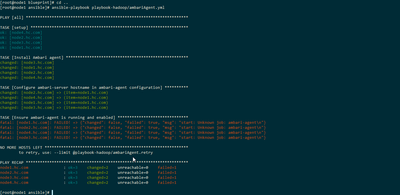
Thanks @Gerd Koenig for the quick reply. This the whole output, and yeah i am on Centos 6.5. If i run the command manually then it executed successfully.
Created 08-05-2016 09:04 AM
- Mark as New
- Bookmark
- Subscribe
- Mute
- Subscribe to RSS Feed
- Permalink
- Report Inappropriate Content
I couldn't figure out that why ambari-agent module was not being recognize but i managed to use script from init.d to start the service and it worked.
Here is the snippet of the play:
---
name: Ensure ambari-agent is running and enabled
command: /etc/init.d/ambari-agent restart



Created 08-05-2016 01:53 PM
- Mark as New
- Bookmark
- Subscribe
- Mute
- Subscribe to RSS Feed
- Permalink
- Report Inappropriate Content
This is a valid question.
Ambari 2.2.1.1 introduced a bug, by adding upstart support on all flavours of Linux: https://issues.apache.org/jira/browse/AMBARI-14842
Unfortunately, the same /etc/init/ambari-agent.conf file was used for all flavours of Linux. And in CentOS/RHEL6, the line 'kill signal SIGKILL' from this file is not compatible with the older version of upstart used in CentOS/RHEL6.
Ansible service module would always prefer to use upstart instead of SysVinit to start services, hence the error, as the upstart stop/start ambari-agent does not work in CentOS/RHEL6.
This is fixed in Ambari 2.2.2.0 so I suggest you use Ambari 2.2.2.0. If you can't, then you'll need to use the following Ansible task before your service task:
- name: Fix for upstart script in RHEL6
  lineinfile: dest=/etc/init/ambari-agent.conf
              state=absent
              regexp='^kill(.*)'
  when: ansible_os_family == "RedHat" and ansible_distribution_major_version == "6"
Kind regards,
Alexandru
Created 08-05-2016 04:32 PM
- Mark as New
- Bookmark
- Subscribe
- Mute
- Subscribe to RSS Feed
- Permalink
- Report Inappropriate Content
Thanks @Alexandru Anghel
This was very informative


