
Our Community is getting an upgrade! To get everything ready for the relaunch, we’ll be placing the site in read-only mode starting September 21st.
We really appreciate your understanding while we get things set up behind the scenes. Catch up on all the exciting details about the move here.
Need help or have questions? Drop us a line at [email protected]

Archives of Support Questions (Read Only)
- Cloudera Community
- Board Archive
- Archives of Support Questions (Read Only)
- Authentication error while securing Nifi
- Subscribe to RSS Feed
- Mark Question as New
- Mark Question as Read
- Float this Question for Current User
- Bookmark
- Subscribe
- Mute
- Printer Friendly Page
- Subscribe to RSS Feed
- Mark Question as New
- Mark Question as Read
- Float this Question for Current User
- Bookmark
- Subscribe
- Mute
- Printer Friendly Page
Authentication error while securing Nifi
- Labels:
-
Apache NiFi


Created on 12-17-2016 04:58 AM - edited 08-18-2019 05:07 AM
- Mark as New
- Bookmark
- Subscribe
- Mute
- Subscribe to RSS Feed
- Permalink
- Report Inappropriate Content
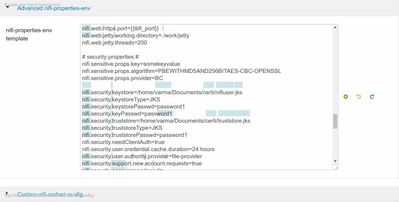
I am using hortonworks sandbox 2.4, While securing Nifi step_by_step, I used TinyCert to generate my own certificate authority and certificates and I download the client and server certificates in PKCS12 format. After that I created some changes in Nifi config --> nifi.properities as shown in the picture. Finally, I open the file authorized-users. xml, in the Nifi-conf directory and create an admin user based on the DN of the client certificate.
<users>
<user dn="CN=guest, OU=demo, O=Hortonworks, L=trichy, ST=tamilnadu, C=india">
<role name="ROLE_ADMIN"/>
</user>
</users>
I follow this link https://community.hortonworks.com/articles/886/securing-nifi-step-by-step.html.
While I run Nifi under localhost:9090 I got error as shown in the picture



Created 12-17-2016 06:05 PM
- Mark as New
- Bookmark
- Subscribe
- Mute
- Subscribe to RSS Feed
- Permalink
- Report Inappropriate Content
Hi Narasimma,
Few pointers,
--> If the configurations are done correctly and you have loaded your client certificate to your browser, you will only be able to view the NiFi UI via https://localhost:port not http://localhost:port like in your screenshot.
--> It looks like you are following the steps to get around it in an older version of HDF. Latest release, HDF-2.x gives us better ways to get SSL enabled with help of NiFi CA and tls-toolkit. please follow the below link for the same.(unfortunately you may not be able to do this in your sandbox where HDP is already installed)
https://community.hortonworks.com/articles/58009/hdf-20-enable-ssl-for-apache-nifi-from-ambari.html
--> In the Latest version we wont be using authorized-users.xml to configure user roles but instead an Initial Admin identity.
Thanks,
Jobin George
Created 12-17-2016 06:05 PM
- Mark as New
- Bookmark
- Subscribe
- Mute
- Subscribe to RSS Feed
- Permalink
- Report Inappropriate Content
Hi Narasimma,
Few pointers,
--> If the configurations are done correctly and you have loaded your client certificate to your browser, you will only be able to view the NiFi UI via https://localhost:port not http://localhost:port like in your screenshot.
--> It looks like you are following the steps to get around it in an older version of HDF. Latest release, HDF-2.x gives us better ways to get SSL enabled with help of NiFi CA and tls-toolkit. please follow the below link for the same.(unfortunately you may not be able to do this in your sandbox where HDP is already installed)
https://community.hortonworks.com/articles/58009/hdf-20-enable-ssl-for-apache-nifi-from-ambari.html
--> In the Latest version we wont be using authorized-users.xml to configure user roles but instead an Initial Admin identity.
Thanks,
Jobin George
Created 12-19-2016 04:18 AM
- Mark as New
- Bookmark
- Subscribe
- Mute
- Subscribe to RSS Feed
- Permalink
- Report Inappropriate Content
Thank you very much Jobin George


