
Our Community is getting an upgrade! To get everything ready for the relaunch, we’ll be placing the site in read-only mode starting September 21st.
We really appreciate your understanding while we get things set up behind the scenes. Catch up on all the exciting details about the move here.
Need help or have questions? Drop us a line at [email protected]

Archives of Support Questions (Read Only)
- Cloudera Community
- Board Archive
- Archives of Support Questions (Read Only)
- Re: Beeline sample with -u -f -n -p
- Subscribe to RSS Feed
- Mark Question as New
- Mark Question as Read
- Float this Question for Current User
- Bookmark
- Subscribe
- Mute
- Printer Friendly Page
- Subscribe to RSS Feed
- Mark Question as New
- Mark Question as Read
- Float this Question for Current User
- Bookmark
- Subscribe
- Mute
- Printer Friendly Page
Beeline sample with -u -f -n -p
- Labels:
-
Apache Hive


Created 11-10-2015 06:05 PM
- Mark as New
- Bookmark
- Subscribe
- Mute
- Subscribe to RSS Feed
- Permalink
- Report Inappropriate Content
Client tries to execute hive sql inside a file via Beeline.
Anyone has working sample of how to use "beeline -u <url> -n <user> -f <file> -p <password>"? I have tried this, but does not work.


Created on 11-11-2015 04:55 PM - edited 08-19-2019 05:51 AM
- Mark as New
- Bookmark
- Subscribe
- Mute
- Subscribe to RSS Feed
- Permalink
- Report Inappropriate Content
You can use this
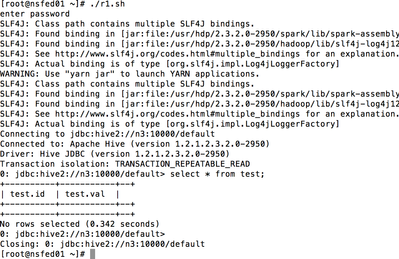
and if you want to prompt for password only then here you go
[root@nsfed01 ~]# cat r1.sh
#read -p "enter HS2 hostname: " HS2
#read -p "enter username: " username
echo "enter password"
read -s passwd
#read -p "enter filename: " filename
beeline -u jdbc:hive2://n3:10000/default -n neeraj -p $passwd -f f.sql
[root@nsfed01 ~]#


Created 11-10-2015 06:09 PM
- Mark as New
- Bookmark
- Subscribe
- Mute
- Subscribe to RSS Feed
- Permalink
- Report Inappropriate Content
/usr/hdp/current/hive-client/bin/beeline -n hrt_qa -p pwd -u "jdbc:hive2://host:2181,host2:2181,host3:2181/;serviceDiscoveryMode=zooKeeper;zooKeeperNamespace=hiveserver2" --outputformat=tsv -f /grid/0/hadoopqe/artifacts/tmp-820871
Created 11-10-2015 06:57 PM
- Mark as New
- Bookmark
- Subscribe
- Mute
- Subscribe to RSS Feed
- Permalink
- Report Inappropriate Content
Forgot to mention, user does not want to show his password in plaintext, he wants to type in prompt...
Created 11-10-2015 06:49 PM
- Mark as New
- Bookmark
- Subscribe
- Mute
- Subscribe to RSS Feed
- Permalink
- Report Inappropriate Content
This worked for me
[root@nsfed01 ~]# beeline -u jdbc:hive2://n2:10000/default -n hive -p hive -f f.sql
SLF4J: See http://www.slf4j.org/codes.html#multiple_bindings for an explanation.
SLF4J: Actual binding is of type [org.slf4j.impl.Log4jLoggerFactory]
Connecting to jdbc:hive2://n2:10000/default
Connected to: Apache Hive (version 1.2.1.2.3.2.0-2950)
Driver: Hive JDBC (version 1.2.1.2.3.2.0-2950)
Transaction isolation: TRANSACTION_REPEATABLE_READ
0: jdbc:hive2://n2:10000/default> select * from test;
+----------+-----------+--+
| test.id | test.val |
+----------+-----------+--+
+----------+-----------+--+
No rows selected (0.767 seconds)
0: jdbc:hive2://n2:10000/default>
Closing: 0: jdbc:hive2://n2:10000/default
[root@nsfed01 ~]#
Created 11-10-2015 06:57 PM
- Mark as New
- Bookmark
- Subscribe
- Mute
- Subscribe to RSS Feed
- Permalink
- Report Inappropriate Content
Forgot to mention, user does not want to show his password in plaintext, he wants to type in prompt...
Created on 11-11-2015 04:55 PM - edited 08-19-2019 05:51 AM
- Mark as New
- Bookmark
- Subscribe
- Mute
- Subscribe to RSS Feed
- Permalink
- Report Inappropriate Content
You can use this
and if you want to prompt for password only then here you go
[root@nsfed01 ~]# cat r1.sh
#read -p "enter HS2 hostname: " HS2
#read -p "enter username: " username
echo "enter password"
read -s passwd
#read -p "enter filename: " filename
beeline -u jdbc:hive2://n3:10000/default -n neeraj -p $passwd -f f.sql
[root@nsfed01 ~]#


