
Our Community is getting an upgrade! To get everything ready for the relaunch, we’ll be placing the site in read-only mode starting September 21st.
We really appreciate your understanding while we get things set up behind the scenes. Catch up on all the exciting details about the move here.
Need help or have questions? Drop us a line at [email protected]

Archives of Support Questions (Read Only)
- Cloudera Community
- Board Archive
- Archives of Support Questions (Read Only)
- Re: Can anyone provide an example of a python scri...
- Subscribe to RSS Feed
- Mark Question as New
- Mark Question as Read
- Float this Question for Current User
- Bookmark
- Subscribe
- Mute
- Printer Friendly Page
- Subscribe to RSS Feed
- Mark Question as New
- Mark Question as Read
- Float this Question for Current User
- Bookmark
- Subscribe
- Mute
- Printer Friendly Page
Can anyone provide an example of a python script executed through ExecuteStreamCommand?
- Labels:
-
Apache NiFi


Created on 03-24-2018 05:51 PM - edited 09-16-2022 06:01 AM
- Mark as New
- Bookmark
- Subscribe
- Mute
- Subscribe to RSS Feed
- Permalink
- Report Inappropriate Content
Albeit obvious, the processor should have the following properties:
- Calls a python script
- Able to supply the FlowFile in to the python script
- Read the FlowFile from within the python script
- Update either the original FlowFile or create a new FlowFile from within the python script
- Output the updated/new FlowFile back in to Nifi
Original question (without any responses)
Any pointers/advice/help is appreciated



Created on 03-27-2018 06:00 AM - edited 08-18-2019 12:12 AM
- Mark as New
- Bookmark
- Subscribe
- Mute
- Subscribe to RSS Feed
- Permalink
- Report Inappropriate Content
Here is a very elementary flow to depict it using ExecuteStreamCommand processor.
The flow looks like
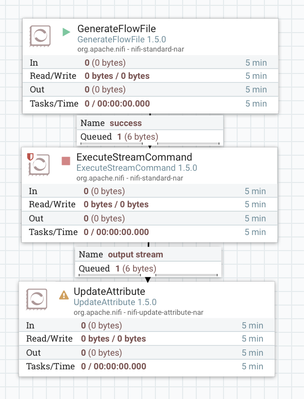
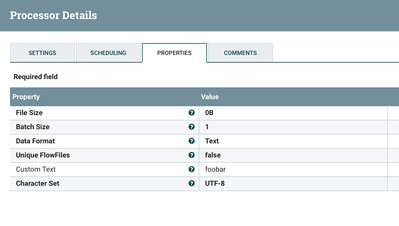
In the GenerateFlowFile processor, I am generating a flow file with sample text "foobar"
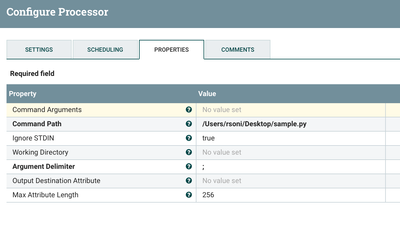
In the ExecuteStreamCommand, I am referring to my python code as
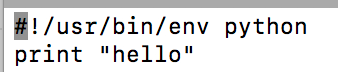
The sample.py looks like as silly as
And now the content of the flow file looks like
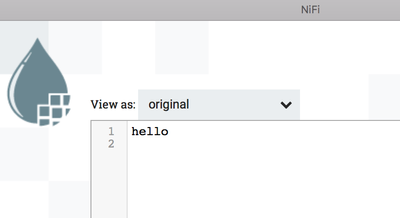
However, if you want to access the content of the existing flow file, I guess the only way you can do it is by converting the content to attribute and this can have consequences since attributes are kept in memory and a very large value for an attribute or a lot of attributes can adversely affect the performance.
Let know if that helps!
Created 03-24-2018 10:03 PM
- Mark as New
- Bookmark
- Subscribe
- Mute
- Subscribe to RSS Feed
- Permalink
- Report Inappropriate Content
Any specific reason for using ExecuteStream Command for this use case of yours? I will recommend using ExecuteScript or InvokeScript Processor and you can perform all the aforementioned operations from your question!
For example, a very beginners example can be the following script which reads a file and create an empty file with all its attributes using ExecuteScript Processor.
flowFile = session.get()
attrMap = flowFile.getAttributes()
session.remove(flowFile)
newflowFile = session.create()
newflowFile = session.putAllAttributes(newflowFile, attrMap)
session.transfer(newflowFile, REL_SUCCESS)
Or this groovy script in an ExecuteScript processor which can read the content of your flow files and accordingly redirect them to downstream connections.
import org.apache.commons.io.IOUtils
import java.nio.charset.StandardCharsets
flowFile = session.get()
if(!flowFile)return
def text = ''
def storeID = 0
session.read(flowFile, {inputStream ->
  text = IOUtils.toString(inputStream, StandardCharsets.UTF_8)
  storeID = text.tokenize("|")[2]
} as InputStreamCallback)
if(storeID >=1 && storeID <= 10)
	session.transfer(flowFile, REL_SUCCESS)
else (storeID >10 && storeID <= 20)
	session.transfer(flowFile, REL_FAILURE)
You can have an external script executed using ExecuteStream command also but why maintain any code outside when the inbuilt flow file handling logic in a processor like ExecuteScript processor can help you achieve the functionality more easily.
Created 03-24-2018 10:42 PM
- Mark as New
- Bookmark
- Subscribe
- Mute
- Subscribe to RSS Feed
- Permalink
- Report Inappropriate Content
Thank you for your reply. The reason that I want to use ExecuteStreamCommand instead of ExecuteScript is because Jython is not an option for me. I am running a wide array of python commands and they need to be executed under a particular Anaconda environment.
I can't seem to find any solid examples of ExecuteStreamCommand, would you mind providing an example or pointing me in the right direction?
Edit: just to add, ExecuteProcess is also not an option as it does not allow for an incoming FlowFile.
Created on 03-27-2018 06:00 AM - edited 08-18-2019 12:12 AM
- Mark as New
- Bookmark
- Subscribe
- Mute
- Subscribe to RSS Feed
- Permalink
- Report Inappropriate Content
Here is a very elementary flow to depict it using ExecuteStreamCommand processor.
The flow looks like
In the GenerateFlowFile processor, I am generating a flow file with sample text "foobar"
In the ExecuteStreamCommand, I am referring to my python code as
The sample.py looks like as silly as
And now the content of the flow file looks like
However, if you want to access the content of the existing flow file, I guess the only way you can do it is by converting the content to attribute and this can have consequences since attributes are kept in memory and a very large value for an attribute or a lot of attributes can adversely affect the performance.
Let know if that helps!
Created 03-27-2018 09:27 PM
- Mark as New
- Bookmark
- Subscribe
- Mute
- Subscribe to RSS Feed
- Permalink
- Report Inappropriate Content
@Vincent van Oudenhoven Does that help?
Created 04-01-2018 04:10 PM
- Mark as New
- Bookmark
- Subscribe
- Mute
- Subscribe to RSS Feed
- Permalink
- Report Inappropriate Content
Did the answer help in the resolution of your query? Please close the thread by marking the answer as Accepted!
Created 04-01-2018 06:57 PM
- Mark as New
- Bookmark
- Subscribe
- Mute
- Subscribe to RSS Feed
- Permalink
- Report Inappropriate Content
It did indeed help. I found the following StackOverflow answer to help too: https://stackoverflow.com/questions/49467969/python-script-using-executestreamcommand
Especially:
Command Arguments: any flags or args, delimited by ; (i.e. /path/to/my_script.py)

Command Path: /path/to/python3
Note the Command Path that you did not specify in the processor. This also allows the use of for example a predefined Anaconda environment.
Anyhow, thank you for the help!


