
Our Community is getting an upgrade! To get everything ready for the relaunch, we’ll be placing the site in read-only mode starting September 21st.
We really appreciate your understanding while we get things set up behind the scenes. Catch up on all the exciting details about the move here.
Need help or have questions? Drop us a line at [email protected]

Archives of Support Questions (Read Only)
- Cloudera Community
- Board Archive
- Archives of Support Questions (Read Only)
- Can not select Set hive.execution.engine as Tez
- Subscribe to RSS Feed
- Mark Question as New
- Mark Question as Read
- Float this Question for Current User
- Bookmark
- Subscribe
- Mute
- Printer Friendly Page
- Subscribe to RSS Feed
- Mark Question as New
- Mark Question as Read
- Float this Question for Current User
- Bookmark
- Subscribe
- Mute
- Printer Friendly Page
Can not select Set hive.execution.engine as Tez
- Labels:
-
Hortonworks Data Platform (HDP)


Created on 06-23-2017 12:23 PM - edited 08-17-2019 08:18 PM
- Mark as New
- Bookmark
- Subscribe
- Mute
- Subscribe to RSS Feed
- Permalink
- Report Inappropriate Content
I am at step 2.1.1 of Hadoop Tutorial - Getting started with HDP (see link below)
https://hortonworks.com/tutorial/hadoop-tutorial-getting-started-with-hdp/section/3/
It states to select.execution.engine as Tez in the settings. I can see the option in drop down menu, or type it in, but I can not select it.
I have installed the "HDP_2.6_virtualbox_05_05_2017_14_46_00_hdp" OVF in a Virtualbox version 5.1.22R115126. The host machine is Windows 7 professional.
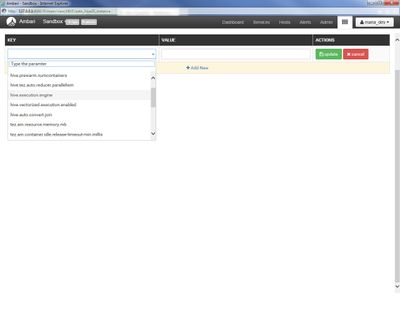
Thanks in advance



Created 06-23-2017 04:37 PM
- Mark as New
- Bookmark
- Subscribe
- Mute
- Subscribe to RSS Feed
- Permalink
- Report Inappropriate Content
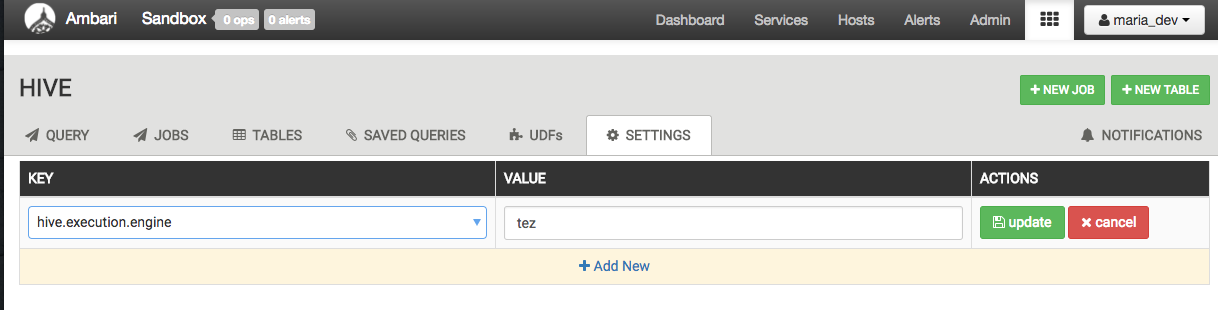
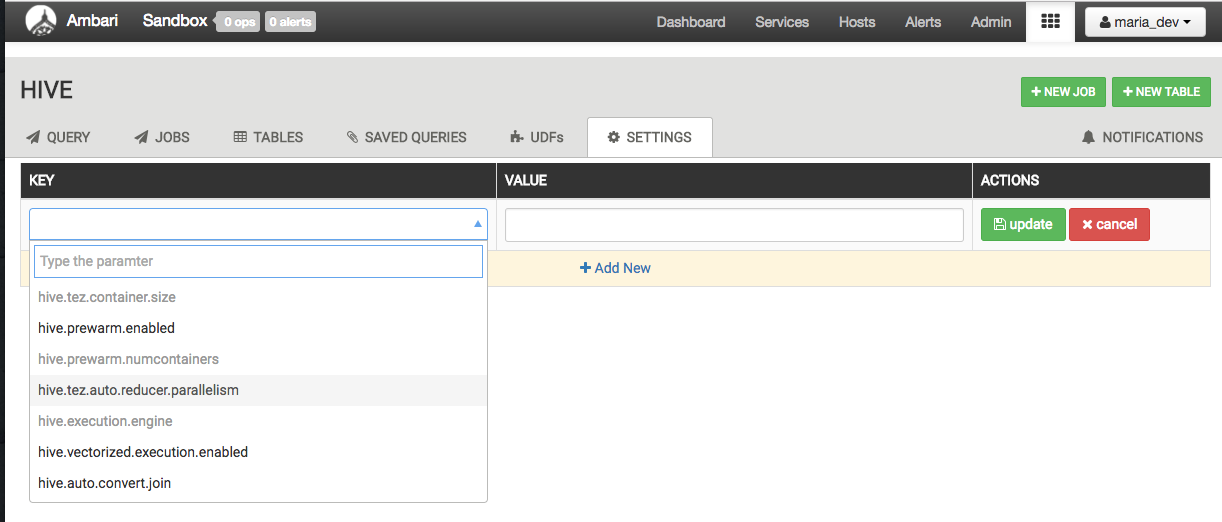
I've seen this in the Ambari Hive View 2.0, where if you once select a property, it becomes grey and cannot be selected again. I suspect its a UI bug, and will report it internally. To work around it, get out of the Hive View 2.0 and come back in and the property will be selectable again. When I tried just now, I just went back to the Ambari dashboard, waited it for the dashboard to load, then went back into the Hive View 2.0 and the property was again selectable for me to set. In the first screenshot, the values I've tried to select, did not update, and re-select are grey. In the second screenshot, ascreen-shot-2017-06-23-at-103601-am.pngfter going out and back into the Hive View 2.0, they are selectable again and able for me to set the execution engine to 'tez'.
Created 06-23-2017 04:37 PM
- Mark as New
- Bookmark
- Subscribe
- Mute
- Subscribe to RSS Feed
- Permalink
- Report Inappropriate Content
I've seen this in the Ambari Hive View 2.0, where if you once select a property, it becomes grey and cannot be selected again. I suspect its a UI bug, and will report it internally. To work around it, get out of the Hive View 2.0 and come back in and the property will be selectable again. When I tried just now, I just went back to the Ambari dashboard, waited it for the dashboard to load, then went back into the Hive View 2.0 and the property was again selectable for me to set. In the first screenshot, the values I've tried to select, did not update, and re-select are grey. In the second screenshot, ascreen-shot-2017-06-23-at-103601-am.pngfter going out and back into the Hive View 2.0, they are selectable again and able for me to set the execution engine to 'tez'.


