
Our Community is getting an upgrade! To get everything ready for the relaunch, we’ll be placing the site in read-only mode starting September 21st.
We really appreciate your understanding while we get things set up behind the scenes. Catch up on all the exciting details about the move here.
Need help or have questions? Drop us a line at [email protected]

Archives of Support Questions (Read Only)
- Cloudera Community
- Board Archive
- Archives of Support Questions (Read Only)
- Can't create a folder in Files View
- Subscribe to RSS Feed
- Mark Question as New
- Mark Question as Read
- Float this Question for Current User
- Bookmark
- Subscribe
- Mute
- Printer Friendly Page
- Subscribe to RSS Feed
- Mark Question as New
- Mark Question as Read
- Float this Question for Current User
- Bookmark
- Subscribe
- Mute
- Printer Friendly Page
Can't create a folder in Files View


Created on 06-29-2017 05:37 PM - edited 09-16-2022 04:51 AM
- Mark as New
- Bookmark
- Subscribe
- Mute
- Subscribe to RSS Feed
- Permalink
- Report Inappropriate Content
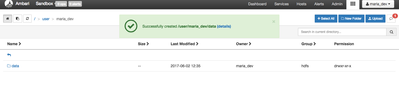
I'm trying to complete Loading Sensor Data into HDFS tutorial, but when I try and create the "data" folder in File VIew user > maria_dev it doesn't show. I do get the message it was created successfully.



Created 06-29-2017 05:54 PM
- Mark as New
- Bookmark
- Subscribe
- Mute
- Subscribe to RSS Feed
- Permalink
- Report Inappropriate Content
I faced this issue when i used IE11 browser, Because it caches the current View of directories and hence when we create the new directories in File View (even though the directory is actually created in the HDFS) the File View still shows old view.
- Disabling Browser Cache in IE11: https://library.netapp.com/ecmdocs/ECMLP2411996/html/GUID-1E34D79A-2EB8-4A0D-AA47-E7BB62B8C77B.html
Please disable the Browser Cache in IE11 and then try again or use any other browser like Chrome / Firefox.

Created on 06-29-2017 05:54 PM - edited 08-17-2019 06:05 PM
- Mark as New
- Bookmark
- Subscribe
- Mute
- Subscribe to RSS Feed
- Permalink
- Report Inappropriate Content
Hi @John Bowler
I just found the tutorial, started my Sandbox and attempted to create the 'data' dir in the tutorial under /user/maria_dev/
It worked for me without an issue. Can you try refreshing your browser to see if that helps? I've had my browser play UI tricks to me in the past.
Created 06-29-2017 05:54 PM
- Mark as New
- Bookmark
- Subscribe
- Mute
- Subscribe to RSS Feed
- Permalink
- Report Inappropriate Content
I faced this issue when i used IE11 browser, Because it caches the current View of directories and hence when we create the new directories in File View (even though the directory is actually created in the HDFS) the File View still shows old view.
- Disabling Browser Cache in IE11: https://library.netapp.com/ecmdocs/ECMLP2411996/html/GUID-1E34D79A-2EB8-4A0D-AA47-E7BB62B8C77B.html
Please disable the Browser Cache in IE11 and then try again or use any other browser like Chrome / Firefox.
Created 06-29-2017 08:05 PM
- Mark as New
- Bookmark
- Subscribe
- Mute
- Subscribe to RSS Feed
- Permalink
- Report Inappropriate Content
This worked!! Thanks so much for both responses!!


