
Our Community is getting an upgrade! To get everything ready for the relaunch, we’ll be placing the site in read-only mode starting September 21st.
We really appreciate your understanding while we get things set up behind the scenes. Catch up on all the exciting details about the move here.
Need help or have questions? Drop us a line at [email protected]

Archives of Support Questions (Read Only)
- Cloudera Community
- Board Archive
- Archives of Support Questions (Read Only)
- Cannot access Sandbox WebUI's anymore, VirtualBox ...
- Subscribe to RSS Feed
- Mark Question as New
- Mark Question as Read
- Float this Question for Current User
- Bookmark
- Subscribe
- Mute
- Printer Friendly Page
- Subscribe to RSS Feed
- Mark Question as New
- Mark Question as Read
- Float this Question for Current User
- Bookmark
- Subscribe
- Mute
- Printer Friendly Page
Cannot access Sandbox WebUI's anymore, VirtualBox Network Settings



Created on 08-19-2016 06:26 PM - edited 09-16-2022 03:35 AM
- Mark as New
- Bookmark
- Subscribe
- Mute
- Subscribe to RSS Feed
- Permalink
- Report Inappropriate Content
Hi,
First time I started the 2.4 HDP Sandbox I was able to work with it on a local browser through the addresses 127.0.0.1:8888 / 4200 (shell) & 8080 (ambari). Now something got changed, probably in the network settings and these addresses don't work anymore. Options are (NAT, NAT network, Bridged, Internal network, Host-only adapter)
Somebody have any advice on this? What was the settings the .ova is shipped with, cause I can't remember, reproduce.
Thanks


Created on 08-19-2016 06:30 PM - edited 08-19-2019 04:15 AM
- Mark as New
- Bookmark
- Subscribe
- Mute
- Subscribe to RSS Feed
- Permalink
- Report Inappropriate Content
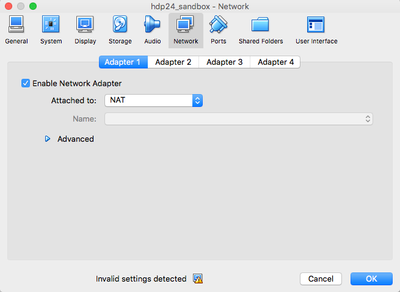
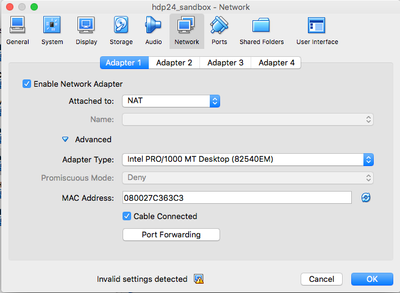
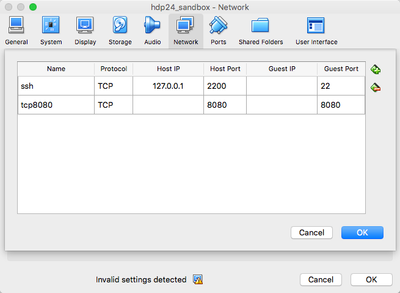
You should be using NAT for the network setting. The piece you need to check is Port Forwarding. You can find it under Network -> Advanced -> Port Forwarding. In my screenshot, I have port forwarding set to 2200<->22. By default the Sandbox is 2222<->22. This is because I'm using Vagrant with my sandbox.
I have provided a couple of screenshots:

Created 08-19-2016 06:29 PM
- Mark as New
- Bookmark
- Subscribe
- Mute
- Subscribe to RSS Feed
- Permalink
- Report Inappropriate Content
Created on 08-19-2016 06:30 PM - edited 08-19-2019 04:15 AM
- Mark as New
- Bookmark
- Subscribe
- Mute
- Subscribe to RSS Feed
- Permalink
- Report Inappropriate Content
You should be using NAT for the network setting. The piece you need to check is Port Forwarding. You can find it under Network -> Advanced -> Port Forwarding. In my screenshot, I have port forwarding set to 2200<->22. By default the Sandbox is 2222<->22. This is because I'm using Vagrant with my sandbox.
I have provided a couple of screenshots:
Created on 08-19-2016 07:05 PM - edited 08-19-2019 04:15 AM
- Mark as New
- Bookmark
- Subscribe
- Mute
- Subscribe to RSS Feed
- Permalink
- Report Inappropriate Content
In addition to Michaels answer...
this is the complete list of ports forwarded if you messed those settings up somehow:
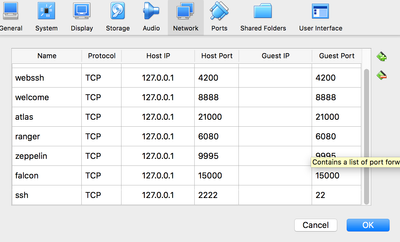
Don't forget to forward port 8080 as well, it is just off the screen.


Created 08-24-2016 08:18 PM
- Mark as New
- Bookmark
- Subscribe
- Mute
- Subscribe to RSS Feed
- Permalink
- Report Inappropriate Content
Also make sure you Ambari server is running
ambari-server status


