
Our Community is getting an upgrade! To get everything ready for the relaunch, we’ll be placing the site in read-only mode starting September 21st.
We really appreciate your understanding while we get things set up behind the scenes. Catch up on all the exciting details about the move here.
Need help or have questions? Drop us a line at [email protected]

Archives of Support Questions (Read Only)
- Cloudera Community
- Board Archive
- Archives of Support Questions (Read Only)
- Changing Namenode & DataNode directories in HDP 2...
- Subscribe to RSS Feed
- Mark Question as New
- Mark Question as Read
- Float this Question for Current User
- Bookmark
- Subscribe
- Mute
- Printer Friendly Page
- Subscribe to RSS Feed
- Mark Question as New
- Mark Question as Read
- Float this Question for Current User
- Bookmark
- Subscribe
- Mute
- Printer Friendly Page
Changing Namenode & DataNode directories in HDP 2.4.2


Created 08-30-2016 06:30 PM
- Mark as New
- Bookmark
- Subscribe
- Mute
- Subscribe to RSS Feed
- Permalink
- Report Inappropriate Content
The Namenode & Datanode directories in HDFS default pointing to sda1(which has less space). I want to point the directories to sdb1 which has larger space. what is the procedure to change the Namenode & Datanode directories. As of now i do not have any data on HDFS so do not have problem of losing data while changing directories. Please let me know the steps. Below is the screen shot.



Created on 08-30-2016 06:39 PM - edited 08-19-2019 03:00 AM
- Mark as New
- Bookmark
- Subscribe
- Mute
- Subscribe to RSS Feed
- Permalink
- Report Inappropriate Content
Login to Ambari UI --> Click on HDFS service --> Click on configs --> Search for data.dir --> Change the location --> Restart required services via Ambari
Please refer below screenshot
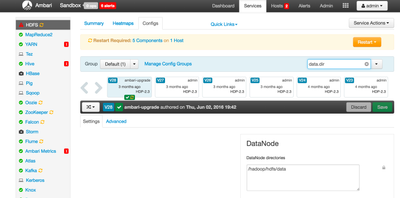
Please note - This procedure will not take care of data migration.
Created on 08-30-2016 06:39 PM - edited 08-19-2019 03:00 AM
- Mark as New
- Bookmark
- Subscribe
- Mute
- Subscribe to RSS Feed
- Permalink
- Report Inappropriate Content
Login to Ambari UI --> Click on HDFS service --> Click on configs --> Search for data.dir --> Change the location --> Restart required services via Ambari
Please refer below screenshot
Please note - This procedure will not take care of data migration.
Created 08-30-2016 07:09 PM
- Mark as New
- Bookmark
- Subscribe
- Mute
- Subscribe to RSS Feed
- Permalink
- Report Inappropriate Content
Hi @Kuldeep Kulkarni. In the datanode & namenode directories path i am giving "/mnt/resource/hadoop/hdfs/namenode & /mnt/resource/hadoop/hdfs/data" .Is this right ?
Please refer the attached screen shot of available partitions image.png.
Thank you.



Created 08-31-2016 06:24 AM
- Mark as New
- Bookmark
- Subscribe
- Mute
- Subscribe to RSS Feed
- Permalink
- Report Inappropriate Content
Yes above change should work and also you should format the new name directory


