
Our Community is getting an upgrade! To get everything ready for the relaunch, we’ll be placing the site in read-only mode starting September 21st.
We really appreciate your understanding while we get things set up behind the scenes. Catch up on all the exciting details about the move here.
Need help or have questions? Drop us a line at [email protected]

Archives of Support Questions (Read Only)
- Cloudera Community
- Board Archive
- Archives of Support Questions (Read Only)
- Cloudbreak Azure Marketplace Deployment Failing - ...
- Subscribe to RSS Feed
- Mark Question as New
- Mark Question as Read
- Float this Question for Current User
- Bookmark
- Subscribe
- Mute
- Printer Friendly Page
- Subscribe to RSS Feed
- Mark Question as New
- Mark Question as Read
- Float this Question for Current User
- Bookmark
- Subscribe
- Mute
- Printer Friendly Page
Cloudbreak Azure Marketplace Deployment Failing - Time Out
- Labels:
-
Hortonworks Cloudbreak


Created on 07-24-2018 02:00 PM - edited 08-17-2019 11:08 PM
- Mark as New
- Bookmark
- Subscribe
- Mute
- Subscribe to RSS Feed
- Permalink
- Report Inappropriate Content
Hi,
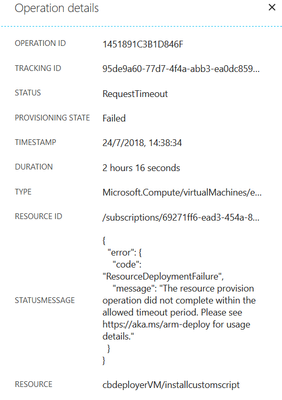
Is anyone experiencing a problem trying to deploy Cloudbreak deployer from the Azure Marketplace? I start the deployment and the resource group and resources are created but then the cbdeployerVM/installcustomscript runs forever eventually failing on a timeout error. See screenshot. I cannot get this to work, I've tried using different regions (North & West Europe) but no difference.



Created 07-24-2018 06:14 PM
- Mark as New
- Bookmark
- Subscribe
- Mute
- Subscribe to RSS Feed
- Permalink
- Report Inappropriate Content
@Paul Norris, Why don't you try using the following link instead of the Cloudbreak available on the Azure Marketplace. This installs Cloudbreak 2.7.1 while the Azure Marketplace version is older:
After navigating to this page, click on the blue button to open the install template.
Created 07-24-2018 06:14 PM
- Mark as New
- Bookmark
- Subscribe
- Mute
- Subscribe to RSS Feed
- Permalink
- Report Inappropriate Content
@Paul Norris, Why don't you try using the following link instead of the Cloudbreak available on the Azure Marketplace. This installs Cloudbreak 2.7.1 while the Azure Marketplace version is older:
After navigating to this page, click on the blue button to open the install template.
Created 07-24-2018 06:42 PM
- Mark as New
- Bookmark
- Subscribe
- Mute
- Subscribe to RSS Feed
- Permalink
- Report Inappropriate Content
Thanks, @Dominika Bialek. That has worked, I got an error initially as the default Standard_DS2 VM size isn't available in Western Europe, changing this to Standard_DS2_v2 did the trick.

Created 07-29-2019 07:26 PM
- Mark as New
- Bookmark
- Subscribe
- Mute
- Subscribe to RSS Feed
- Permalink
- Report Inappropriate Content
Bonjour Dominika,
Is there a way to know which "VM Size" to choose from when using the location "Canada Central"?
Merci,
François.


Created 01-18-2021 09:53 AM
- Mark as New
- Bookmark
- Subscribe
- Mute
- Subscribe to RSS Feed
- Permalink
- Report Inappropriate Content
Hi Dominika,
I get error an error when you paste output link into my google browser
cloudbreak-controller-yv2j46nvuqfic.eastus.cloudapp.azure.com refused to connect.
Please let me know if this is expected, and how to get around this.
Thanks,
Lawrence


Created 01-19-2021 12:21 AM
- Mark as New
- Bookmark
- Subscribe
- Mute
- Subscribe to RSS Feed
- Permalink
- Report Inappropriate Content
@Law, as this is an older post, you would have a better chance of receiving a resolution by starting a new thread. This will also be an opportunity to provide details specific to your environment that could aid others in assisting you with a more accurate answer to your question. You can link this thread as a reference in your new post.
Regards,
Vidya Sargur,Community Manager
Was your question answered? Make sure to mark the answer as the accepted solution.
If you find a reply useful, say thanks by clicking on the thumbs up button.
Learn more about the Cloudera Community:

Created 01-20-2021 06:06 AM
- Mark as New
- Bookmark
- Subscribe
- Mute
- Subscribe to RSS Feed
- Permalink
- Report Inappropriate Content
Hey @Law ,
Can you please provide your cloudbreak version and from where you are taking this link.
Also, if you can start a new thread with your query and related information specific to your environment that could aid others in assisting you with a more accurate answer to your question.
Created 07-24-2018 07:05 PM
- Mark as New
- Bookmark
- Subscribe
- Mute
- Subscribe to RSS Feed
- Permalink
- Report Inappropriate Content
@Paul Norris I'm glad it worked for you. We will look into the Cloudbreak deployment problem from the Azure Marketplace.
CC @pdarvasi

Created 07-24-2018 08:58 PM
- Mark as New
- Bookmark
- Subscribe
- Mute
- Subscribe to RSS Feed
- Permalink
- Report Inappropriate Content
@Dominika Bialek, I had the exact same issue yesterday, I tried different DCs (Sydney and US) and different VMs, same timeout errors for all. I am going to try now your suggested link...
,Hey @Dominika Bialek and @Paul Norris, I just wanted to let you know that I was getting the exact same error, I tried different data centers (Sydney, US) and different VMs, they all timed out. I am gonna try now Dominika's suggested link above...


