
Our Community is getting an upgrade! To get everything ready for the relaunch, we’ll be placing the site in read-only mode starting September 21st.
We really appreciate your understanding while we get things set up behind the scenes. Catch up on all the exciting details about the move here.
Need help or have questions? Drop us a line at [email protected]

Archives of Support Questions (Read Only)
- Cloudera Community
- Board Archive
- Archives of Support Questions (Read Only)
- Cloudbreak on Openstack not populating local stora...
- Subscribe to RSS Feed
- Mark Question as New
- Mark Question as Read
- Float this Question for Current User
- Bookmark
- Subscribe
- Mute
- Printer Friendly Page
- Subscribe to RSS Feed
- Mark Question as New
- Mark Question as Read
- Float this Question for Current User
- Bookmark
- Subscribe
- Mute
- Printer Friendly Page
Cloudbreak on Openstack not populating local storage directories.
- Labels:
-
Apache Ambari
-
Hortonworks Cloudbreak



Created on 03-09-2017 07:25 AM - edited 08-18-2019 06:14 AM
- Mark as New
- Bookmark
- Subscribe
- Mute
- Subscribe to RSS Feed
- Permalink
- Report Inappropriate Content
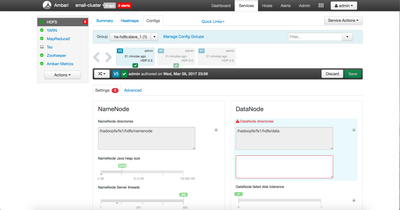
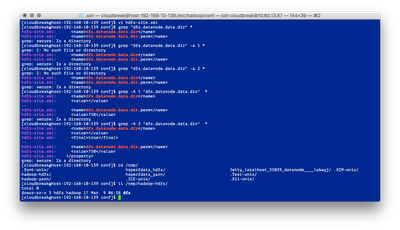
I'm trying to build a Namenode HA cluster on OpenStack. I have two mount points for my instance when it's created: / for all the os related bits and /hadoopfs/fs1 for all the HDFS/YARN data. I think the /hadoopfs/fs{1..n} is standard. When I deploy my cluster and completes I end up with dfs.datanodes.data.dir:/hadoopfs/fs1/hdfs/data set, but then all the config groups that get generated during the build process have null values set. So this is causing the datanode process to create its data dir in /tmp/hadoop-hdfs/dfs/data/ which is on the root filesystem instead of the 20TB data store for the instance. What am I missing that could be causing this to happen?
From Ambari:
From the command line:
Finally here's a copy of my blueprint:
{
  "Blueprints": {
    "blueprint_name": "ha-hdfs",
    "stack_name": "HDP",
    "stack_version": "2.5"
  },
  "host_groups": [
    {
      "name": "gateway",
      "cardinality" : "1",
      "components": [
        { "name": "HDFS_CLIENT" },
        { "name": "MAPREDUCE2_CLIENT" },
        { "name": "METRICS_COLLECTOR" },
        { "name": "METRICS_MONITOR" },
        { "name": "TEZ_CLIENT" },
        { "name": "YARN_CLIENT" },
        { "name": "ZOOKEEPER_CLIENT" }
      ]
    },
    {
      "name": "master_1",
      "cardinality" : "1",
      "components": [
        { "name": "HISTORYSERVER" },
        { "name": "JOURNALNODE" },
        { "name": "METRICS_MONITOR" },
        { "name": "NAMENODE" },
        { "name": "ZKFC" },
        { "name": "ZOOKEEPER_SERVER" }
      ]
    },
    {
      "name": "master_2",
      "cardinality" : "1",
      "components": [
        { "name": "APP_TIMELINE_SERVER" },
        { "name": "JOURNALNODE" },
        { "name": "METRICS_MONITOR" },
        { "name": "RESOURCEMANAGER" },
        { "name": "ZOOKEEPER_SERVER" }
      ]
    },
    {
      "name": "master_3",
      "cardinality" : "1",
      "components": [
        { "name": "JOURNALNODE" },
        { "name": "METRICS_MONITOR" },
        { "name": "NAMENODE" },
        { "name": "ZKFC" },
        { "name": "ZOOKEEPER_SERVER" }
      ]
    },
    {
      "name": "slave_1",
      "components": [
        { "name": "DATANODE" },
        { "name": "METRICS_MONITOR" },
        { "name": "NODEMANAGER" }
      ]
    }
  ],
  "configurations": [
    {
      "core-site": {
        "properties" : {
          "fs.defaultFS" : "hdfs://myclusterhaha",
          "ha.zookeeper.quorum" : "%HOSTGROUP::master_1%:2181,%HOSTGROUP::master_2%:2181,%HOSTGROUP::master_3%:2181"
      }}
    },
    {
      "hdfs-site": {
        "properties" : {
          "dfs.client.failover.proxy.provider.myclusterhaha" : "org.apache.hadoop.hdfs.server.namenode.ha.ConfiguredFailoverProxyProvider",
          "dfs.ha.automatic-failover.enabled" : "true",
          "dfs.ha.fencing.methods" : "shell(/bin/true)",
          "dfs.ha.namenodes.myclusterhaha" : "nn1,nn2",
          "dfs.namenode.http-address" : "%HOSTGROUP::master_1%:50070",
          "dfs.namenode.http-address.myclusterhaha.nn1" : "%HOSTGROUP::master_1%:50070",
          "dfs.namenode.http-address.myclusterhaha.nn2" : "%HOSTGROUP::master_3%:50070",
          "dfs.namenode.https-address" : "%HOSTGROUP::master_1%:50470",
          "dfs.namenode.https-address.myclusterhaha.nn1" : "%HOSTGROUP::master_1%:50470",
          "dfs.namenode.https-address.myclusterhaha.nn2" : "%HOSTGROUP::master_3%:50470",
          "dfs.namenode.rpc-address.myclusterhaha.nn1" : "%HOSTGROUP::master_1%:8020",
          "dfs.namenode.rpc-address.myclusterhaha.nn2" : "%HOSTGROUP::master_3%:8020",
          "dfs.namenode.shared.edits.dir" : "qjournal://%HOSTGROUP::master_1%:8485;%HOSTGROUP::master_2%:8485;%HOSTGROUP::master_3%:8485/myclusterhaha",
          "dfs.nameservices" : "myclusterhaha",
          "dfs.datanode.data.dir" : "/hadoopfs/fs1/hdfs/data"
      }
      }

    },
    {
      "hadoop-env": {
        "properties": {
          "hadoop_heapsize": "4096",
          "dtnode_heapsize": "8192m",
          "namenode_heapsize": "32768m"
        }
      }
    }
  ]
}
Any advice you can provide would be great.
Thanks,
Scott


Created 03-09-2017 04:55 PM
- Mark as New
- Bookmark
- Subscribe
- Mute
- Subscribe to RSS Feed
- Permalink
- Report Inappropriate Content
Hi,
It looks like it's a bug in Cloudbreak when you don't attach volumes to the instances. It can be configured when you create a template on the UI. We'll get this fixed.
Created 03-09-2017 04:55 PM
- Mark as New
- Bookmark
- Subscribe
- Mute
- Subscribe to RSS Feed
- Permalink
- Report Inappropriate Content
Hi,
It looks like it's a bug in Cloudbreak when you don't attach volumes to the instances. It can be configured when you create a template on the UI. We'll get this fixed.


