
Our Community is getting an upgrade! To get everything ready for the relaunch, we’ll be placing the site in read-only mode starting September 21st.
We really appreciate your understanding while we get things set up behind the scenes. Catch up on all the exciting details about the move here.
Need help or have questions? Drop us a line at [email protected]

Archives of Support Questions (Read Only)
- Cloudera Community
- Board Archive
- Archives of Support Questions (Read Only)
- Cloudera manager hosts
- Subscribe to RSS Feed
- Mark Question as New
- Mark Question as Read
- Float this Question for Current User
- Bookmark
- Subscribe
- Mute
- Printer Friendly Page
- Subscribe to RSS Feed
- Mark Question as New
- Mark Question as Read
- Float this Question for Current User
- Bookmark
- Subscribe
- Mute
- Printer Friendly Page
Cloudera manager hosts
- Labels:
-
Cloudera Manager


Created 09-26-2017 09:02 AM
- Mark as New
- Bookmark
- Subscribe
- Mute
- Subscribe to RSS Feed
- Permalink
- Report Inappropriate Content
Created 09-26-2017 03:30 PM
- Mark as New
- Bookmark
- Subscribe
- Mute
- Subscribe to RSS Feed
- Permalink
- Report Inappropriate Content
solved it by logging in as other user with id as my username. Before that give the user root password less permissions in the etc/sudoers file. Add the permissions as the last line



Created 09-26-2017 09:09 AM
- Mark as New
- Bookmark
- Subscribe
- Mute
- Subscribe to RSS Feed
- Permalink
- Report Inappropriate Content
As long the localhost can be resolved, you should be able to search for and find your host.
If you choose that host in the add new cluster wizard, you can select to install all services on that one host.
If you are having trouble, try posting a couple screen shots to help explain the problem.
-Ben
Created 09-26-2017 01:38 PM
- Mark as New
- Bookmark
- Subscribe
- Mute
- Subscribe to RSS Feed
- Permalink
- Report Inappropriate Content
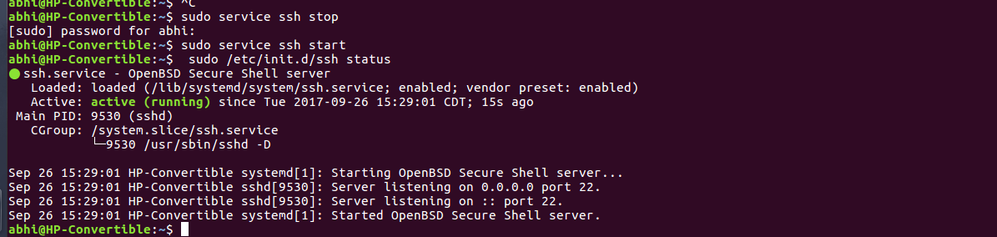
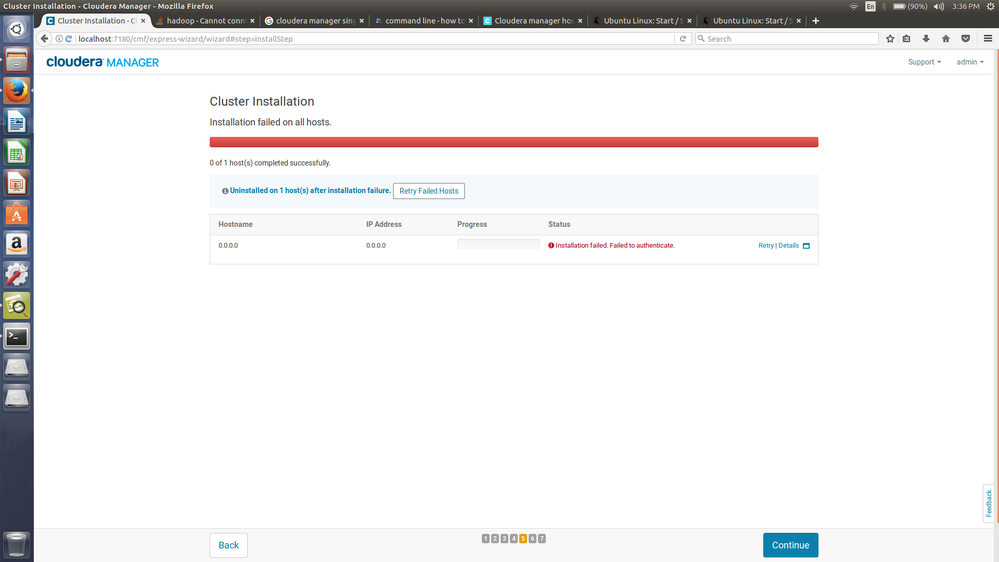
Thanks for the reply. I am uploadig the screenshot of my ssh status and cloudera manager failed status.
Created 09-26-2017 01:39 PM
- Mark as New
- Bookmark
- Subscribe
- Mute
- Subscribe to RSS Feed
- Permalink
- Report Inappropriate Content
i tried the password and giving the private key as well. Both give me failed to authenticate message
Created 09-26-2017 03:30 PM
- Mark as New
- Bookmark
- Subscribe
- Mute
- Subscribe to RSS Feed
- Permalink
- Report Inappropriate Content
solved it by logging in as other user with id as my username. Before that give the user root password less permissions in the etc/sudoers file. Add the permissions as the last line


