
Our Community is getting an upgrade! To get everything ready for the relaunch, we’ll be placing the site in read-only mode starting September 21st.
We really appreciate your understanding while we get things set up behind the scenes. Catch up on all the exciting details about the move here.
Need help or have questions? Drop us a line at [email protected]

Archives of Support Questions (Read Only)
- Cloudera Community
- Board Archive
- Archives of Support Questions (Read Only)
- Connection refused -- 2.6
- Subscribe to RSS Feed
- Mark Question as New
- Mark Question as Read
- Float this Question for Current User
- Bookmark
- Subscribe
- Mute
- Printer Friendly Page
- Subscribe to RSS Feed
- Mark Question as New
- Mark Question as Read
- Float this Question for Current User
- Bookmark
- Subscribe
- Mute
- Printer Friendly Page
Connection refused -- 2.6
- Labels:
-
Docker


Created 08-21-2017 08:58 PM
- Mark as New
- Bookmark
- Subscribe
- Mute
- Subscribe to RSS Feed
- Permalink
- Report Inappropriate Content
Following the tutorials, installed Docker, installed Sandbox, troubleshooted for hours and finally got Ambari up and working. Came back 2 weeks later to do the Atlas tutorials, and can't connect. In OSX terminal, I an starting with command ssh [email protected] -p 8080;. I am getting a Connection refused error. Did I miss some simple step? Thanks in advance.


Created 08-26-2017 04:25 PM
- Mark as New
- Bookmark
- Subscribe
- Mute
- Subscribe to RSS Feed
- Permalink
- Report Inappropriate Content
Great to hear it worked for you 🙂 Now you ought to reward the best answer so members can promptly help other members to resolve issues instantly @HCC
Have a great weekend



Created 08-21-2017 09:21 PM
- Mark as New
- Bookmark
- Subscribe
- Mute
- Subscribe to RSS Feed
- Permalink
- Report Inappropriate Content
Hi @L Hurley
Can you try the ssh command again but use port 2222 ? 8080 is usually the default web port for the Ambari UI.
Created 08-21-2017 09:33 PM
- Mark as New
- Bookmark
- Subscribe
- Mute
- Subscribe to RSS Feed
- Permalink
- Report Inappropriate Content
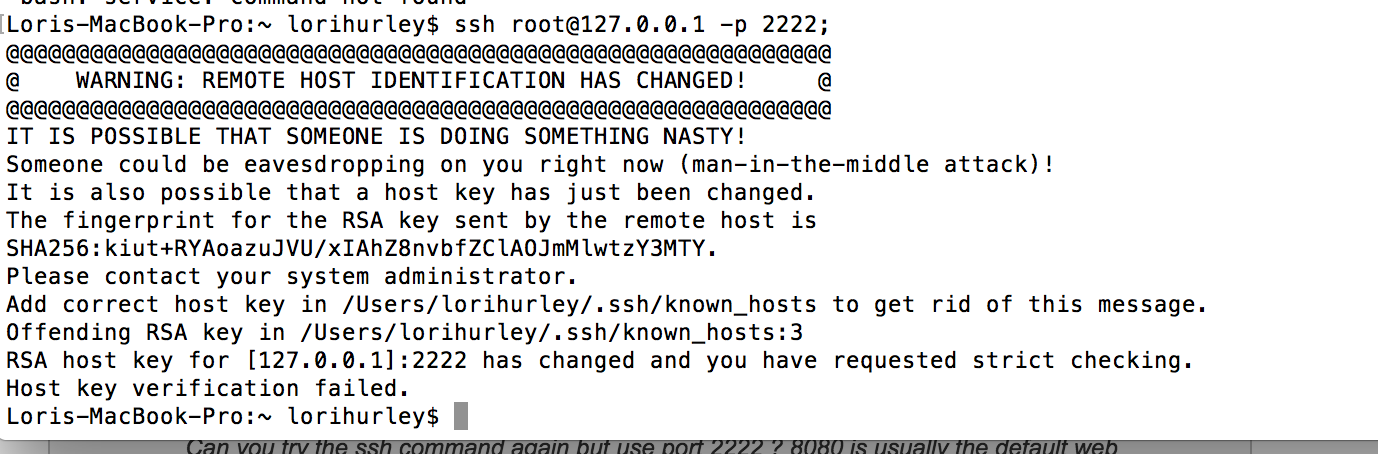
I got a scary security message when I did that. What is going on? screen-shot-2017-08-21-at-43029-pm.png
Created 08-21-2017 09:34 PM
- Mark as New
- Bookmark
- Subscribe
- Mute
- Subscribe to RSS Feed
- Permalink
- Report Inappropriate Content
Which is weird because looking back through terminal, I did try 2222 originally.
Created 08-21-2017 10:57 PM
- Mark as New
- Bookmark
- Subscribe
- Mute
- Subscribe to RSS Feed
- Permalink
- Report Inappropriate Content
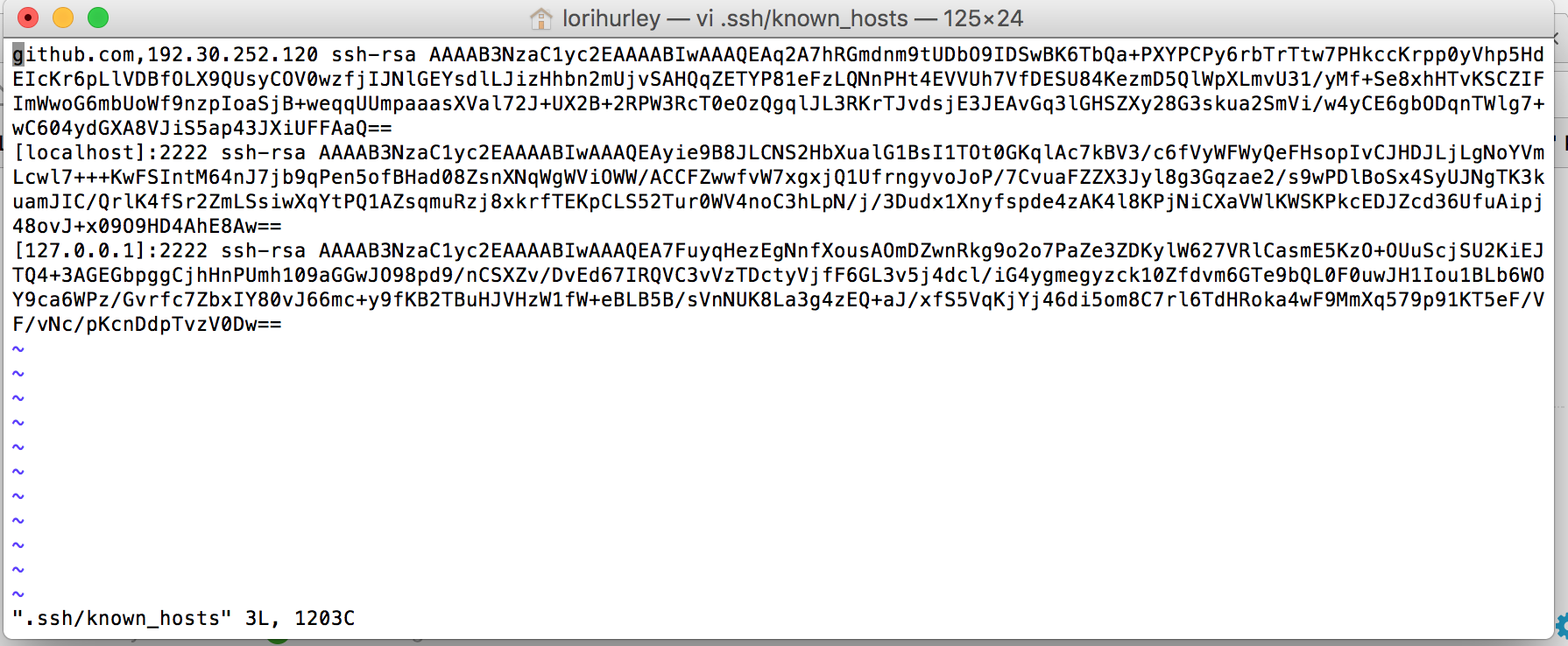
Looks like the key has changed. On your local system, go into .ssh/known_hosts and just delete any lines related to the sandbox. Then try the ssh again on -p 2222 and you'll be prompted to re-accept the key and should be good to go.
Created 08-22-2017 01:16 AM
- Mark as New
- Bookmark
- Subscribe
- Mute
- Subscribe to RSS Feed
- Permalink
- Report Inappropriate Content
Thank you for your patience and your assistance. Here is what .ssh/known_hosts looks like. I don't know what to make of it. screen-shot-2017-08-21-at-81523-pm.png
Created 08-23-2017 04:05 PM
- Mark as New
- Bookmark
- Subscribe
- Mute
- Subscribe to RSS Feed
- Permalink
- Report Inappropriate Content
hi @L Hurley
what you want to do is open the known_hosts file in a text editor and delete any lines that correspond with the IP address of the sandbox, which in your case is 127.0.0.1 and then try it again
Created 08-24-2017 12:29 PM
- Mark as New
- Bookmark
- Subscribe
- Mute
- Subscribe to RSS Feed
- Permalink
- Report Inappropriate Content
I did the image reinstalled and did do as you said deleting the info from known_hosts. Now I get the original connection refused error:
[root@sandbox ~]# ssh [email protected] -p 2222
ssh: connect to host 127.0.0.1 port 2222: Connection refused
Created 08-24-2017 03:06 PM
- Mark as New
- Bookmark
- Subscribe
- Mute
- Subscribe to RSS Feed
- Permalink
- Report Inappropriate Content
Hi @L Hurley
From the snippet you pasted, you are already logged in! You are logged into the sandbox as root, so ssh'ing in a second time would surley result in an error. root@sandbox
Created 08-24-2017 04:34 PM
- Mark as New
- Bookmark
- Subscribe
- Mute
- Subscribe to RSS Feed
- Permalink
- Report Inappropriate Content
But, I get an error at the URL. I'm not able to get to Ambari and move on with the darn tutorials. Error:
This page isn’t working
127.0.0.1 didn’t send any data.
ERR_EMPTY_RESPONSE


