
Our Community is getting an upgrade! To get everything ready for the relaunch, we’ll be placing the site in read-only mode starting September 21st.
We really appreciate your understanding while we get things set up behind the scenes. Catch up on all the exciting details about the move here.
Need help or have questions? Drop us a line at [email protected]

Archives of Support Questions (Read Only)
- Cloudera Community
- Board Archive
- Archives of Support Questions (Read Only)
- ConsumeJMS - Failed to load the WebSphere MQ nativ...
- Subscribe to RSS Feed
- Mark Question as New
- Mark Question as Read
- Float this Question for Current User
- Bookmark
- Subscribe
- Mute
- Printer Friendly Page
- Subscribe to RSS Feed
- Mark Question as New
- Mark Question as Read
- Float this Question for Current User
- Bookmark
- Subscribe
- Mute
- Printer Friendly Page
ConsumeJMS - Failed to load the WebSphere MQ native JNI library: 'mqjbnd'.
- Labels:
-
Apache NiFi
-
Cloudera Data Flow


Created on
05-26-2016
04:05 PM
- last edited on
04-21-2026
05:31 AM
by
 GrazittiAPI

- Mark as New
- Bookmark
- Subscribe
- Mute
- Subscribe to RSS Feed
- Permalink
- Report Inappropriate Content
I am trying to use the ConsumeJMS processor using HDF-1.2.0.1-1.
I have configured the connection factory and ssl context service. I have put mq jars in a folder and have configured it and also provided libmqjbnd.so in that folder. I even tried export LD_LIBRARY_PATH. I am looking for the right way for me to provide this .so to HDF.
Appreciate any direction.
I am getting the following error:
ConsumeJMS - JMSConsumer[destination:<queue name>; pub-sub:false;] ConsumeJMS - JMSConsumer[destination:<queue name>; pub-sub:false;] failed to process due to org.springframework.jms.UncategorizedJmsException: Uncategorized exception occured during JMS processing; nested exception is com.ibm.msg.client.jms.DetailedJMSException: JMSFMQ6312: An exception occurred in the Java(tm) MQI. The Java(tm) MQI has thrown an exception describing the problem. See the linked exception for further information.; nested exception is com.ibm.mq.jmqi.local.LocalMQ$4: CC=2;RC=2495;AMQ8598: Failed to load the WebSphere MQ native JNI library: 'mqjbnd'.; rolling back session: org.springframework.jms.UncategorizedJmsException: Uncategorized exception occured during JMS processing; nested exception is com.ibm.msg.client.jms.DetailedJMSException: JMSFMQ6312: An exception occurred in the Java(tm) MQI. The Java(tm) MQI has thrown an exception describing the problem. See the linked exception for further information.; nested exception is com.ibm.mq.jmqi.local.LocalMQ$4: CC=2;RC=2495;AMQ8598: Failed to load the WebSphere MQ native JNI library: 'mqjbnd'. 09:20:40 CDTERROR145dc502-4dc8-4666-89cb-5d875a279392 2016-05-26 09:32:59,967 ERROR [Timer-Driven Process Thread-1] o.apache.nifi.jms.processors.ConsumeJMS org.springframework.jms.UncategorizedJmsException: Uncategorized exception occured during JMS processing; nested exception is com.ibm.msg.client.jms.DetailedJMSException: JMSFMQ6312: An exception occurred in the Java(tm) MQI. The Java(tm) MQI has thrown an exception describing the problem. See the linked exception for further information.; nested exception is com.ibm.mq.jmqi.local.LocalMQ$4: CC=2;RC=2495;AMQ8598: Failed to load the WebSphere MQ native JNI library: 'mqjbnd'. at org.springframework.jms.support.JmsUtils.convertJmsAccessException(JmsUtils.java:316) ~[spring-jms-4.2.4.RELEASE.jar:4.2.4.RELEASE] at org.springframework.jms.support.JmsAccessor.convertJmsAccessException(JmsAccessor.java:169) ~[spring-jms-4.2.4.RELEASE.jar:4.2.4.RELEASE] at org.springframework.jms.core.JmsTemplate.execute(JmsTemplate.java:497) ~[spring-jms-4.2.4.RELEASE.jar:4.2.4.RELEASE] at org.springframework.jms.core.JmsTemplate.receiveSelected(JmsTemplate.java:764) ~[spring-jms-4.2.4.RELEASE.jar:4.2.4.RELEASE] at org.springframework.jms.core.JmsTemplate.receive(JmsTemplate.java:738) ~[spring-jms-4.2.4.RELEASE.jar:4.2.4.RELEASE] at org.springframework.jms.core.JmsTemplate.receive(JmsTemplate.java:727) ~[spring-jms-4.2.4.RELEASE.jar:4.2.4.RELEASE] at org.apache.nifi.jms.processors.JMSConsumer.consume(JMSConsumer.java:65) ~[nifi-jms-processors-0.6.0.1.2.0.1-1.jar:0.6.0.1.2.0.1-1] at org.apache.nifi.jms.processors.ConsumeJMS.rendezvousWithJms(ConsumeJMS.java:79) ~[nifi-jms-processors-0.6.0.1.2.0.1-1.jar:0.6.0.1.2.0.1-1] at org.apache.nifi.jms.processors.AbstractJMSProcessor.onTrigger(AbstractJMSProcessor.java:135) ~[nifi-jms-processors-0.6.0.1.2.0.1-1.jar:0.6.0.1.2.0.1-1] at org.apache.nifi.jms.processors.ConsumeJMS.onTrigger(ConsumeJMS.java:50) ~[nifi-jms-processors-0.6.0.1.2.0.1-1.jar:0.6.0.1.2.0.1-1] at org.apache.nifi.processor.AbstractProcessor.onTrigger(AbstractProcessor.java:27) ~[nifi-api-0.6.0.1.2.0.1-1.jar:0.6.0.1.2.0.1-1] at org.apache.nifi.controller.StandardProcessorNode.onTrigger(StandardProcessorNode.java:1059) [nifi-framework-core-0.6.0.1.2.0.1-1.jar:0.6.0.1.2.0.1-1] at org.apache.nifi.controller.tasks.ContinuallyRunProcessorTask.call(ContinuallyRunProcessorTask.java:136) [nifi-framework-core-0.6.0.1.2.0.1-1.jar:0.6.0.1.2.0.1-1] at org.apache.nifi.controller.tasks.ContinuallyRunProcessorTask.call(ContinuallyRunProcessorTask.java:47) [nifi-framework-core-0.6.0.1.2.0.1-1.jar:0.6.0.1.2.0.1-1] at org.apache.nifi.controller.scheduling.TimerDrivenSchedulingAgent$1.run(TimerDrivenSchedulingAgent.java:123) [nifi-framework-core-0.6.0.1.2.0.1-1.jar:0.6.0.1.2.0.1-1] at java.util.concurrent.Executors$RunnableAdapter.call(Executors.java:511) [na:1.8.0_65] at java.util.concurrent.FutureTask.runAndReset(FutureTask.java:308) [na:1.8.0_65] at java.util.concurrent.ScheduledThreadPoolExecutor$ScheduledFutureTask.access$301(ScheduledThreadPoolExecutor.java:180) [na:1.8.0_65] at java.util.concurrent.ScheduledThreadPoolExecutor$ScheduledFutureTask.run(ScheduledThreadPoolExecutor.java:294) [na:1.8.0_65] at java.util.concurrent.ThreadPoolExecutor.runWorker(ThreadPoolExecutor.java:1142) [na:1.8.0_65] at java.util.concurrent.ThreadPoolExecutor$Worker.run(ThreadPoolExecutor.java:617) [na:1.8.0_65] at java.lang.Thread.run(Thread.java:745) [na:1.8.0_65] Caused by: com.ibm.msg.client.jms.DetailedJMSException: JMSFMQ6312: An exception occurred in the Java(tm) MQI. at sun.reflect.NativeConstructorAccessorImpl.newInstance0(Native Method) ~[na:1.8.0_65] at sun.reflect.NativeConstructorAccessorImpl.newInstance(NativeConstructorAccessorImpl.java:62) ~[na:1.8.0_65] at sun.reflect.DelegatingConstructorAccessorImpl.newInstance(DelegatingConstructorAccessorImpl.java:45) ~[na:1.8.0_65] at java.lang.reflect.Constructor.newInstance(Constructor.java:422) ~[na:1.8.0_65] at com.ibm.msg.client.commonservices.j2se.NLSServices.createException(NLSServices.java:319) ~[na:na] at com.ibm.msg.client.commonservices.nls.NLSServices.createException(NLSServices.java:226) ~[na:na] at com.ibm.msg.client.wmq.factories.WMQConnectionFactory.createV7ProviderConnection(WMQConnectionFactory.java:8445) ~[na:na] at com.ibm.msg.client.wmq.factories.WMQConnectionFactory.createProviderConnection(WMQConnectionFactory.java:7814) ~[na:na] at com.ibm.msg.client.jms.admin.JmsConnectionFactoryImpl._createConnection(JmsConnectionFactoryImpl.java:299) ~[na:na] at com.ibm.msg.client.jms.admin.JmsConnectionFactoryImpl.createConnection(JmsConnectionFactoryImpl.java:236) ~[na:na] at com.ibm.mq.jms.MQConnectionFactory.createCommonConnection(MQConnectionFactory.java:6024) ~[na:na] at com.ibm.mq.jms.MQQueueConnectionFactory.createQueueConnection(MQQueueConnectionFactory.java:136) ~[na:na] at com.ibm.mq.jms.MQQueueConnectionFactory.createConnection(MQQueueConnectionFactory.java:209) ~[na:na] at org.springframework.jms.connection.UserCredentialsConnectionFactoryAdapter.doCreateConnection(UserCredentialsConnectionFactoryAdapter.java:178) ~[spring-jms-4.2.4.RELEASE.jar:4.2.4.RELEASE] at org.springframework.jms.connection.UserCredentialsConnectionFactoryAdapter.createConnection(UserCredentialsConnectionFactoryAdapter.java:152) ~[spring-jms-4.2.4.RELEASE.jar:4.2.4.RELEASE] at org.springframework.jms.connection.SingleConnectionFactory.doCreateConnection(SingleConnectionFactory.java:365) ~[spring-jms-4.2.4.RELEASE.jar:4.2.4.RELEASE] at org.springframework.jms.connection.SingleConnectionFactory.initConnection(SingleConnectionFactory.java:305) ~[spring-jms-4.2.4.RELEASE.jar:4.2.4.RELEASE] at org.springframework.jms.connection.SingleConnectionFactory.getConnection(SingleConnectionFactory.java:283) ~[spring-jms-4.2.4.RELEASE.jar:4.2.4.RELEASE] at org.springframework.jms.connection.SingleConnectionFactory.createConnection(SingleConnectionFactory.java:224) ~[spring-jms-4.2.4.RELEASE.jar:4.2.4.RELEASE] at org.springframework.jms.support.JmsAccessor.createConnection(JmsAccessor.java:180) ~[spring-jms-4.2.4.RELEASE.jar:4.2.4.RELEASE] at org.springframework.jms.core.JmsTemplate.execute(JmsTemplate.java:484) ~[spring-jms-4.2.4.RELEASE.jar:4.2.4.RELEASE] ... 19 common frames omitted Caused by: com.ibm.mq.jmqi.local.LocalMQ$4: CC=2;RC=2495;AMQ8598: Failed to load the WebSphere MQ native JNI library: 'mqjbnd'. at com.ibm.mq.jmqi.local.LocalMQ.loadLib(LocalMQ.java:1268) ~[na:na] at com.ibm.mq.jmqi.local.LocalMQ$1.run(LocalMQ.java:309) ~[na:na] at java.security.AccessController.doPrivileged(Native Method) ~[na:1.8.0_65] at com.ibm.mq.jmqi.local.LocalMQ.initialise_inner(LocalMQ.java:259) ~[na:na] at com.ibm.mq.jmqi.local.LocalMQ.initialise(LocalMQ.java:221) ~[na:na] at com.ibm.mq.jmqi.local.LocalMQ.<init>(LocalMQ.java:1350) ~[na:na] at com.ibm.mq.jmqi.local.LocalServer.<init>(LocalServer.java:230) ~[na:na] at sun.reflect.NativeConstructorAccessorImpl.newInstance0(Native Method) ~[na:1.8.0_65] at sun.reflect.NativeConstructorAccessorImpl.newInstance(NativeConstructorAccessorImpl.java:62) ~[na:1.8.0_65] at sun.reflect.DelegatingConstructorAccessorImpl.newInstance(DelegatingConstructorAccessorImpl.java:45) ~[na:1.8.0_65] at java.lang.reflect.Constructor.newInstance(Constructor.java:422) ~[na:1.8.0_65] at com.ibm.mq.jmqi.JmqiEnvironment.getInstance(JmqiEnvironment.java:706) ~[na:na] at com.ibm.mq.jmqi.JmqiEnvironment.getMQI(JmqiEnvironment.java:640) ~[na:na] at com.ibm.msg.client.wmq.factories.WMQConnectionFactory.createV7ProviderConnection(WMQConnectionFactory.java:8437) ~[na:na] ... 33 common frames omitted Caused by: java.lang.UnsatisfiedLinkError: no mqjbnd in java.library.path at java.lang.ClassLoader.loadLibrary(ClassLoader.java:1864) ~[na:1.8.0_65] at java.lang.Runtime.loadLibrary0(Runtime.java:870) ~[na:1.8.0_65] at java.lang.System.loadLibrary(System.java:1122) ~[na:1.8.0_65] at com.ibm.mq.jmqi.local.LocalMQ.loadLib(LocalMQ.java:1240) ~[na:na] ... 46 common frames omitted



Created on 10-26-2016 12:32 AM - edited 08-19-2019 05:06 AM
- Mark as New
- Bookmark
- Subscribe
- Mute
- Subscribe to RSS Feed
- Permalink
- Report Inappropriate Content
Sharath,
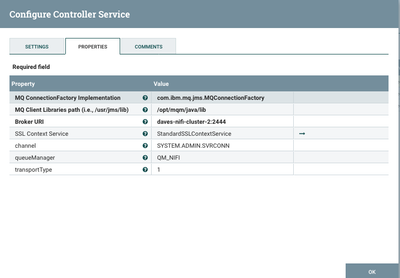
I added three additional properties to my JMSConnectionFactoryProvider controller service and it cleared up the error:
channel
queueManager
transportType

Created 05-26-2016 06:48 PM
- Mark as New
- Bookmark
- Subscribe
- Mute
- Subscribe to RSS Feed
- Permalink
- Report Inappropriate Content
Can you share details on how you configured the Controller Service and processors? In general you shouldn't need to use any native library.
Created 05-26-2016 07:19 PM
- Mark as New
- Bookmark
- Subscribe
- Mute
- Subscribe to RSS Feed
- Permalink
- Report Inappropriate Content
@Andrew Grande, here are the details:
StandardSSLContextService:
| Keystore Filename | Key.jks |
| Keystore Password | password |
| setKeystore Type | JKS |
| Truststore Filename | Key.jks |
| Truststore Password | password |
| setTruststore Type | JKS |
| SSL Protocol | TLSv1 |
JMSConnectionFactoryProvider:
| MQ ConnectionFactory Implementation | com.ibm.mq.jms.MQQueueConnectionFactory |
| MQ Client Libraries path (i.e., /usr/jms/lib) | /usr/…/lib (has mq jars from version 😎 |
| Broker URI | Server:port |
| SSL Context Service | <the above defined service> |
| Added a property - channel | <channel name> |
ConsumeJMS processor:
| User name | Username |
| Password | Password |
| Destination name | <queue name> |
| Destination Type | QUEUE |
| Session Cache size | 1 |
| Connection factory service | <The above defined JMSConnectionFactoryProvider > |
Created 05-26-2016 09:34 PM
- Mark as New
- Bookmark
- Subscribe
- Mute
- Subscribe to RSS Feed
- Permalink
- Report Inappropriate Content
Are you trying to connect to an older MQ broker by any chance? We have successfully tested with 7.5 and 8.0 before.
Created 05-26-2016 10:09 PM
- Mark as New
- Bookmark
- Subscribe
- Mute
- Subscribe to RSS Feed
- Permalink
- Report Inappropriate Content
Also, check out this discussion, might help https://community.hortonworks.com/questions/29074/publish-jms-processor-failing.html

Created 05-27-2016 07:30 PM
- Mark as New
- Bookmark
- Subscribe
- Mute
- Subscribe to RSS Feed
- Permalink
- Report Inappropriate Content
Two things I would validate.
1) Make sure java.library.path has the mqjbnd in the path. I believe System.loadLibrary uses java.library.path instead of the LD_LIBRARY_PATH. Not sure about WMQ but if the newly loaded library needs to load another library then LD_LIBRARY_PATH will need to be set also.
2) Make sure the bit versions of the JVM and MQ client are the same. For example if you have a 64 bit JVM make sure it is loading the 64bit WMQ libraries and not 32 bit.
Created 05-31-2016 01:30 PM
- Mark as New
- Bookmark
- Subscribe
- Mute
- Subscribe to RSS Feed
- Permalink
- Report Inappropriate Content
@Andrew Grande I had looked through that post but had not looked at the shared files. I did look and it seemed to be a little helpful as I could compare what I had done and noticed I had missed a property or two. Also remembered what you had mentioned about not needing the native library and I tried removing that as well. Now it looks like the processor is attempting to connect and getting a different but it did hit the MQ server. So, it is progress and I will did into that error today. Thanks for the help.
Created on 10-26-2016 12:32 AM - edited 08-19-2019 05:06 AM
- Mark as New
- Bookmark
- Subscribe
- Mute
- Subscribe to RSS Feed
- Permalink
- Report Inappropriate Content
Sharath,
I added three additional properties to my JMSConnectionFactoryProvider controller service and it cleared up the error:
channel
queueManager
transportType
Created on 10-03-2018 01:07 PM - edited 08-19-2019 05:05 AM
- Mark as New
- Bookmark
- Subscribe
- Mute
- Subscribe to RSS Feed
- Permalink
- Report Inappropriate Content
Sharath,
Another way to resolve the issue is to make sure the symbolic link to the shared object points to the 64-bit library in the /usr/lib directory. I added the below symbolic link to my system running NiFi and the error was resolved:
ln -s /opt/mqm/java/lib64/libmqjbnd.so /ust/lib/libmqjbnd.so
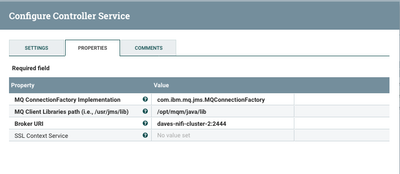
Here is a snapshot of my JMSConnectionFactoryProvider controller service configuration
Created 10-26-2016 07:23 PM
- Mark as New
- Bookmark
- Subscribe
- Mute
- Subscribe to RSS Feed
- Permalink
- Report Inappropriate Content
@dwynne thanks for the responses. I probably should have updated my post saying that I got it to work after adding the properties like you had mentioned. I had seen those additional properties mentioned in the post https://community.hortonworks.com/questions/29074/publish-jms-processor-failing.html and had added them and had removed the .so file and that had worked.


