
Our Community is getting an upgrade! To get everything ready for the relaunch, we’ll be placing the site in read-only mode starting September 21st.
We really appreciate your understanding while we get things set up behind the scenes. Catch up on all the exciting details about the move here.
Need help or have questions? Drop us a line at [email protected]

Archives of Support Questions (Read Only)
- Cloudera Community
- Board Archive
- Archives of Support Questions (Read Only)
- DataNode Install Error (Ambari - Cluster)
- Subscribe to RSS Feed
- Mark Question as New
- Mark Question as Read
- Float this Question for Current User
- Bookmark
- Subscribe
- Mute
- Printer Friendly Page
- Subscribe to RSS Feed
- Mark Question as New
- Mark Question as Read
- Float this Question for Current User
- Bookmark
- Subscribe
- Mute
- Printer Friendly Page
DataNode Install Error (Ambari - Cluster)
- Labels:
-
Apache Ambari
-
Apache Hadoop


Created 01-26-2016 03:28 AM
- Mark as New
- Bookmark
- Subscribe
- Mute
- Subscribe to RSS Feed
- Permalink
- Report Inappropriate Content
Hi All,
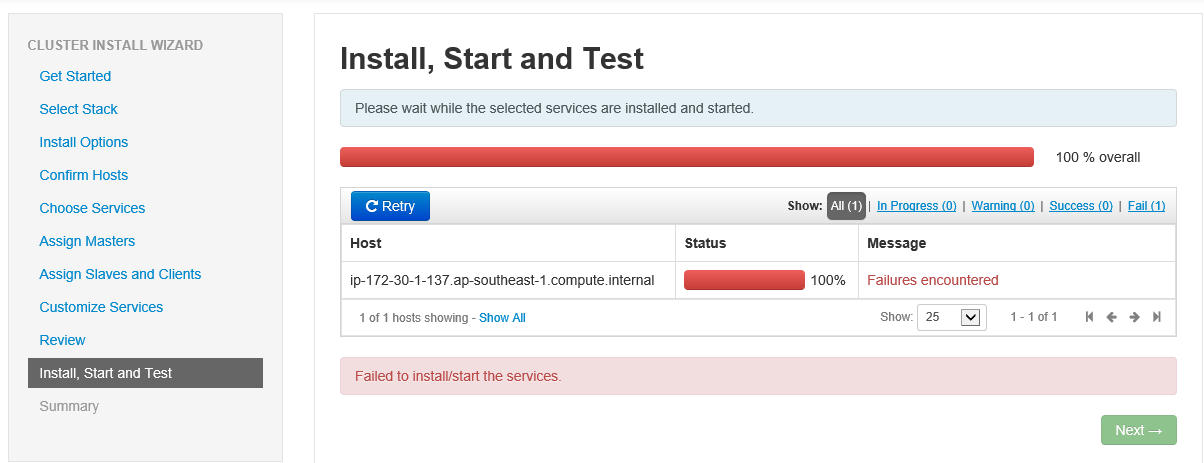
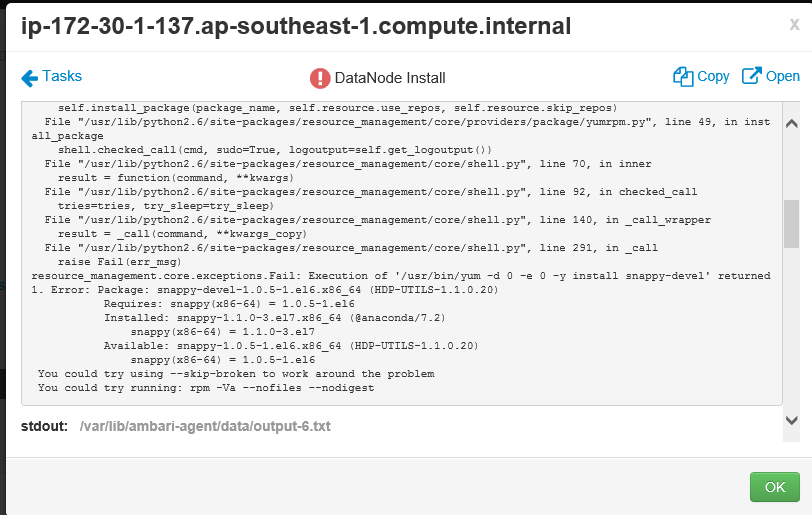
When I tried to create the node it gave me the following error message.
Created 01-26-2016 03:35 AM
- Mark as New
- Bookmark
- Subscribe
- Mute
- Subscribe to RSS Feed
- Permalink
- Report Inappropriate Content
Sorry guys. Managed to resolve this issue by installing the correct version of snappy.
Created 01-26-2016 03:35 AM
- Mark as New
- Bookmark
- Subscribe
- Mute
- Subscribe to RSS Feed
- Permalink
- Report Inappropriate Content
Sorry guys. Managed to resolve this issue by installing the correct version of snappy.

Created 08-06-2017 01:33 PM
- Mark as New
- Bookmark
- Subscribe
- Mute
- Subscribe to RSS Feed
- Permalink
- Report Inappropriate Content
Hi , I received similar issue. can you please assist
Seeking your assistance in setting up Hadoop Cluster on my system. Below are the packages that I installed:
Errors:
stderr: Traceback (most recent call last): File "/var/lib/ambari-agent/cache/common-services/HDFS/2.1.0.2.0/package/scripts/datanode.py", line 167, in <module> DataNode().execute() File "/usr/lib/python2.6/site-packages/resource_management/libraries/script/script.py", line 219, in execute method(env) File "/var/lib/ambari-agent/cache/common-services/HDFS/2.1.0.2.0/package/scripts/datanode.py", line 49, in install self.install_packages(env, params.exclude_packages) File "/usr/lib/python2.6/site-packages/resource_management/libraries/script/script.py", line 410, in install_packages retry_count=agent_stack_retry_count) File "/usr/lib/python2.6/site-packages/resource_management/core/base.py", line 154, in __init__ self.env.run() File "/usr/lib/python2.6/site-packages/resource_management/core/environment.py", line 160, in run self.run_action(resource, action) File "/usr/lib/python2.6/site-packages/resource_management/core/environment.py", line 124, in run_action provider_action() File "/usr/lib/python2.6/site-packages/resource_management/core/providers/package/__init__.py", line 54, in action_install self.install_package(package_name, self.resource.use_repos, self.resource.skip_repos) File "/usr/lib/python2.6/site-packages/resource_management/core/providers/package/yumrpm.py", line 49, in install_package self.checked_call_with_retries(cmd, sudo=True, logoutput=self.get_logoutput()) File "/usr/lib/python2.6/site-packages/resource_management/core/providers/package/__init__.py", line 83, in checked_call_with_retries return self._call_with_retries(cmd, is_checked=True, **kwargs) File "/usr/lib/python2.6/site-packages/resource_management/core/providers/package/__init__.py", line 91, in _call_with_retries code, out = func(cmd, **kwargs) File "/usr/lib/python2.6/site-packages/resource_management/core/shell.py", line 70, in inner result = function(command, **kwargs) File "/usr/lib/python2.6/site-packages/resource_management/core/shell.py", line 92, in checked_call tries=tries, try_sleep=try_sleep) File "/usr/lib/python2.6/site-packages/resource_management/core/shell.py", line 140, in _call_wrapper result = _call(command, **kwargs_copy) File "/usr/lib/python2.6/site-packages/resource_management/core/shell.py", line 291, in _call raise Fail(err_msg) resource_management.core.exceptions.Fail: Execution of '/usr/bin/yum -d 0 -e 0 -y install snappy-devel' returned 1. Error: Package: snappy-devel-1.0.5-1.el6.x86_64 (HDP-UTILS) Requires: snappy(x86-64) = 1.0.5-1.el6 Installed: snappy-1.1.0-3.el7.x86_64 (@anaconda) snappy(x86-64) = 1.1.0-3.el7 Available: snappy-1.0.5-1.el6.x86_64 (HDP-UTILS) snappy(x86-64) = 1.0.5-1.el6 You could try using --skip-broken to work around the problem You could try running: rpm -Va --nofiles --nodigest


