
Our Community is getting an upgrade! To get everything ready for the relaunch, we’ll be placing the site in read-only mode starting September 21st.
We really appreciate your understanding while we get things set up behind the scenes. Catch up on all the exciting details about the move here.
Need help or have questions? Drop us a line at [email protected]

Archives of Support Questions (Read Only)
- Cloudera Community
- Board Archive
- Archives of Support Questions (Read Only)
- Deploy cloudera CM build cluster in AWS failed
- Subscribe to RSS Feed
- Mark Question as New
- Mark Question as Read
- Float this Question for Current User
- Bookmark
- Subscribe
- Mute
- Printer Friendly Page
- Subscribe to RSS Feed
- Mark Question as New
- Mark Question as Read
- Float this Question for Current User
- Bookmark
- Subscribe
- Mute
- Printer Friendly Page
Deploy cloudera CM build cluster in AWS failed
- Labels:
-
Cloudera Manager


Created on 09-29-2016 04:25 PM - edited 09-16-2022 03:42 AM
- Mark as New
- Bookmark
- Subscribe
- Mute
- Subscribe to RSS Feed
- Permalink
- Report Inappropriate Content
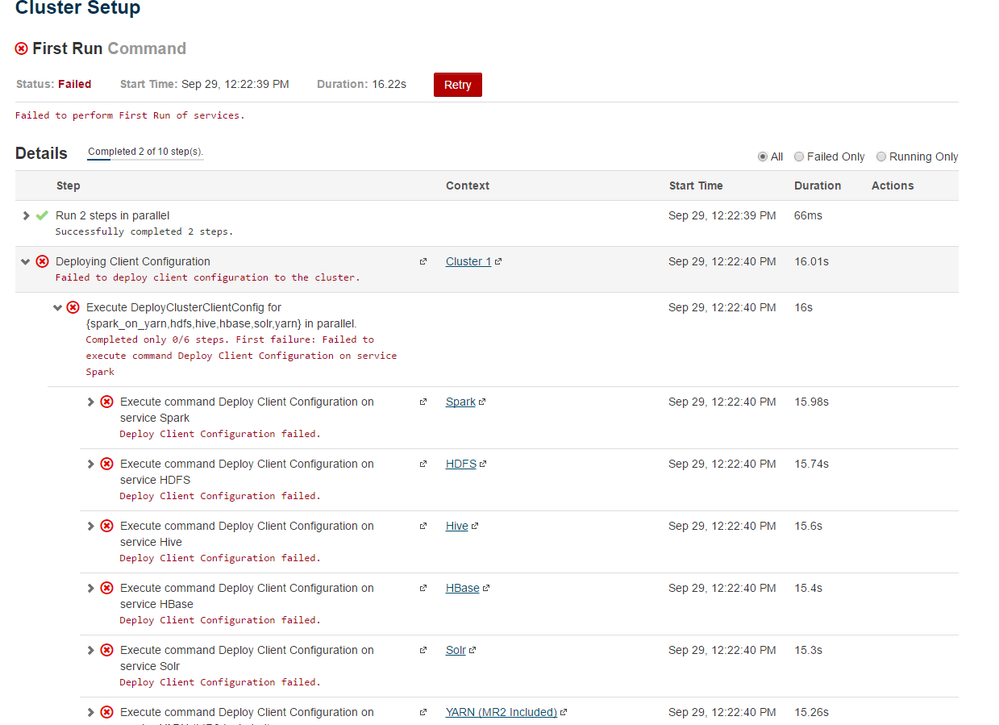
i tried to deploy Cloudera Cm in AWS faild
i think might be the clouder-scm dont have authorize so i follow the previous posted solution below .
Then i restart the machine to test . now i am not able to come to the autoconfig page .
1. How to restart autoconfig ?
2. If not able to restart autoconfig how to manually config the cluster ?
-------------------------------------------------------------------------------------------------------------------
1.
ln -s YOUR_JAVA_HOME /usr/java/default
2. add sudo nopassword to cloudera-scm user
vim /etc/sudoers
-----------------------------------
cloudera-scm ALL=(ALL) NOPASSWD: ALL



Created 10-07-2016 02:57 AM
- Mark as New
- Bookmark
- Subscribe
- Mute
- Subscribe to RSS Feed
- Permalink
- Report Inappropriate Content
The error states:
"Either your MetaData is incorrect, or you need to enable "datanucleus.autoCreateTables""
You need to do one of two things:
1. Uninstall and reinstall Hive.
or
2. On the Hive MetaStore server, add the following to the "/etc/hive/conf.cloudera.hive/hive-site.xml" file:
<property>
  <name>datanucleus.autoCreateTables</name>
  <value>True</value>
</property>
Restart the Hive service.
Created 09-29-2016 06:56 PM
- Mark as New
- Bookmark
- Subscribe
- Mute
- Subscribe to RSS Feed
- Permalink
- Report Inappropriate Content
i find out how to restart the config and check the log . In the log i find below error :
so i tried to curl the each node i started get Connection refuse error
 Failed to connect to previous supervisor.
Traceback (most recent call last):
  File "/usr/lib64/cmf/agent/build/env/lib/python2.7/site-packages/cmf-5.8.2-py2.7.egg/cmf/agent.py", line 2083, in find_or_start_supervisor
    self.configure_supervisor_clients()
  File "/usr/lib64/cmf/agent/build/env/lib/python2.7/site-packages/cmf-5.8.2-py2.7.egg/cmf/agent.py", line 2268, in configure_supervisor_clients
    supervisor_options.realize(args=["-c", os.path.join(self.supervisor_dir, "supervisord.conf")])
Created on 10-06-2016 03:06 PM - edited 10-06-2016 03:08 PM
- Mark as New
- Bookmark
- Subscribe
- Mute
- Subscribe to RSS Feed
- Permalink
- Report Inappropriate Content
Hello,
Can you tell me what OS (and its version) you are using in your attempt to deploy a CM cluster in AWS?
Created 10-06-2016 03:20 PM
- Mark as New
- Bookmark
- Subscribe
- Mute
- Subscribe to RSS Feed
- Permalink
- Report Inappropriate Content
thank you for the reply .
now i have issue for the Hive metastore database start . not able to connnect the to postgresql give me wrong credential for user "Hive". so i trying to login embeded database then change the password and try.
but i when i run i got below error .
/usr/bin/postgres -D /var/lib/cloudera-scm-server-db/data
postgres cannot access the server configuration file "/var/lib/cloudera-scm-server-db/data/postgresql.conf": Permission denied
Created 10-06-2016 04:44 PM
- Mark as New
- Bookmark
- Subscribe
- Mute
- Subscribe to RSS Feed
- Permalink
- Report Inappropriate Content
now i run
psql -U cloudera-scm -p 7432 -h /var/run/cloudera-scm-server
it give me below error:
psql: FATAL: database "cloudera-scm" does not exist
Created 10-06-2016 06:11 PM
- Mark as New
- Bookmark
- Subscribe
- Mute
- Subscribe to RSS Feed
- Permalink
- Report Inappropriate Content
Hello,
cat db.properties file and note the database name and username:
cat /etc/cloudera-scm-server/db.properties
You psql command looks a bit odd. Use the information from the db.properites file to run the following command:
psql -d <database-name> -U <username> -h localhost -p 7432
If you still get the same error, then you probably missed a step and should perform a reinstallation.
If you still have issues after a reinstallation, I can give step-by-step instructions for an AWS install.
Created 10-06-2016 08:14 PM
- Mark as New
- Bookmark
- Subscribe
- Mute
- Subscribe to RSS Feed
- Permalink
- Report Inappropriate Content
yes i got the password from db.properties file and use below comand get the Hive password.
then i reset the password in the configuration page .but i get new error
psql -U scm -p 7432 -h /var/run/cloudera-scm-server -c "select attr,value from configs where attr like 'hive_metastore_database%';"
Failed to acquire connection to jdbc:postgresql://ip-172-31-15-162.us-west-1.compute.internal:7432/hive. Sleeping for 7000 ms. Attempts left: 3 org.postgresql.util.PSQLException: FATAL: the database system is shutting down
Created 10-06-2016 10:40 PM
- Mark as New
- Bookmark
- Subscribe
- Mute
- Subscribe to RSS Feed
- Permalink
- Report Inappropriate Content
i run below query and i am able to connect to PostgreSQL
psql -h ip-172-31-15-162.us-west-1.compute.internal -p 7432 -d hive -U hive
i checked the log file now the error is
WARN DataNucleus.Query: [main]: Query for candidates of org.apache.hadoop.hive.metastore.model.MVersionTable and subclasses resulted in no possible candidates
Required table missing : ""VERSION"" in Catalog "" Schema "". DataNucleus requires this table to perform its persistence operations. Either your MetaData is incorrect, or you need to enable "datanucleus.autoCreateTables"
org.datanucleus.store.rdbms.exceptions.MissingTableException: Required table missing : ""VERSION"" in Catalog "" Schema "". DataNucleus requires this table to perform its persistence operations. Either your MetaData is incorrect, or you need to enable "datanucleus.autoCreateTables"
at org.datanucleus.store.rdbms.table.AbstractTable.exists(AbstractTable.java:485)
Created 10-07-2016 02:57 AM
- Mark as New
- Bookmark
- Subscribe
- Mute
- Subscribe to RSS Feed
- Permalink
- Report Inappropriate Content
The error states:
"Either your MetaData is incorrect, or you need to enable "datanucleus.autoCreateTables""
You need to do one of two things:
1. Uninstall and reinstall Hive.
or
2. On the Hive MetaStore server, add the following to the "/etc/hive/conf.cloudera.hive/hive-site.xml" file:
<property>
  <name>datanucleus.autoCreateTables</name>
  <value>True</value>
</property>
Restart the Hive service.
Created 10-08-2016 02:46 PM
- Mark as New
- Bookmark
- Subscribe
- Mute
- Subscribe to RSS Feed
- Permalink
- Report Inappropriate Content
thank you for your reply . after apply your suggestion i facing below error again.i find out someone said it is a bug but not impact running .Please help to give some input
ERROR org.apache.hadoop.hdfs.KeyProviderCache
[pool-4-thread-1]: Could not find uri with key [dfs.encryption.key.provider.uri] to create a keyProvider !!


