
Our Community is getting an upgrade! To get everything ready for the relaunch, we’ll be placing the site in read-only mode starting September 21st.
We really appreciate your understanding while we get things set up behind the scenes. Catch up on all the exciting details about the move here.
Need help or have questions? Drop us a line at [email protected]

Archives of Support Questions (Read Only)
- Cloudera Community
- Board Archive
- Archives of Support Questions (Read Only)
- Re: Docker Sandbox HDP2.5 memory problem
- Subscribe to RSS Feed
- Mark Question as New
- Mark Question as Read
- Float this Question for Current User
- Bookmark
- Subscribe
- Mute
- Printer Friendly Page
- Subscribe to RSS Feed
- Mark Question as New
- Mark Question as Read
- Float this Question for Current User
- Bookmark
- Subscribe
- Mute
- Printer Friendly Page
Docker Sandbox HDP2.5 memory problem
- Labels:
-
Hortonworks Data Platform (HDP)



Created 09-22-2016 10:59 PM
- Mark as New
- Bookmark
- Subscribe
- Mute
- Subscribe to RSS Feed
- Permalink
- Report Inappropriate Content
Hi,
I have insufficient memory on my Docker Sandbox. Hiveserver2 can not start because of it:
OpenJDK 64-Bit Server VM warning: INFO: os::commit_memory(0x00007f74b44d3000, 3183083520, 0) failed; error='Cannot allocate memory' (errno=12) # # There is insufficient memory for the Java Runtime Environment to continue. # Native memory allocation (malloc) failed to allocate 3183083520 bytes for committing reserved memory.
I tried allocating 8GB to the container by altering the start_sandbox.sh script:
docker run -v hadoop:/hadoop -m 8G --name sandbox --hostname "sandbox.hortonworks.com" --privileged -d \
But still I have only 2GB in the container:
top - 22:58:30 up 18 min,  2 users,  load average: 0.26, 1.47, 1.25
Tasks:  39 total,   1 running,  38 sleeping,   0 stopped,   0 zombie
Cpu(s):  5.1%us,  3.5%sy,  0.0%ni, 67.8%id, 23.6%wa,  0.0%hi,  0.0%si,  0.0%st
Mem:   2047164k total,  1973328k used,    73836k free,      400k buffers
Swap:  4093948k total,  3181344k used,   912604k free,    22904k cached


  PID USER      PR  NI  VIRT  RES  SHR S %CPU %MEM    TIME+  COMMAND
  608 hdfs      20   0  982m 132m 5372 S 25.0  6.6   0:07.20 java
  606 hdfs      20   0 1022m 146m 5304 S  3.7  7.3   0:12.34 java
How to solve this?
Created 09-23-2016 09:39 AM
- Mark as New
- Bookmark
- Subscribe
- Mute
- Subscribe to RSS Feed
- Permalink
- Report Inappropriate Content
From the docker docs I get that docker containers must actually be limited to not take all mem available on the host OS. This is confusing.
Created 09-23-2016 09:39 AM
- Mark as New
- Bookmark
- Subscribe
- Mute
- Subscribe to RSS Feed
- Permalink
- Report Inappropriate Content
From the docker docs I get that docker containers must actually be limited to not take all mem available on the host OS. This is confusing.
Created 09-25-2016 02:32 PM
- Mark as New
- Bookmark
- Subscribe
- Mute
- Subscribe to RSS Feed
- Permalink
- Report Inappropriate Content
Here is some extra env info:
jknulst$ docker info
Containers: 1
 Running: 1
 Paused: 0
 Stopped: 0
Images: 1
Server Version: 1.12.1
Storage Driver: aufs
 Root Dir: /var/lib/docker/aufs
 Backing Filesystem: extfs
 Dirs: 10
 Dirperm1 Supported: true
Logging Driver: json-file
Cgroup Driver: cgroupfs
Plugins:
 Volume: local
 Network: bridge null host overlay
Swarm: inactive
Runtimes: runc
Default Runtime: runc
Security Options: seccomp
Kernel Version: 4.4.20-moby
Operating System: Alpine Linux v3.4
OSType: linux
Architecture: x86_64
CPUs: 4
Total Memory: 1.952 GiB
Name: moby
ID: NWBP:4ERH:CUCP:IF5Y:CY23:M2EQ:O7L7:BBPN:A5IA:HWO7:7T3A:OHFP
Docker Root Dir: /var/lib/docker
Debug Mode (client): false
Debug Mode (server): true
 File Descriptors: 23
 Goroutines: 39
 System Time: 2016-09-25T14:27:37.828975604Z
 EventsListeners: 1
No Proxy: *.local, 169.254/16
Registry: https://index.docker.io/v1/
Insecure Registries:
 127.0.0.0/8
Please note the 'Total Memory: 1.952 GiB' this tells me the limit is somewhere on the Docker level, not the container level.
Created on 09-25-2016 02:36 PM - edited 08-18-2019 04:14 AM
- Mark as New
- Bookmark
- Subscribe
- Mute
- Subscribe to RSS Feed
- Permalink
- Report Inappropriate Content
OK got it now,
The restriction was on the Docker host service level.
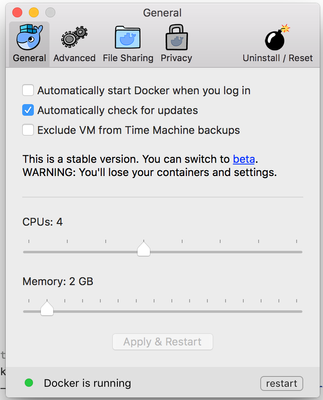
Just shift the Memory slider and then you should be fine.


Created 09-23-2016 09:52 AM
- Mark as New
- Bookmark
- Subscribe
- Mute
- Subscribe to RSS Feed
- Permalink
- Report Inappropriate Content
How much memory you got on Host machine?
Created 09-23-2016 10:13 AM
- Mark as New
- Bookmark
- Subscribe
- Mute
- Subscribe to RSS Feed
- Permalink
- Report Inappropriate Content
@Jasper,
You can use,
docker run -v hadoop:/hadoop --memory="8g" --name sandbox --hostname "sandbox.hortonworks.com"--privileged -d \
OR
docker run -v hadoop:/hadoop -m 8g --name sandbox --hostname "sandbox.hortonworks.com"--privileged -d \


