
Our Community is getting an upgrade! To get everything ready for the relaunch, we’ll be placing the site in read-only mode starting September 21st.
We really appreciate your understanding while we get things set up behind the scenes. Catch up on all the exciting details about the move here.
Need help or have questions? Drop us a line at [email protected]

Archives of Support Questions (Read Only)
- Cloudera Community
- Board Archive
- Archives of Support Questions (Read Only)
- Error in using Sqoop
- Subscribe to RSS Feed
- Mark Question as New
- Mark Question as Read
- Float this Question for Current User
- Bookmark
- Subscribe
- Mute
- Printer Friendly Page
- Subscribe to RSS Feed
- Mark Question as New
- Mark Question as Read
- Float this Question for Current User
- Bookmark
- Subscribe
- Mute
- Printer Friendly Page
Error in using Sqoop
- Labels:
-
Apache Sqoop


Created 02-19-2016 01:09 PM
- Mark as New
- Bookmark
- Subscribe
- Mute
- Subscribe to RSS Feed
- Permalink
- Report Inappropriate Content
Hi,
HDP 2.3.4.0 cluster in 4 nodes has been set up and it is working fine. We are trying to evaluate Atlas using demo in below link:
https://github.com/shivajid/atlas/tree/master/tutorial
We are facing issue while using Sqoop during execution of above demo. Full description of issue is as below:
1) Sqoop and MySql databases are in different hosts.
2) MySql jar is in both the hosts and also in lib folder of sqoop home /usr/hdp/2.3.4.0-3485/sqoop/lib/
3) Have provided below privilege in MySql to avoid privilege issues:
grant all privileges on *.* to 'trucker1'@'%' identified by 'trucker';
flush privileges;
4) Now trying to import data using below command:
sqoop import --connect jdbc:mysql://3.209.124.206:3306/test --username trucker1 --password trucker --table DRIVERS -m 1 --target-dir demo$1 --hive-import --hive-table hortondrivers$1
5) Facing below error when executing above command.
16/02/19 18:20:45 WARN tool.BaseSqoopTool: Setting your password on the command-line is insecure. Consider using -P instead. 16/02/19 18:20:45 INFO manager.MySQLManager: Preparing to use a MySQL streaming resultset. 16/02/19 18:20:45 INFO tool.CodeGenTool: Beginning code generation 16/02/19 18:20:45 ERROR sqoop.Sqoop: Got exception running Sqoop: java.lang.RuntimeException: Could not load db driver class: com.mysql.jdbc.Driver java.lang.RuntimeException: Could not load db driver class: com.mysql.jdbc.Driver at org.apache.sqoop.manager.SqlManager.makeConnection(SqlManager.java:636) at org.apache.sqoop.manager.GenericJdbcManager.getConnection(GenericJdbcManager.java:52) at org.apache.sqoop.manager.SqlManager.execute(SqlManager.java:525) at org.apache.sqoop.manager.SqlManager.execute(SqlManager.java:548) at org.apache.sqoop.manager.SqlManager.getColumnTypesForRawQuery(SqlManager.java:191) at org.apache.sqoop.manager.SqlManager.getColumnTypes(SqlManager.java:175) at org.apache.sqoop.manager.ConnManager.getColumnTypes(ConnManager.java:262) at org.apache.sqoop.orm.ClassWriter.getColumnTypes(ClassWriter.java:1235) at org.apache.sqoop.orm.ClassWriter.generate(ClassWriter.java:1060) at org.apache.sqoop.tool.CodeGenTool.generateORM(CodeGenTool.java:82) at org.apache.sqoop.tool.ImportTool.importTable(ImportTool.java:390) at org.apache.sqoop.tool.ImportTool.run(ImportTool.java:476) at org.apache.sqoop.Sqoop.run(Sqoop.java:145) at org.apache.hadoop.util.ToolRunner.run(ToolRunner.java:70) at org.apache.sqoop.Sqoop.runSqoop(Sqoop.java:181) at org.apache.sqoop.Sqoop.runTool(Sqoop.java:220) at org.apache.sqoop.Sqoop.runTool(Sqoop.java:229) at org.apache.sqoop.Sqoop.main(Sqoop.java:238) at com.cloudera.sqoop.Sqoop.main(Sqoop.java:57)
Looking for your help as we need to understand how Atlas work for data governance.
Thanks!



Created 02-23-2016 03:39 AM
- Mark as New
- Bookmark
- Subscribe
- Mute
- Subscribe to RSS Feed
- Permalink
- Report Inappropriate Content
Hi @rajdip chaudhuri, mysql-connector-java.jar in /usr/hdp/sqoop-client/lib is a symlink to /usr/share/java/mysql-connector-java.jar which itself is a symlink to the real jar file with a version in its name. Make sure it points to the right file:
ls -l /usr/share/java/mysql-connector-java.jar
and ispect the destination file. Also, mysql-connecter that can be installed by yum is good for Mysql-5.1, but for 5.5 and 5.6 you need the latest version.


Created 02-19-2016 01:11 PM
- Mark as New
- Bookmark
- Subscribe
- Mute
- Subscribe to RSS Feed
- Permalink
- Report Inappropriate Content
See this
Could not load db driver class: com.mysql.jdbc.Driver java.lang.RuntimeException: Could not load db driver class: com.mysql.jdbc.Driver at org.apache.sqoop.manager.SqlManager.makeConnection
ls -l /usr/share/java/mysql* and http://stackoverflow.com/questions/22741183/sqoop-could-not-load-mysql-driver-exception
[root@phdns02 ~]# cd /usr/hdp/current/sqoop-client/lib/
You have mail in /var/spool/mail/root
[root@phdns02 lib]# ls -l mysql-connector-java.jar
lrwxrwxrwx. 1 root root 40 Feb 14 19:38 mysql-connector-java.jar -> /usr/share/java/mysql-connector-java.jar
[root@phdns02 lib]# pwd
/usr/hdp/current/sqoop-client/lib
[root@phdns02 lib]#
Created 02-19-2016 01:19 PM
- Mark as New
- Bookmark
- Subscribe
- Mute
- Subscribe to RSS Feed
- Permalink
- Report Inappropriate Content
Hi @Neeraj Sabharwal & @Artem Ervits thanks for your points but the jar is already at the mentioned path. Attaching the screenshot.
Created 02-19-2016 01:23 PM
- Mark as New
- Bookmark
- Subscribe
- Mute
- Subscribe to RSS Feed
- Permalink
- Report Inappropriate Content
@rajdip chaudhuri Let's check the versions ...
You have to make sure that we don't have version mismatch.
Created 02-19-2016 01:33 PM
- Mark as New
- Bookmark
- Subscribe
- Mute
- Subscribe to RSS Feed
- Permalink
- Report Inappropriate Content
With HDp 2.3.4.0 sqoop of version 1.4.6.2.3 comes. My sql jar file was downloaded through yum during cluster set up. However, downloading the latest jar file frm https://dev.mysql.com/downloads/file/?id=13520.
Will let you know if this jar file works or not.
Created 02-23-2016 05:49 AM
- Mark as New
- Bookmark
- Subscribe
- Mute
- Subscribe to RSS Feed
- Permalink
- Report Inappropriate Content

Created 02-23-2016 02:39 AM
- Mark as New
- Bookmark
- Subscribe
- Mute
- Subscribe to RSS Feed
- Permalink
- Report Inappropriate Content
@rajdip chaudhuri did you get it resolved?
Created 02-23-2016 03:39 AM
- Mark as New
- Bookmark
- Subscribe
- Mute
- Subscribe to RSS Feed
- Permalink
- Report Inappropriate Content
Hi @rajdip chaudhuri, mysql-connector-java.jar in /usr/hdp/sqoop-client/lib is a symlink to /usr/share/java/mysql-connector-java.jar which itself is a symlink to the real jar file with a version in its name. Make sure it points to the right file:
ls -l /usr/share/java/mysql-connector-java.jar
and ispect the destination file. Also, mysql-connecter that can be installed by yum is good for Mysql-5.1, but for 5.5 and 5.6 you need the latest version.


Created 09-20-2016 03:13 PM
- Mark as New
- Bookmark
- Subscribe
- Mute
- Subscribe to RSS Feed
- Permalink
- Report Inappropriate Content
Just adding my two cents as I faced the same issue today..and able to resolve..After downloading the JAR file while copying this jar file into linux box I used winscp with transfer setting as default instead of using binary ..caused could not load DB drviers after I copied it back with binary it worked fine..please try it..


Created 12-15-2017 05:53 AM
- Mark as New
- Bookmark
- Subscribe
- Mute
- Subscribe to RSS Feed
- Permalink
- Report Inappropriate Content
I'm facing same problem with you, and I tried all following methods, but it doesn't work. So how you solved the problem?@rajdip chaudhuri
Created on 12-15-2017 06:02 AM - edited 08-18-2019 06:03 AM
- Mark as New
- Bookmark
- Subscribe
- Mute
- Subscribe to RSS Feed
- Permalink
- Report Inappropriate Content
Did you solved the problem? I'm facing the same problem with you. And I tried all methods mentioned above, but it didn't work
Here is my exceptions
[root@cos1 ~]# sqoop list-tables --connect jdbc:mysql://192.168.2.190/experiment3 --username scott -P
17/12/15 19:17:36 INFO sqoop.Sqoop: Running Sqoop version: 1.4.6 Enter password: 17/12/15 19:17:41
INFO manager.MySQLManager: Preparing to use a MySQL streaming resultset. 17/12/15 19:17:41
ERROR sqoop.Sqoop: Got exception running Sqoop: java.lang.RuntimeException: Could not load db driver class: com.mysql.jdbc.Driver
java.lang.RuntimeException: Could not load db driver class: com.mysql.jdbc.Driver
at org.apache.sqoop.manager.SqlManager.makeConnection(SqlManager.java:856)
at org.apache.sqoop.manager.GenericJdbcManager.getConnection(GenericJdbcManager.java:52)
at org.apache.sqoop.manager.CatalogQueryManager.listTables(CatalogQueryManager.java:102)
at org.apache.sqoop.tool.ListTablesTool.run(ListTablesTool.java:49) at org.apache.sqoop.Sqoop.run(Sqoop.java:143)
at org.apache.hadoop.util.ToolRunner.run(ToolRunner.java:70) at org.apache.sqoop.Sqoop.runSqoop(Sqoop.java:179)
at org.apache.sqoop.Sqoop.runTool(Sqoop.java:218) at org.apache.sqoop.Sqoop.runTool(Sqoop.java:227)
at org.apache.sqoop.Sqoop.main(Sqoop.java:236)
Here is my screenshot
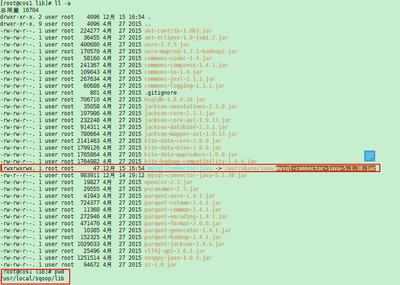

I'm using sqoop-1.4.6, hadoop-2.7.4 and mysql-connecctor-java-5.1.38.jar

- « Previous
-
- 1
- 2
- Next »

