Our Community is getting an upgrade! To get everything ready for the relaunch, we’ll be placing the site in read-only mode starting September 21st.
We really appreciate your understanding while we get things set up behind the scenes. Catch up on all the exciting details about the move here.
Need help or have questions? Drop us a line at [email protected]

Archives of Support Questions (Read Only)
- Cloudera Community
- Board Archive
- Archives of Support Questions (Read Only)
- Re: Error: "Cannot retrieve repository metadata (r...
- Subscribe to RSS Feed
- Mark Question as New
- Mark Question as Read
- Float this Question for Current User
- Bookmark
- Subscribe
- Mute
- Printer Friendly Page
- Subscribe to RSS Feed
- Mark Question as New
- Mark Question as Read
- Float this Question for Current User
- Bookmark
- Subscribe
- Mute
- Printer Friendly Page
Error: "Cannot retrieve repository metadata (repomd.xml) for repository: HDP-2.3. Please verify its path and try again"
- Labels:
-
Hortonworks Data Platform (HDP)


Created on 02-09-2016 06:07 AM - edited 08-19-2019 02:12 AM
- Mark as New
- Bookmark
- Subscribe
- Mute
- Subscribe to RSS Feed
- Permalink
- Report Inappropriate Content
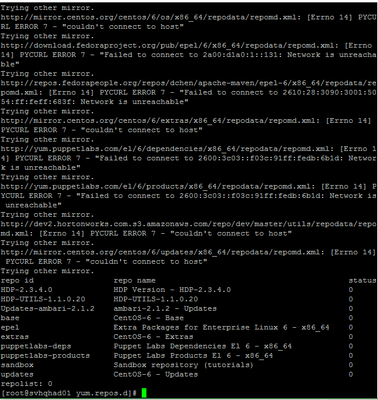
when I try to use yum to update or install some packages, I get this error. .
"http://public-repo-1.hortonworks.com/HDP/centos6/2.x/updates/2.3.2.0/repodata/repomd.xml: [Errno 14] PYCURL ERROR 7 - "couldn't connect to host" Trying other mirror. Error: Cannot retrieve repository metadata (repomd.xml) for repository: HDP-2.3. Please verify its path and try again"
I am working on HDP 2.3.4 Sandbox deployed on a CentOS 6 server which is behind the proxy. The server has internet access. I can ping google.com , for example.
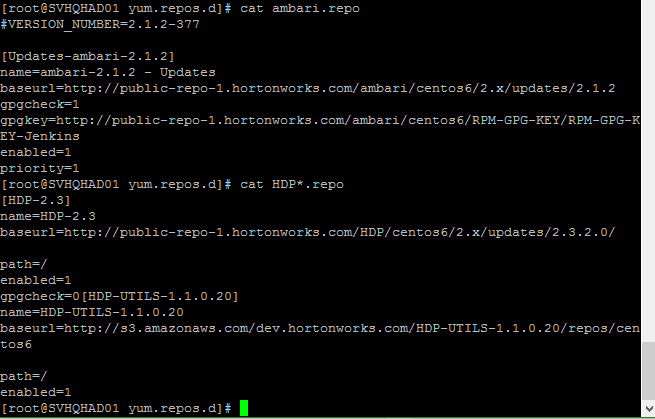
the contents of /etc/yum.repos.d looks like this:

Any workaround regarding this issue would be highly appreciated!
Created 02-29-2016 12:25 PM
- Mark as New
- Bookmark
- Subscribe
- Mute
- Subscribe to RSS Feed
- Permalink
- Report Inappropriate Content
Resolved: The problem was related to proxy Authentication. So, I installed and configured CNTLM to access ISA Proxy Server on Centos 6.
Look at the article :
1.Install and configure cntlm
2. configure yum to use through ISA Proxy
- vi /etc/yum.conf
add a line:
proxy=http://127.0.0.1:3128/
- vi .bash_profile
add :
export http_proxy=http://localhost:3128/
export https_proxy=${http_proxy}
export ftp_proxy=${http_proxy}
- logoff root and login again
- yum clean all
- yum install XXXX
yum update, yum repolist or yum install now works fine


Created 02-09-2016 06:28 AM
- Mark as New
- Bookmark
- Subscribe
- Mute
- Subscribe to RSS Feed
- Permalink
- Report Inappropriate Content
Verify the content of repo files. I am able to run the repolist. It looks like that you have changed the repo files. In case you have not changed it then retry the operation
[root@sandbox ~]# yum repolist
Loaded plugins: fastestmirror, priorities
Loading mirror speeds from cached hostfile
* base: mirrors.unifiedlayer.com
* epel: mirror.symnds.com
* extras: mirror.beyondhosting.net
* updates: reflector.westga.edu
repo id repo name status
HDP-2.3 HDP-2.3 175
HDP-UTILS-1.1.0.20 HDP-UTILS-1.1.0.20 43
Updates-ambari-2.1.2 ambari-2.1.2 - Updates 6
base CentOS-6 - Base 6,575
epel Extra Packages for Enterprise Linux 6 - x86_64 11,992
epel-apache-maven maven from apache foundation. 2
extras CentOS-6 - Extras 50
puppetlabs-deps Puppet Labs Dependencies El 6 - x86_64 77
puppetlabs-products Puppet Labs Products El 6 - x86_64 544
sandbox Sandbox repository (tutorials) 2
updates CentOS-6 - Updates 1,063
repolist: 20,529
[root@sandbox ~]#
Created on 02-09-2016 06:48 AM - edited 08-19-2019 02:12 AM
- Mark as New
- Bookmark
- Subscribe
- Mute
- Subscribe to RSS Feed
- Permalink
- Report Inappropriate Content
Thanks for your prompt response:
out put of the command yum repolist looks like this: "Network is unreachable"
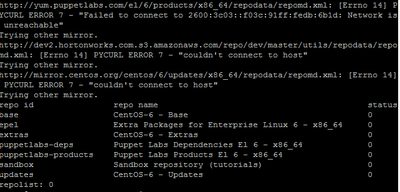
Is there anything that I should configure on the proxy?
N.B. I can resolve global IP addresses
$ ping google.com
PING google.com (216.58.212.110) 56(84) bytes of data.
then it stacks here.
Created on 02-09-2016 07:03 AM - edited 08-19-2019 02:12 AM
- Mark as New
- Bookmark
- Subscribe
- Mute
- Subscribe to RSS Feed
- Permalink
- Report Inappropriate Content
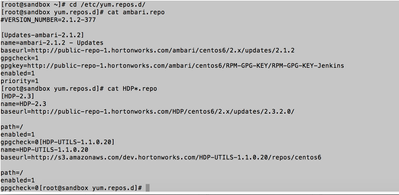
@Kibrom Gebrehiwot Did you modify the repo files? It should not be talking to dev2.hortonworks.com.
cd /etc/yum.repo.d
See this
Created on 02-09-2016 07:19 AM - edited 08-19-2019 02:12 AM
- Mark as New
- Bookmark
- Subscribe
- Mute
- Subscribe to RSS Feed
- Permalink
- Report Inappropriate Content
I didn't modify any of the repo files. All the outputs are the same as yours.



Created 02-09-2016 09:04 AM
- Mark as New
- Bookmark
- Subscribe
- Mute
- Subscribe to RSS Feed
- Permalink
- Report Inappropriate Content
Did you get anything on running grep -ir dev2 /etc/yum.repos.d ?
Created 02-09-2016 11:14 AM
- Mark as New
- Bookmark
- Subscribe
- Mute
- Subscribe to RSS Feed
- Permalink
- Report Inappropriate Content
sandbox.repo:baseurl=http://dev2.hortonworks.com.s3.amazonaws.com/repo/dev/master/utils/
mv sandbox.repo sandbox.repo.1
This should resolve the issue
Created 02-09-2016 12:05 PM
- Mark as New
- Bookmark
- Subscribe
- Mute
- Subscribe to RSS Feed
- Permalink
- Report Inappropriate Content
@Kibrom Gebrehiwot Looking at errors....Looks like you are having trouble getting to any of those repo. I see your ping google.com works fine
try to run
wget https://community.hortonworks.com/storage/temp/1943-repofiles.png
See if it works or not

Created 02-09-2016 09:31 AM
- Mark as New
- Bookmark
- Subscribe
- Mute
- Subscribe to RSS Feed
- Permalink
- Report Inappropriate Content
Created on 02-09-2016 12:19 PM - edited 08-19-2019 02:11 AM
- Mark as New
- Bookmark
- Subscribe
- Mute
- Subscribe to RSS Feed
- Permalink
- Report Inappropriate Content
I did all what you suggested me. But no luck yet.
Please, Have a look at the output of your suggested workaround: it seems the issue is related to network or proxy configuration. Any suggestion on the necessary network/proxy configurations?