
Archives of Support Questions (Read Only)
- Cloudera Community
- Board Archive
- Archives of Support Questions (Read Only)
- Error: "Cannot retrieve repository metadata (repom...
- Subscribe to RSS Feed
- Mark Question as New
- Mark Question as Read
- Float this Question for Current User
- Bookmark
- Subscribe
- Mute
- Printer Friendly Page
- Subscribe to RSS Feed
- Mark Question as New
- Mark Question as Read
- Float this Question for Current User
- Bookmark
- Subscribe
- Mute
- Printer Friendly Page
Error: "Cannot retrieve repository metadata (repomd.xml) for repository: HDP-2.3. Please verify its path and try again"
- Labels:
-
Hortonworks Data Platform (HDP)


Created on 02-09-2016 06:07 AM - edited 08-19-2019 02:12 AM
- Mark as New
- Bookmark
- Subscribe
- Mute
- Subscribe to RSS Feed
- Permalink
- Report Inappropriate Content
when I try to use yum to update or install some packages, I get this error. .
"http://public-repo-1.hortonworks.com/HDP/centos6/2.x/updates/2.3.2.0/repodata/repomd.xml: [Errno 14] PYCURL ERROR 7 - "couldn't connect to host" Trying other mirror. Error: Cannot retrieve repository metadata (repomd.xml) for repository: HDP-2.3. Please verify its path and try again"
I am working on HDP 2.3.4 Sandbox deployed on a CentOS 6 server which is behind the proxy. The server has internet access. I can ping google.com , for example.
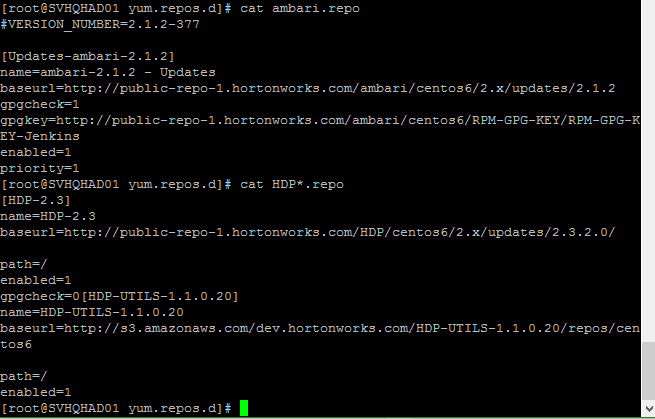
the contents of /etc/yum.repos.d looks like this:

Any workaround regarding this issue would be highly appreciated!
Created 02-29-2016 12:25 PM
- Mark as New
- Bookmark
- Subscribe
- Mute
- Subscribe to RSS Feed
- Permalink
- Report Inappropriate Content
Resolved: The problem was related to proxy Authentication. So, I installed and configured CNTLM to access ISA Proxy Server on Centos 6.
Look at the article :
1.Install and configure cntlm
2. configure yum to use through ISA Proxy
- vi /etc/yum.conf
add a line:
proxy=http://127.0.0.1:3128/
- vi .bash_profile
add :
export http_proxy=http://localhost:3128/
export https_proxy=${http_proxy}
export ftp_proxy=${http_proxy}
- logoff root and login again
- yum clean all
- yum install XXXX
yum update, yum repolist or yum install now works fine


Created 02-09-2016 12:26 PM
- Mark as New
- Bookmark
- Subscribe
- Mute
- Subscribe to RSS Feed
- Permalink
- Report Inappropriate Content
[root@sandbox yum.repos.d]# cat /etc/resolv.conf
nameserver 8.8.8.8
[root@sandbox yum.repos.d]#
What do you have in that file?
Created 02-09-2016 12:27 PM
- Mark as New
- Bookmark
- Subscribe
- Mute
- Subscribe to RSS Feed
- Permalink
- Report Inappropriate Content
Created 02-09-2016 12:35 PM
- Mark as New
- Bookmark
- Subscribe
- Mute
- Subscribe to RSS Feed
- Permalink
- Report Inappropriate Content
/etc/resolve.conf contains the IP address for the Global DNS server and nameservers of my LAN.
Created 02-09-2016 12:36 PM
- Mark as New
- Bookmark
- Subscribe
- Mute
- Subscribe to RSS Feed
- Permalink
- Report Inappropriate Content
@Kibrom Gebrehiwot Can you run this ? wget https://community.hortonworks.com/storage/temp/1943-repofiles.png
Created 02-09-2016 12:40 PM
- Mark as New
- Bookmark
- Subscribe
- Mute
- Subscribe to RSS Feed
- Permalink
- Report Inappropriate Content
Output looks like this:
[root@svhqhad01 ~]# wget https://community.hortonworks.com/storage/temp/1943-repofiles.png --2016-02-09 15:37:44-- https://community.hortonworks.com/storage/temp/1943-repofiles.png Resolving community.hortonworks.com... 52.89.170.127, 54.187.142.13 Connecting to community.hortonworks.com|52.89.170.127|:443... failed: Connection refused. Connecting to community.hortonworks.com|54.187.142.13|:443... failed: Connection refused.
Created 02-09-2016 12:43 PM
- Mark as New
- Bookmark
- Subscribe
- Mute
- Subscribe to RSS Feed
- Permalink
- Report Inappropriate Content
@Kibrom Gebrehiwot So...You don't have access to internet as you can see that your connection is refused. Can you take a backup of /etc/resolve.conf and add that entry which I shared?
Are you on corporate vpn? Firewall blocking outbound traffic in your laptop?
Created 02-09-2016 01:15 PM
- Mark as New
- Bookmark
- Subscribe
- Mute
- Subscribe to RSS Feed
- Permalink
- Report Inappropriate Content
@Neeraj Sabharwal nameserver 8.8.8.8 already exists in /etc/resolv.conf
The sandbox is installed on Centos 6.7 and I am remotely accessing it with PuTTY.
I can access the Web UIs from the browser. There is corporate firewall too.
Created 02-09-2016 01:20 PM
- Mark as New
- Bookmark
- Subscribe
- Mute
- Subscribe to RSS Feed
- Permalink
- Report Inappropriate Content
@Kibrom Gebrehiwot send me your file and I will try to reproduce
Please see those redhat links
Can you remove other entries from that file ?
Are you on vpn?
Do you have firewall on ?
Is iptable off in sandbox?
Created 02-09-2016 01:35 PM
- Mark as New
- Bookmark
- Subscribe
- Mute
- Subscribe to RSS Feed
- Permalink
- Report Inappropriate Content
This is content of /etc/resolv.conf
nameserver 8.8.8.8
nameserver 10.0.225.44
- I am not on VPN
- firewall is on
- iptables is ON in Sandbox
Created 02-09-2016 01:37 PM
- Mark as New
- Bookmark
- Subscribe
- Mute
- Subscribe to RSS Feed
- Permalink
- Report Inappropriate Content
Please turn off iptables 🙂


