
Our Community is getting an upgrade! To get everything ready for the relaunch, we’ll be placing the site in read-only mode starting September 21st.
We really appreciate your understanding while we get things set up behind the scenes. Catch up on all the exciting details about the move here.
Need help or have questions? Drop us a line at [email protected]

Archives of Support Questions (Read Only)
- Cloudera Community
- Board Archive
- Archives of Support Questions (Read Only)
- Fail to connect to keberosized hive via JDBC from ...
- Subscribe to RSS Feed
- Mark Question as New
- Mark Question as Read
- Float this Question for Current User
- Bookmark
- Subscribe
- Mute
- Printer Friendly Page
- Subscribe to RSS Feed
- Mark Question as New
- Mark Question as Read
- Float this Question for Current User
- Bookmark
- Subscribe
- Mute
- Printer Friendly Page
Fail to connect to keberosized hive via JDBC from windows
- Labels:
-
Apache Hadoop
-
Apache Hive
-
Kerberos
-
Security


Created on 08-30-2018 07:10 AM - edited 09-16-2022 06:39 AM
- Mark as New
- Bookmark
- Subscribe
- Mute
- Subscribe to RSS Feed
- Permalink
- Report Inappropriate Content
Hi all,
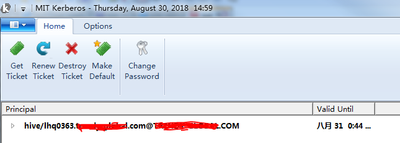
I'd like to connect to hive with keberos enabled via JDBC from windows. MIT is installed and ticket tis reterieved.
The smoke test java code is
public class HiveJDBC2 {
  private static String driverName = "org.apache.hive.jdbc.HiveDriver";
  public static void main(String[] args) throws SQLException, IOException, ClassNotFoundException {
    try {
      Class.forName(driverName);
    } catch (ClassNotFoundException e) {
      e.printStackTrace();
      System.exit(1);
    }
    System.setProperty("java.security.auth.login.config", "gss-jaas.conf");
    System.setProperty("sun.security.jgss.debug", "true");
    System.setProperty("javax.security.auth.useSubjectCredsOnly", "false");
    System.setProperty("java.security.krb5.conf", "krb5.conf");
    Connection con = DriverManager.getConnection("jdbc:hive2://10.2.29.102:10000/default;principal=hive/[email protected]");
    System.out.println("Connected");
    con.close();
  }
}
The error log is:
 Search Subject for Kerberos V5 INIT cred (<<DEF>>, sun.security.jgss.krb5.Krb5InitCredential)
Debug is  true storeKey false useTicketCache true useKeyTab false doNotPrompt false ticketCache is null isInitiator true KeyTab is null refreshKrb5Config is false principal is hive/[email protected] tryFirstPass is false useFirstPass is false storePass is false clearPass is false
Acquire TGT from Cache
Principal is hive/[email protected]
Commit Succeeded
Exception in thread "main" java.sql.SQLException: Could not open client transport with JDBC Uri: jdbc:hive2://10.2.29.102:10000/default;principal=hive/[email protected]: GSS initiate failed
 at org.apache.hive.jdbc.HiveConnection.openTransport(HiveConnection.java:218)
 at org.apache.hive.jdbc.HiveConnection.<init>(HiveConnection.java:156)
 at org.apache.hive.jdbc.HiveDriver.connect(HiveDriver.java:105)
 at java.sql.DriverManager.getConnection(DriverManager.java:664)
 at java.sql.DriverManager.getConnection(DriverManager.java:270)
 at com.test.HiveJDBC2.main(HiveJDBC2.java:26)
Caused by: org.apache.thrift.transport.TTransportException: GSS initiate failed
 at org.apache.thrift.transport.TSaslTransport.sendAndThrowMessage(TSaslTransport.java:232)
 at org.apache.thrift.transport.TSaslTransport.open(TSaslTransport.java:316)
 at org.apache.thrift.transport.TSaslClientTransport.open(TSaslClientTransport.java:37)
 at org.apache.hadoop.hive.thrift.client.TUGIAssumingTransport$1.run(TUGIAssumingTransport.java:52)
 at org.apache.hadoop.hive.thrift.client.TUGIAssumingTransport$1.run(TUGIAssumingTransport.java:49)
 at java.security.AccessController.doPrivileged(Native Method)
 at javax.security.auth.Subject.doAs(Subject.java:422)
 at org.apache.hadoop.security.UserGroupInformation.doAs(UserGroupInformation.java:1866)
 at org.apache.hadoop.hive.thrift.client.TUGIAssumingTransport.open(TUGIAssumingTransport.java:49)
 at org.apache.hive.jdbc.HiveConnection.openTransport(HiveConnection.java:194)
 ... 5 more
I have searched quite a few threads but no luck. would someone give me any ideas?


Created 08-30-2018 07:22 AM
- Mark as New
- Bookmark
- Subscribe
- Mute
- Subscribe to RSS Feed
- Permalink
- Report Inappropriate Content
We got this working. For those utilizing Horton works Timeserver with Kerosene, this is the thing that you have to do (giving you're Kerosene/present is substantial on your objective host.
Created 08-30-2018 07:22 AM
- Mark as New
- Bookmark
- Subscribe
- Mute
- Subscribe to RSS Feed
- Permalink
- Report Inappropriate Content
We got this working. For those utilizing Horton works Timeserver with Kerosene, this is the thing that you have to do (giving you're Kerosene/present is substantial on your objective host.
Created 08-30-2018 07:29 AM
- Mark as New
- Bookmark
- Subscribe
- Mute
- Subscribe to RSS Feed
- Permalink
- Report Inappropriate Content
The same program runs succefully on an edgenode with hive2 client.
Created 08-30-2018 07:38 AM
- Mark as New
- Bookmark
- Subscribe
- Mute
- Subscribe to RSS Feed
- Permalink
- Report Inappropriate Content
thanks your hints @euricana . it really caused by server time is 5 min earlier than host time


