
Our Community is getting an upgrade! To get everything ready for the relaunch, we’ll be placing the site in read-only mode starting September 21st.
We really appreciate your understanding while we get things set up behind the scenes. Catch up on all the exciting details about the move here.
Need help or have questions? Drop us a line at [email protected]

Archives of Support Questions (Read Only)
- Cloudera Community
- Board Archive
- Archives of Support Questions (Read Only)
- Falcon/Storm/Flume not Installed Properly as i am ...
- Subscribe to RSS Feed
- Mark Question as New
- Mark Question as Read
- Float this Question for Current User
- Bookmark
- Subscribe
- Mute
- Printer Friendly Page
- Subscribe to RSS Feed
- Mark Question as New
- Mark Question as Read
- Float this Question for Current User
- Bookmark
- Subscribe
- Mute
- Printer Friendly Page
Falcon/Storm/Flume not Installed Properly as i am not able to Start/Stop Services .


Created on 03-30-2016 03:31 AM - edited 08-18-2019 06:06 AM
- Mark as New
- Bookmark
- Subscribe
- Mute
- Subscribe to RSS Feed
- Permalink
- Report Inappropriate Content
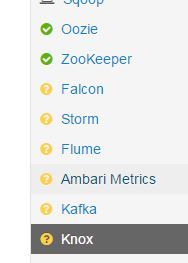
How can i delete these services and install again?



Created 03-31-2016 09:04 AM
- Mark as New
- Bookmark
- Subscribe
- Mute
- Subscribe to RSS Feed
- Permalink
- Report Inappropriate Content
You need to use something like the below one .
curl -u admin:admin -H "X-Requested-By: ambari" -X GET http://localhost:8080/api/v1/clusters/HDP_QA/services//FLUME_HANDLER
curl -u admin:admin -H "X-Requested-By: ambari" -X DELETE http://localhost:8080/api/v1/clusters/HDP_QA/services/FALCON_SERVER
here are the list of components names Ambari understands,
[ { "name" : "KAFKA_BROKER" }, { "name" : "SUPERVISOR" }, { "name" : "METRICS_MONITOR" }, { "name" : "FLUME_HANDLER" }, { "name" : "SQOOP" }, { "name" : "YARN_CLIENT" }, { "name" : "FALCON_CLIENT" }, { "name" : "HDFS_CLIENT" }, { "name" : "OOZIE_CLIENT" }, { "name" : "YARN_CLIENT" }, { "name" : "ZOOKEEPER_CLIENT" }, { "name" : "HIVE_CLIENT" }, { "name" : "HCAT" }, { "name" : "MAPREDUCE2_CLIENT" }, { "name" : "HBASE_CLIENT" } ],
{ "name" : "NODEMANAGER" }, { "name" : "METRICS_MONITOR" }, { "name" : "DATANODE" }, { "name" : "SUPERVISOR" }, { "name" : "HBASE_REGIONSERVER"
{ "name" : "HBASE_MASTER" }, { "name" : "METRICS_MONITOR" }, { "name" : "ZOOKEEPER_SERVER" }, { "name" : "STORM_UI_SERVER" }, { "name" : "DRPC_SERVER" }, { "name" : "NIMBUS" }, { "name" : "WEBHCAT_SERVER" }, { "name" : "HIVE_SERVER" }, { "name" : "HIVE_METASTORE" }, { "name" : "TEZ_CLIENT" }, { "name" : "HCAT" }
{ "name" : "METRICS_MONITOR" }, { "name" : "METRICS_COLLECTOR" }, { "name" : "ZOOKEEPER_SERVER" }, { "name" : "HISTORYSERVER" }, { "name" : "APP_TIMELINE_SERVER" }, { "name" : "RESOURCEMANAGER" }, { "name" : "SECONDARY_NAMENODE" } { "name" : "NAMENODE" }, { "name" : "METRICS_MONITOR" }, { "name" : "ZOOKEEPER_SERVER" }


Created 03-30-2016 03:35 AM
- Mark as New
- Bookmark
- Subscribe
- Mute
- Subscribe to RSS Feed
- Permalink
- Report Inappropriate Content
Use the following instructions to delete services https://cwiki.apache.org/confluence/display/AMBARI/Using+APIs+to+delete+a+service+or+all+host+compon...
Created 03-30-2016 11:20 AM
- Mark as New
- Bookmark
- Subscribe
- Mute
- Subscribe to RSS Feed
- Permalink
- Report Inappropriate Content
I get below Error when i run GET
# curl -u admin:admin -H "X-Requested-By: ambari" -X GET http://localhost:8080/api/v1/clusters/c1/services/FALCON { "status" : 404, "message" : "Parent Cluster resource doesn't exist. Cluster not found, clusterName=c1. Cluster not found, clusterName=c1"
Created 03-30-2016 11:28 AM
- Mark as New
- Bookmark
- Subscribe
- Mute
- Subscribe to RSS Feed
- Permalink
- Report Inappropriate Content
What is the cluster name you gave to your cluster? Replace c1 with that name.
Created 03-30-2016 12:03 PM
- Mark as New
- Bookmark
- Subscribe
- Mute
- Subscribe to RSS Feed
- Permalink
- Report Inappropriate Content
My bad i replaced with clustername
{ "status" : 404, "message" : "The requested resource doesn't exist: Service not found, clusterName=HDP_QA, serviceName=Flume"
Created 03-30-2016 12:07 PM
- Mark as New
- Bookmark
- Subscribe
- Mute
- Subscribe to RSS Feed
- Permalink
- Report Inappropriate Content
Service names are in upper case, do query with this first curl -u admin:admin -H "X-Requested-By: ambari" -X GET http://localhost:8080/api/v1/clusters/c1/services/
Make a note of all services you have, then do a get on individual services, replace cluster name in my query


Created 03-30-2016 03:50 AM
- Mark as New
- Bookmark
- Subscribe
- Mute
- Subscribe to RSS Feed
- Permalink
- Report Inappropriate Content
@Ajay Kuppachi In case, if you are not able to delete the service using api then you need to check the service state in ambari database. Below are commands for same -
# psql -U ambari <= [password will be - bigdata, unless you have customize it.] ambari=>select * from servicedesiredstate where service_name='<service-name>' eg. ambari=>select * from servicedesiredstate where service_name='KNOX'
ambari=>select * from servicecomponentdesiredstate where service_name='<service-name>';
ambari=>select * from hostcomponentstate where service_name='<service-name>';
ambari=>select * from hostcomponentdesiredstate where service_name='<service-name>';
ambari=>quit;
You need to update the state accordingly.
Thanks
Sagar
Created 03-30-2016 11:24 AM
- Mark as New
- Bookmark
- Subscribe
- Mute
- Subscribe to RSS Feed
- Permalink
- Report Inappropriate Content
I don't see these service_names on below tables
SERVICECOMPONENTDESIREDSTATE
HOSTCOMPONENTDESIREDSTATE
HOSTCOMPONENTSTATE
but i see those services under clusterservices Tables
Thanks,
Ajay
Created 03-31-2016 09:04 AM
- Mark as New
- Bookmark
- Subscribe
- Mute
- Subscribe to RSS Feed
- Permalink
- Report Inappropriate Content
You need to use something like the below one .
curl -u admin:admin -H "X-Requested-By: ambari" -X GET http://localhost:8080/api/v1/clusters/HDP_QA/services//FLUME_HANDLER
curl -u admin:admin -H "X-Requested-By: ambari" -X DELETE http://localhost:8080/api/v1/clusters/HDP_QA/services/FALCON_SERVER
here are the list of components names Ambari understands,
[ { "name" : "KAFKA_BROKER" }, { "name" : "SUPERVISOR" }, { "name" : "METRICS_MONITOR" }, { "name" : "FLUME_HANDLER" }, { "name" : "SQOOP" }, { "name" : "YARN_CLIENT" }, { "name" : "FALCON_CLIENT" }, { "name" : "HDFS_CLIENT" }, { "name" : "OOZIE_CLIENT" }, { "name" : "YARN_CLIENT" }, { "name" : "ZOOKEEPER_CLIENT" }, { "name" : "HIVE_CLIENT" }, { "name" : "HCAT" }, { "name" : "MAPREDUCE2_CLIENT" }, { "name" : "HBASE_CLIENT" } ],
{ "name" : "NODEMANAGER" }, { "name" : "METRICS_MONITOR" }, { "name" : "DATANODE" }, { "name" : "SUPERVISOR" }, { "name" : "HBASE_REGIONSERVER"
{ "name" : "HBASE_MASTER" }, { "name" : "METRICS_MONITOR" }, { "name" : "ZOOKEEPER_SERVER" }, { "name" : "STORM_UI_SERVER" }, { "name" : "DRPC_SERVER" }, { "name" : "NIMBUS" }, { "name" : "WEBHCAT_SERVER" }, { "name" : "HIVE_SERVER" }, { "name" : "HIVE_METASTORE" }, { "name" : "TEZ_CLIENT" }, { "name" : "HCAT" }
{ "name" : "METRICS_MONITOR" }, { "name" : "METRICS_COLLECTOR" }, { "name" : "ZOOKEEPER_SERVER" }, { "name" : "HISTORYSERVER" }, { "name" : "APP_TIMELINE_SERVER" }, { "name" : "RESOURCEMANAGER" }, { "name" : "SECONDARY_NAMENODE" } { "name" : "NAMENODE" }, { "name" : "METRICS_MONITOR" }, { "name" : "ZOOKEEPER_SERVER" }


