
Our Community is getting an upgrade! To get everything ready for the relaunch, we’ll be placing the site in read-only mode starting September 21st.
We really appreciate your understanding while we get things set up behind the scenes. Catch up on all the exciting details about the move here.
Need help or have questions? Drop us a line at [email protected]

Archives of Support Questions (Read Only)
- Cloudera Community
- Board Archive
- Archives of Support Questions (Read Only)
- Re: File /app-logs/centos/logs-ifile/application_1...
- Subscribe to RSS Feed
- Mark Question as New
- Mark Question as Read
- Float this Question for Current User
- Bookmark
- Subscribe
- Mute
- Printer Friendly Page
- Subscribe to RSS Feed
- Mark Question as New
- Mark Question as Read
- Float this Question for Current User
- Bookmark
- Subscribe
- Mute
- Printer Friendly Page
File /app-logs/centos/logs-ifile/application_1525529485402_0019 does not exist
- Labels:
-
Apache Hadoop
-
Apache YARN


Created 05-06-2018 08:11 PM
- Mark as New
- Bookmark
- Subscribe
- Mute
- Subscribe to RSS Feed
- Permalink
- Report Inappropriate Content
By error I deleted the folder app-logs in HDFS. After executing spark-submit, I cannot access yarn logs:
[centos@eureambarimaster1]$ yarn logs -applicationId application_1525529485402_0019 -> logs1 18/05/06 20:08:14 INFO client.RMProxy: Connecting to ResourceManager at eureambarislave2.local.eurecat.org/192.168.0.15:8050 18/05/06 20:08:14 INFO client.AHSProxy: Connecting to Application History server at eureambarislave1.local.eurecat.org/192.168.0.10:10200
File /app-logs/centos/logs-ifile/application_1525529485402_0019 does not exist.
How can I re-create this folder so that the user "centos" can access it?


Created 05-06-2018 09:07 PM
- Mark as New
- Bookmark
- Subscribe
- Mute
- Subscribe to RSS Feed
- Permalink
- Report Inappropriate Content
That's simple as hdfs user run
$ hdfs dfs -mkdir /app-logs/centos
Change owner permissions
$ hdfs dfs -chown -R centos /app-logs/centos
The permissions should then look like this see the third line
$ hdfs dfs -ls /app-logs
Found 5 items
drwxrwx---   - admin     hadoop          0 2018-05-04 18:03 /app-logs/admin
drwxrwx---   - ambari-qa hadoop          0 2017-10-19 13:59 /app-logs/ambari-qa
drwxr-xr-x   - centos    hadoop          0 2018-05-06 21:31 /app-logs/centos
drwxrwx---   - hive      hadoop          0 2018-04-13 23:04 /app-logs/hive
Now you can launch your spark -submit
Please let me know
Created 05-06-2018 09:07 PM
- Mark as New
- Bookmark
- Subscribe
- Mute
- Subscribe to RSS Feed
- Permalink
- Report Inappropriate Content
That's simple as hdfs user run
$ hdfs dfs -mkdir /app-logs/centos
Change owner permissions
$ hdfs dfs -chown -R centos /app-logs/centos
The permissions should then look like this see the third line
$ hdfs dfs -ls /app-logs
Found 5 items
drwxrwx---   - admin     hadoop          0 2018-05-04 18:03 /app-logs/admin
drwxrwx---   - ambari-qa hadoop          0 2017-10-19 13:59 /app-logs/ambari-qa
drwxr-xr-x   - centos    hadoop          0 2018-05-06 21:31 /app-logs/centos
drwxrwx---   - hive      hadoop          0 2018-04-13 23:04 /app-logs/hive
Now you can launch your spark -submit
Please let me know
Created 05-07-2018 06:39 AM
- Mark as New
- Bookmark
- Subscribe
- Mute
- Subscribe to RSS Feed
- Permalink
- Report Inappropriate Content
Thank you. I did exactly what you suggested, but I still get the same error. The directory "app_logs/centos" has ownership: centos hdfs:
18/05/07 06:36:36 INFO client.AHSProxy: Connecting to Application History server at eureambarislave1.local.eurecat.org/192.168.0.10:10200
File /app-logs/centos/logs-ifile/application_1525529485402_0020 does not exist.
File /app-logs/centos/logs/application_1525529485402_0020 does not exist.
Can not find any log file matching the pattern: [ALL] for the application: application_1525529485402_0020
Can not find the logs for the application: application_1525529485402_0020 with the appOwner: centos
Created on 05-07-2018 06:42 AM - edited 08-18-2019 01:29 AM
- Mark as New
- Bookmark
- Subscribe
- Mute
- Subscribe to RSS Feed
- Permalink
- Report Inappropriate Content
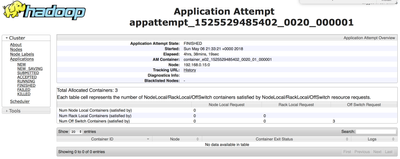
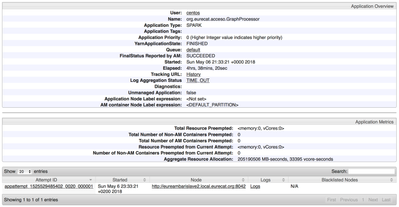
However, the application with such Id exists in ResourceManager. Please see the attached screenshot.

Created 05-07-2018 06:59 AM
- Mark as New
- Bookmark
- Subscribe
- Mute
- Subscribe to RSS Feed
- Permalink
- Report Inappropriate Content
Can you drill down the application_1525529485402_0020 logs in the RM UI and paste the results here?
Created on 05-07-2018 08:34 AM - edited 08-18-2019 01:29 AM
- Mark as New
- Bookmark
- Subscribe
- Mute
- Subscribe to RSS Feed
- Permalink
- Report Inappropriate Content
Yes, sure. Please see attached more screenshots from the RM UI. Thanks.
Created 05-07-2018 08:45 AM
- Mark as New
- Bookmark
- Subscribe
- Mute
- Subscribe to RSS Feed
- Permalink
- Report Inappropriate Content
I re-submitted Spark job and now it works fine. The problem was that I submitted Spark job before changing permissions.


Created 12-05-2019 04:54 AM
- Mark as New
- Bookmark
- Subscribe
- Mute
- Subscribe to RSS Feed
- Permalink
- Report Inappropriate Content
I am using Hortonworks cloudbreak on Azure. I want to run pig job from Oozie but when a job enters into the RUNNING state it throws below error message and stuck in RUNNING state,
Can not find the logs for the application: application_xxx_1113 with the appOwner: hdfs
I run Oozie job as a hdfs user and the logs directory hdfs:///app-logs/hdfs/logs/ has all privileges. When I run the same pig script using 'pig -x tez script.pig' then it run successfully but when I run through Oozie workflow it throws the above error.



Created 12-05-2019 06:15 AM
- Mark as New
- Bookmark
- Subscribe
- Mute
- Subscribe to RSS Feed
- Permalink
- Report Inappropriate Content
@pateljay As this thread is older and solved the original question. You would be better served by creating a new thread for your specific issue. That way there is no confusion between the two separate issues.
Created 05-07-2018 09:06 AM
- Mark as New
- Bookmark
- Subscribe
- Mute
- Subscribe to RSS Feed
- Permalink
- Report Inappropriate Content
🙂 Good to know those petty details permissions ...Happy hadooping !!!!


