
Our Community is getting an upgrade! To get everything ready for the relaunch, we’ll be placing the site in read-only mode starting September 21st.
We really appreciate your understanding while we get things set up behind the scenes. Catch up on all the exciting details about the move here.
Need help or have questions? Drop us a line at [email protected]

Archives of Support Questions (Read Only)
- Cloudera Community
- Board Archive
- Archives of Support Questions (Read Only)
- Funny characters in output file from Impala shell
- Subscribe to RSS Feed
- Mark Question as New
- Mark Question as Read
- Float this Question for Current User
- Bookmark
- Subscribe
- Mute
- Printer Friendly Page
- Subscribe to RSS Feed
- Mark Question as New
- Mark Question as Read
- Float this Question for Current User
- Bookmark
- Subscribe
- Mute
- Printer Friendly Page
Funny characters in output file from Impala shell
- Labels:
-
Apache Impala


Created on 02-21-2015 11:22 PM - edited 09-16-2022 02:22 AM
- Mark as New
- Bookmark
- Subscribe
- Mute
- Subscribe to RSS Feed
- Permalink
- Report Inappropriate Content
Hi,
I want to output the results of some queries passed to impala-shell (in the real scenario read from an input file) to an output file. I have observed that when I redirect the output of impala-shell to a file in the normal bash way, there are some funny characters printed at the beginning of each result block ^[[?1034h (please see screenshot below):
impala-shell --quiet -i server:port -d database -q "select count(*) as cnt from table1" > output.txt
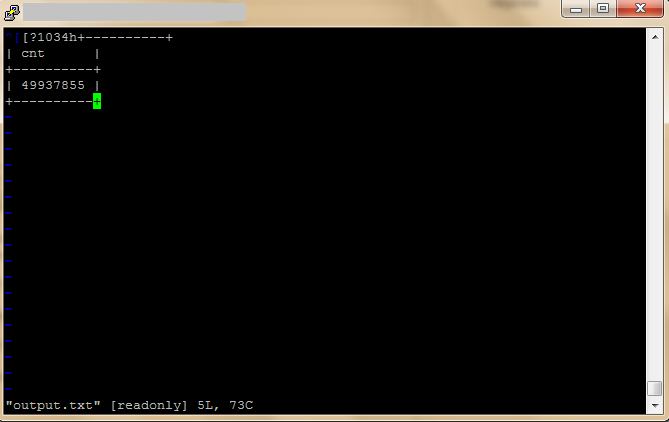
When the following syntax is used, the funny characters are not printed:
impala-shell --quiet -i server:port -d database -q "select count(*) as cnt from table1" -o output.txt
Is this a bug in impala-shell or how would I stop those funny characters from appearing? For some other reasons I need to use the standard redirection to a file rather than the -o option.
Thanks,
Martin

Created 02-22-2015 06:25 PM
- Mark as New
- Bookmark
- Subscribe
- Mute
- Subscribe to RSS Feed
- Permalink
- Report Inappropriate Content
This is by design. I forgot the rationale. It can be avoided by setting env variable TERM to linux
(for bash and friends)
export TERM=linux
Created 02-22-2015 06:25 PM
- Mark as New
- Bookmark
- Subscribe
- Mute
- Subscribe to RSS Feed
- Permalink
- Report Inappropriate Content
This is by design. I forgot the rationale. It can be avoided by setting env variable TERM to linux
(for bash and friends)
export TERM=linux
Created 02-22-2015 07:34 PM
- Mark as New
- Bookmark
- Subscribe
- Mute
- Subscribe to RSS Feed
- Permalink
- Report Inappropriate Content


