
Our Community is getting an upgrade! To get everything ready for the relaunch, we’ll be placing the site in read-only mode starting September 21st.
We really appreciate your understanding while we get things set up behind the scenes. Catch up on all the exciting details about the move here.
Need help or have questions? Drop us a line at [email protected]

Archives of Support Questions (Read Only)
- Cloudera Community
- Board Archive
- Archives of Support Questions (Read Only)
- Re: Getting erro for GetHDFS nifi processor
- Subscribe to RSS Feed
- Mark Question as New
- Mark Question as Read
- Float this Question for Current User
- Bookmark
- Subscribe
- Mute
- Printer Friendly Page
- Subscribe to RSS Feed
- Mark Question as New
- Mark Question as Read
- Float this Question for Current User
- Bookmark
- Subscribe
- Mute
- Printer Friendly Page
Getting erro for GetHDFS nifi processor
- Labels:
-
Apache Hadoop
-
Apache Kafka
-
Apache NiFi


Created 12-01-2017 05:16 PM
- Mark as New
- Bookmark
- Subscribe
- Mute
- Subscribe to RSS Feed
- Permalink
- Report Inappropriate Content
I am trying to get files from HDFS directory with apache nifi GetHDFS processor; however, I am getting the error in the nifi-app.log whenever I try to run the job
Caused by: java.lang.IllegalArgumentException: Wrong FS: hdfs://XXX:8020/user/sample_b.csv, expected: file:///
at org.apache.hadoop.fs.FileSystem.checkPath(FileSystem.java:649)
Any one has any idea what is causing the error?


Created 12-01-2017 06:47 PM
- Mark as New
- Bookmark
- Subscribe
- Mute
- Subscribe to RSS Feed
- Permalink
- Report Inappropriate Content
I think issue is with hdfs-site.xml and core-site.xml
Use the xml's from /usr/hdp/2.4.2.0-258/hadoop/conf instead of /usr/hdp/2.4.2.0-258/etc/hadoop/conf.empty directory
/usr/hdp/2.4.2.0-258/hadoop/conf/hdfs-site.xml
/usr/hdp/2.4.2.0-258/hadoop/conf/core-site.xml
Copy them to another directory and try to use them in the Hadoop configuration resources property in GetHDFS processor.
Created on 12-01-2017 05:37 PM - edited 08-17-2019 08:26 PM
- Mark as New
- Bookmark
- Subscribe
- Mute
- Subscribe to RSS Feed
- Permalink
- Report Inappropriate Content
once make sure your file is in the directory and Nifi has permissions to the directory.
I am not sure about your get hdfs configurations, take a look on the below configs and configure your processor same configs in the screenshot shown below.
Configs:-
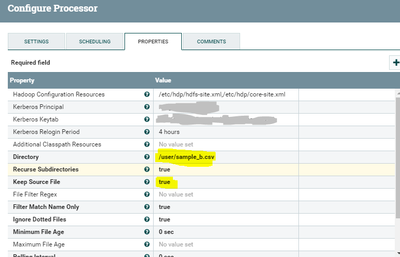
Important Property is Keep source file configure this property as per your needs.
| Keep Source File | false |
| Determines whether to delete the file from HDFS after it has been successfully transferred. If true, the file will be fetched repeatedly. This is intended for testing only. |
Created 12-01-2017 05:56 PM
- Mark as New
- Bookmark
- Subscribe
- Mute
- Subscribe to RSS Feed
- Permalink
- Report Inappropriate Content
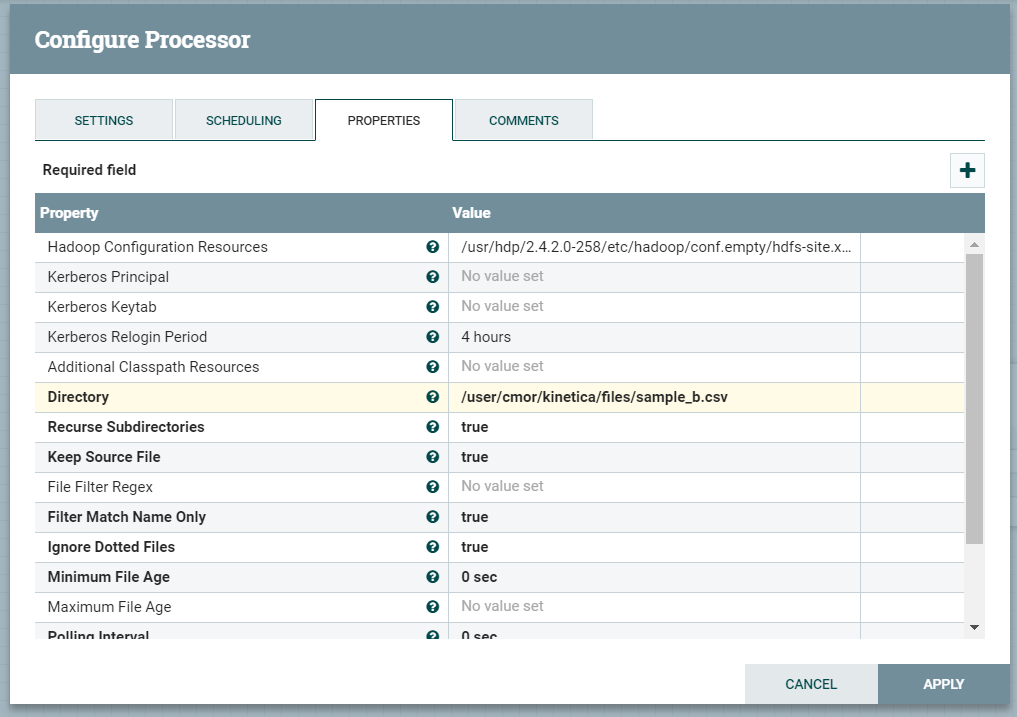
Thank you for quick response...I made the changes as suggested by you but now the processor is failing with below error:
Caused by: java.io.IOException: PropertyDescriptor PropertyDescriptor[Directory] has invalid value /user/cmor/kinetica/files/sample_b.csv. The directory does not exist.
Here is how the configuration of the processor looks:
Created 12-01-2017 06:08 PM
- Mark as New
- Bookmark
- Subscribe
- Mute
- Subscribe to RSS Feed
- Permalink
- Report Inappropriate Content
As per your Logs
Caused by: java.io.IOException: PropertyDescriptor PropertyDescriptor[Directory] has invalid value /user/cmor/kinetica/files/sample_b.csv.The directory does not exist.
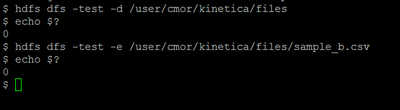
Can you check is the above directory exists in HDFS by using below command
bash# hdfs dfs -test -d /user/cmor/kinetica/files
bash# echo $?
bash# hdfs dfs -test -e /user/cmor/kinetica/files/sample_b.csv
bash# echo $?
//if echo returns 0 file or directory exists
//if echo returns 1 file or directory exists
Make sure the path in the Directory property is correct and run the processor again.
Usage of hdfs test command
bash# hdfs dfs -test -[defsz] <hdfs-path>
Options:<br>-d: f the path is a directory, return 0.<br>-e: if the path exists, return 0.<br>-f: if the path is a file, return 0.<br>-s: if the path is not empty, return 0.<br>-z: if the file is zero length, return 0.
Created on 12-01-2017 06:15 PM - edited 08-17-2019 08:26 PM
- Mark as New
- Bookmark
- Subscribe
- Mute
- Subscribe to RSS Feed
- Permalink
- Report Inappropriate Content
Created 12-01-2017 06:47 PM
- Mark as New
- Bookmark
- Subscribe
- Mute
- Subscribe to RSS Feed
- Permalink
- Report Inappropriate Content
I think issue is with hdfs-site.xml and core-site.xml
Use the xml's from /usr/hdp/2.4.2.0-258/hadoop/conf instead of /usr/hdp/2.4.2.0-258/etc/hadoop/conf.empty directory
/usr/hdp/2.4.2.0-258/hadoop/conf/hdfs-site.xml
/usr/hdp/2.4.2.0-258/hadoop/conf/core-site.xml
Copy them to another directory and try to use them in the Hadoop configuration resources property in GetHDFS processor.
Created 12-01-2017 07:25 PM
- Mark as New
- Bookmark
- Subscribe
- Mute
- Subscribe to RSS Feed
- Permalink
- Report Inappropriate Content
Thank you @Shu; it is running now.


