
Our Community is getting an upgrade! To get everything ready for the relaunch, we’ll be placing the site in read-only mode starting September 21st.
We really appreciate your understanding while we get things set up behind the scenes. Catch up on all the exciting details about the move here.
Need help or have questions? Drop us a line at [email protected]

Archives of Support Questions (Read Only)
- Cloudera Community
- Board Archive
- Archives of Support Questions (Read Only)
- Re: HDP 2,3.4- Running jobs is not getting display...
- Subscribe to RSS Feed
- Mark Question as New
- Mark Question as Read
- Float this Question for Current User
- Bookmark
- Subscribe
- Mute
- Printer Friendly Page
- Subscribe to RSS Feed
- Mark Question as New
- Mark Question as Read
- Float this Question for Current User
- Bookmark
- Subscribe
- Mute
- Printer Friendly Page
HDP 2,3.4- Running jobs is not getting displayed in Spark UI
- Labels:
-
Apache Spark


Created on 02-15-2016 02:58 AM - edited 08-19-2019 01:14 AM
- Mark as New
- Bookmark
- Subscribe
- Mute
- Subscribe to RSS Feed
- Permalink
- Report Inappropriate Content
Hi,
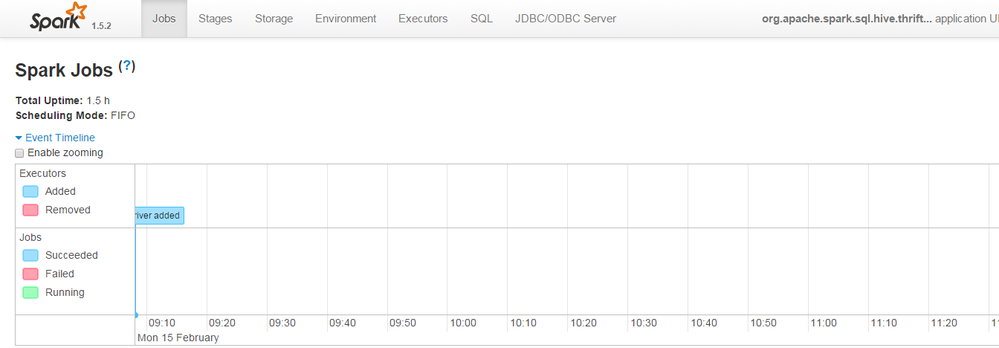
I am running HDP-2.3.4 cluster on EC2.When I go to http://ec2-xx-xx-xxx-xxx.ap-southeast-1.compute.amazonaws.com:4041/jobs/ ,it doesnt display any currently running jobs.
Whereas in spark-shell ,it shows the spark UI started at 4041
16/02/14 21:45:13 INFO AbstractConnector: Started [email protected]:4041
16/02/14 21:45:13 INFO Utils: Successfully started service 'SparkUI' on port 4041.
16/02/14 21:45:13 INFO SparkUI: Started SparkUI at http://xxx.xx.xx.xxx:4041
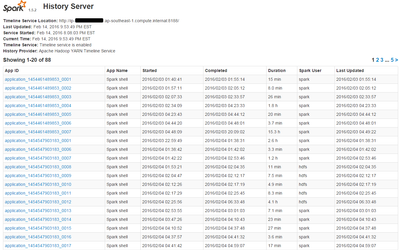
But if I go to history server at It shows all the old jobs ran in the past .
I am new bee to Spark.
P.S. Attaching the screen shots of Spark Web UI and History UI
Thanks,
Divya


Created 02-16-2016 02:08 AM
- Mark as New
- Bookmark
- Subscribe
- Mute
- Subscribe to RSS Feed
- Permalink
- Report Inappropriate Content
Spark History only shows your job after it's finished.
To access Spark UI while your job is running on YARN, got to YARN UI (usually port :8088) and click on Application Master link of your job.


Created 02-15-2016 03:01 AM
- Mark as New
- Bookmark
- Subscribe
- Mute
- Subscribe to RSS Feed
- Permalink
- Report Inappropriate Content
You may be running the job local mode. Specify master to get the job listing.
Created 02-15-2016 04:24 AM
- Mark as New
- Bookmark
- Subscribe
- Mute
- Subscribe to RSS Feed
- Permalink
- Report Inappropriate Content
I am running my spark below :
spark-shell --properties-file /TestDivya/Spark/Oracle.properties --jars /usr/hdp/2.3.4.0-3485/spark/lib/ojdbc6.jar --driver-class-path /usr/hdp/2.3.4.0-3485/spark/lib/ojdbc6.jar --packages com.databricks:spark-csv_2.10:1.1.0 --master yarn-client -i /TestDivya/Spark/Test.scala
Do I need to modify my options to view jobs in Spark UI ?
Created 02-15-2016 04:27 AM
- Mark as New
- Bookmark
- Subscribe
- Mute
- Subscribe to RSS Feed
- Permalink
- Report Inappropriate Content
@Divya Gehlot I guess you are using ambari. You can see Spark and quick link...Go to spark history server to get details. Your job looks ok. If that does not work then replace --master yarn-client with --master yarn
Created on 02-15-2016 08:08 AM - edited 08-19-2019 01:14 AM
- Mark as New
- Bookmark
- Subscribe
- Mute
- Subscribe to RSS Feed
- Permalink
- Report Inappropriate Content
@Neeraj Sabharwal :I am able to view jobs in Spark history server but unable to view current running jobs in Spark Web UI even I though I am specifying --master yarn-client or --master yarn
When the job finishes I could see the "
This webpage is not available
ERR_CONNECTION_REFUSED "
And When job running it displays the page but doesnt show any running jobs .
Am I missing any settings ?
Created 02-15-2016 12:31 PM
- Mark as New
- Bookmark
- Subscribe
- Mute
- Subscribe to RSS Feed
- Permalink
- Report Inappropriate Content
Hi Divya, Please see this thread https://community.hortonworks.com/questions/11382/hdp-234-spark-web-ui.html
You can access it only through the lifetime of the job.
Created 02-16-2016 01:52 AM
- Mark as New
- Bookmark
- Subscribe
- Mute
- Subscribe to RSS Feed
- Permalink
- Report Inappropriate Content

Created 02-15-2016 03:11 AM
- Mark as New
- Bookmark
- Subscribe
- Mute
- Subscribe to RSS Feed
- Permalink
- Report Inappropriate Content
@Divya Gehlot please follow the steps in this document http://docs.hortonworks.com/HDPDocuments/HDP2/HDP-2.3.4/bk_spark-guide/content/ch_tuning-spark.html#...
Created 02-16-2016 02:08 AM
- Mark as New
- Bookmark
- Subscribe
- Mute
- Subscribe to RSS Feed
- Permalink
- Report Inappropriate Content
Spark History only shows your job after it's finished.
To access Spark UI while your job is running on YARN, got to YARN UI (usually port :8088) and click on Application Master link of your job.
Created 02-18-2016 08:43 AM
- Mark as New
- Bookmark
- Subscribe
- Mute
- Subscribe to RSS Feed
- Permalink
- Report Inappropriate Content
As SparkUI port was internal ip of Ec2 ,that's the reason I wasn't able to view the current running jobs in Spark UI.
To resolve this issue ,had to configure SSH Tunnel.


