
Our Community is getting an upgrade! To get everything ready for the relaunch, we’ll be placing the site in read-only mode starting September 21st.
We really appreciate your understanding while we get things set up behind the scenes. Catch up on all the exciting details about the move here.
Need help or have questions? Drop us a line at [email protected]

Archives of Support Questions (Read Only)
- Cloudera Community
- Board Archive
- Archives of Support Questions (Read Only)
- HDP 2.5: Oozie Launcher ERROR, reason: Main class...
- Subscribe to RSS Feed
- Mark Question as New
- Mark Question as Read
- Float this Question for Current User
- Bookmark
- Subscribe
- Mute
- Printer Friendly Page
- Subscribe to RSS Feed
- Mark Question as New
- Mark Question as Read
- Float this Question for Current User
- Bookmark
- Subscribe
- Mute
- Printer Friendly Page
HDP 2.5: Oozie Launcher ERROR, reason: Main class [org.apache.oozie.action.hadoop.ShellMain], exit code [1]


Created on 01-18-2017 10:24 AM - edited 08-19-2019 02:02 AM
- Mark as New
- Bookmark
- Subscribe
- Mute
- Subscribe to RSS Feed
- Permalink
- Report Inappropriate Content
I have tried the example provided in the Hortonwork tutorial,
http://hortonworks.com/hadoop-tutorial/defining-processing-data-end-end-data-pipeline-apache-falcon/
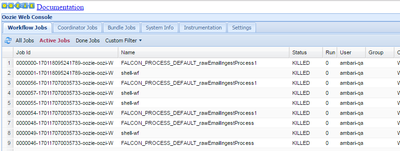
I have followed the steps has provided in that tutorial but facing issue when executing "rawEmailIngestProcess", all the Jobs are KILLLED.
I have followed the below links to identify root cause,
Checked in Resouremanger Log.
Checked in Oozie log.
https://community.hortonworks.com/articles/9148/troubleshooting-an-oozie-flow.html
No error message in resource manger log, Found the error in the oozie log file.
Launcher ERROR, reason: Main class [org.apache.oozie.action.hadoop.ShellMain], exit code [1]


Created 01-18-2017 10:35 AM
- Mark as New
- Bookmark
- Subscribe
- Mute
- Subscribe to RSS Feed
- Permalink
- Report Inappropriate Content
Can you check an instance of shell-wf job . Do you see any link in the console URL section for this.
If a yarn job is launched , you can view the logs further using below command or by directly viewing through RM UI
yarn logs -applicationId <application_ID>.


Created 01-18-2017 10:27 AM
- Mark as New
- Bookmark
- Subscribe
- Mute
- Subscribe to RSS Feed
- Permalink
- Report Inappropriate Content
Please click on one of the KILLED workflow --> Click on failed action --> See if you are getting any error in error section
If not then click on Console URL --> It will land you to RM UI --> Click on succeeded mapper --> Click on logs --> Check stderr logs
You should get some hint over there.
Created 01-18-2017 10:33 AM
- Mark as New
- Bookmark
- Subscribe
- Mute
- Subscribe to RSS Feed
- Permalink
- Report Inappropriate Content
Yes I got the below error from Oozie,
2017-01-18 09:19:56,597 WARN ShellActionExecutor:523 - SERVER[] USER[ambari-qa] GROUP[-] TOKEN[] APP[shell-wf] JOB[0000055-170117070035733-oozie-oozi-W] ACTION[0000055-170117070035733-oozie-oozi-W@shell-node] Launcher ERROR, reason: Main class [org.apache.oozie.action.hadoop.ShellMain], exit code [1]
Created 01-18-2017 10:35 AM
- Mark as New
- Bookmark
- Subscribe
- Mute
- Subscribe to RSS Feed
- Permalink
- Report Inappropriate Content
But no error message in the stderr log.. Is there any workaround to fix this issue...
Created 01-18-2017 10:35 AM
- Mark as New
- Bookmark
- Subscribe
- Mute
- Subscribe to RSS Feed
- Permalink
- Report Inappropriate Content
Can you check an instance of shell-wf job . Do you see any link in the console URL section for this.
If a yarn job is launched , you can view the logs further using below command or by directly viewing through RM UI
yarn logs -applicationId <application_ID>.
Created 01-18-2017 12:34 PM
- Mark as New
- Bookmark
- Subscribe
- Mute
- Subscribe to RSS Feed
- Permalink
- Report Inappropriate Content
yarn logs -applicationId <application_ID> .. Helped me to identify the issue.. It is a permission issue for the user and I have fixed it.

Created 04-05-2017 02:37 PM
- Mark as New
- Bookmark
- Subscribe
- Mute
- Subscribe to RSS Feed
- Permalink
- Report Inappropriate Content
Hi! -- I am experiencing the same issue with the same tutorial (Falcon) in a Google Cloud based HDP installation. I'd be grateful if you could add some more info regarding that permission issue. Thanks in advance.

Created 07-07-2017 07:48 AM
- Mark as New
- Bookmark
- Subscribe
- Mute
- Subscribe to RSS Feed
- Permalink
- Report Inappropriate Content
Hi, You're my life saviour. I tried checking the logs on the schedular website but just couldnt find it.
and then I used this Yarn log and saved it into a log.txt file and there you go. Found the exact error that I was looking for.
Thank you so much. 🙂

Created 09-22-2017 09:31 AM
- Mark as New
- Bookmark
- Subscribe
- Mute
- Subscribe to RSS Feed
- Permalink
- Report Inappropriate Content
hi i added spark node in oozie workflow but getting this error all time {
reason: Main class [org.apache.oozie.action.hadoop.SparkMain], exit code [101]


