
Our Community is getting an upgrade! To get everything ready for the relaunch, we’ll be placing the site in read-only mode starting September 21st.
We really appreciate your understanding while we get things set up behind the scenes. Catch up on all the exciting details about the move here.
Need help or have questions? Drop us a line at [email protected]

Archives of Support Questions (Read Only)
- Cloudera Community
- Board Archive
- Archives of Support Questions (Read Only)
- Re: HDP 2.5 Sandbox Virtualbox Error: "vboxnet0 n...
- Subscribe to RSS Feed
- Mark Question as New
- Mark Question as Read
- Float this Question for Current User
- Bookmark
- Subscribe
- Mute
- Printer Friendly Page
- Subscribe to RSS Feed
- Mark Question as New
- Mark Question as Read
- Float this Question for Current User
- Bookmark
- Subscribe
- Mute
- Printer Friendly Page
HDP 2.5 Sandbox Virtualbox Error: "vboxnet0 not found"
- Labels:
-
Hortonworks Data Platform (HDP)


Created on 09-19-2016 10:48 AM - edited 08-18-2019 05:11 AM
- Mark as New
- Bookmark
- Subscribe
- Mute
- Subscribe to RSS Feed
- Permalink
- Report Inappropriate Content
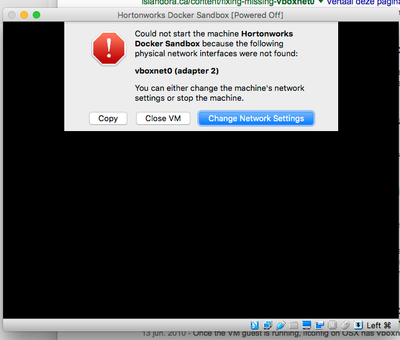
With latest Virtualbox (5.1.6) and HDP 2.5 Sandbox I get this VirtualBox Error:
"Could not start the machine Hortonworks Docker Sandbox because the following physical network interfaces were not found: vboxnet0 (adapter 2)"
(BTW: The previous HDP 2.4 sandbox only has one network adaptor on import.)



Created 09-19-2016 05:42 PM
- Mark as New
- Bookmark
- Subscribe
- Mute
- Subscribe to RSS Feed
- Permalink
- Report Inappropriate Content
Go to VirtualBox Preferences>Network>Host-only Networks
and Add host-only network for vboxnet0. This will solve the problem
Created 09-19-2016 10:52 AM
- Mark as New
- Bookmark
- Subscribe
- Mute
- Subscribe to RSS Feed
- Permalink
- Report Inappropriate Content
In my case, just disabling Network Adapter 2 from the VM's setting worked (OSX), however, a customer (Windows10) got the following error message:
"Connectivity issues detected! Check connection of network interface"
Not sure if this is related, still investigating...


Created 09-19-2016 04:58 PM
- Mark as New
- Bookmark
- Subscribe
- Mute
- Subscribe to RSS Feed
- Permalink
- Report Inappropriate Content
I had the same issue. I fixed it by setting vboxnet0 as the host-only adapter in the settings of the virtual machine. Followed the instructions here http://islandora.ca/content/fixing-missing-vboxnet0
Created 09-19-2016 05:42 PM
- Mark as New
- Bookmark
- Subscribe
- Mute
- Subscribe to RSS Feed
- Permalink
- Report Inappropriate Content
Go to VirtualBox Preferences>Network>Host-only Networks
and Add host-only network for vboxnet0. This will solve the problem


Created on 09-19-2016 05:49 PM - edited 08-18-2019 05:10 AM
- Mark as New
- Bookmark
- Subscribe
- Mute
- Subscribe to RSS Feed
- Permalink
- Report Inappropriate Content
During import of the appliance file, VirtualBox will show you the VM configuration. You can uncheck the second network option, which is the one that uses the vboxnet0 adapter.

If you go to VirtualBox -> Preferences -> Network -> Host-only Networks you should see something like this (vboxnet0):
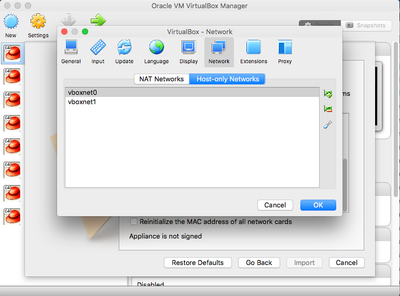
My guess is that you don't have vboxnet0 defined. You can add it from this screen.

Created 09-23-2016 08:43 AM
- Mark as New
- Bookmark
- Subscribe
- Mute
- Subscribe to RSS Feed
- Permalink
- Report Inappropriate Content
I got stung by this as well. I could not figure out the solution until I found this page. I am not keen on this change to the sandbox.

Created 09-23-2016 09:17 PM
- Mark as New
- Bookmark
- Subscribe
- Mute
- Subscribe to RSS Feed
- Permalink
- Report Inappropriate Content
We just did a refresh of the Sandbox to fix this issue. If you have run into this issue I would suggest downloading the Sandbox again or following the steps above.


