
Archives of Support Questions (Read Only)
- Cloudera Community
- Board Archive
- Archives of Support Questions (Read Only)
- HDP 2.5 virtualbox import error
- Subscribe to RSS Feed
- Mark Question as New
- Mark Question as Read
- Float this Question for Current User
- Bookmark
- Subscribe
- Mute
- Printer Friendly Page
- Subscribe to RSS Feed
- Mark Question as New
- Mark Question as Read
- Float this Question for Current User
- Bookmark
- Subscribe
- Mute
- Printer Friendly Page
HDP 2.5 virtualbox import error
- Labels:
-
Hortonworks Data Platform (HDP)


Created on 12-24-2016 04:47 PM - edited 08-18-2019 03:44 AM
- Mark as New
- Bookmark
- Subscribe
- Mute
- Subscribe to RSS Feed
- Permalink
- Report Inappropriate Content
Hi Guys,
Can you suggest a possible solution? I am having an issue for HDP 2 5 virtualbox.
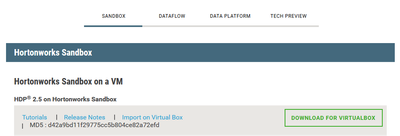
From the download site I noted the MD5 and used fciv after the complete download.

The checksum matches but when I import the image in virtual box I still get the following error.
Failed to import appliance C:/Users/Julius/Downloads/HDP_2.5_virtualbox.ova.
Seeking within the archive failed (VERR_TAR_CHKSUM_MISMATCH).
| Result Code: | VBOX_E_IPRT_ERROR (0x80BB0005) |
| Component: | Appliance |
| Interface: | IAppliance {3059cf9e-25c7-4f0b-9fa5-3c42e441670b} |
Thanks in advance!
Regards,
Julius



Created 12-24-2016 04:52 PM
- Mark as New
- Bookmark
- Subscribe
- Mute
- Subscribe to RSS Feed
- Permalink
- Report Inappropriate Content
@Julius Gamboa faced similar exception with virtualbox but after upgrading it I was able to import succesfully
Created 12-24-2016 04:52 PM
- Mark as New
- Bookmark
- Subscribe
- Mute
- Subscribe to RSS Feed
- Permalink
- Report Inappropriate Content
@Julius Gamboa faced similar exception with virtualbox but after upgrading it I was able to import succesfully
Created 12-24-2016 04:57 PM
- Mark as New
- Bookmark
- Subscribe
- Mute
- Subscribe to RSS Feed
- Permalink
- Report Inappropriate Content
Thanks for the response @Rajkumar Singh. I am using virtualbox 4.2 and when I try to update virtual box it says that I have the latest version. May I know what version did you update to?
Created 12-24-2016 05:02 PM
- Mark as New
- Bookmark
- Subscribe
- Mute
- Subscribe to RSS Feed
- Permalink
- Report Inappropriate Content
@Julius Gamboa this is Version 5.0.30 r112061 on Mac.

Created 12-24-2016 05:33 PM
- Mark as New
- Bookmark
- Subscribe
- Mute
- Subscribe to RSS Feed
- Permalink
- Report Inappropriate Content
You may try
VBoxManage internalcommands repairhd --format OVA --filename <image>
Use the "--dry-run" option to check what the tool would do.
Once image repaired again try to import it.


