
Our Community is getting an upgrade! To get everything ready for the relaunch, we’ll be placing the site in read-only mode starting September 21st.
We really appreciate your understanding while we get things set up behind the scenes. Catch up on all the exciting details about the move here.
Need help or have questions? Drop us a line at [email protected]

Archives of Support Questions (Read Only)
- Cloudera Community
- Board Archive
- Archives of Support Questions (Read Only)
- Re: HDP 2.6 - Initiate sandbox through browser
- Subscribe to RSS Feed
- Mark Question as New
- Mark Question as Read
- Float this Question for Current User
- Bookmark
- Subscribe
- Mute
- Printer Friendly Page
- Subscribe to RSS Feed
- Mark Question as New
- Mark Question as Read
- Float this Question for Current User
- Bookmark
- Subscribe
- Mute
- Printer Friendly Page
HDP 2.6 - Initiate sandbox through browser
- Labels:
-
Hortonworks Data Platform (HDP)


Created on 06-17-2017 09:14 PM - edited 08-17-2019 07:18 PM
- Mark as New
- Bookmark
- Subscribe
- Mute
- Subscribe to RSS Feed
- Permalink
- Report Inappropriate Content
Hi ,
I'm using MAC OS Sierra.
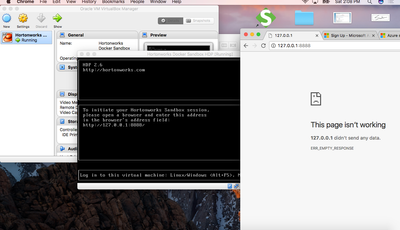
I started HDP 2.6 sandbox using Virtual Box. I get a window which says 'To initiate Hortonworks Sandbox session please open a browser and enter this address in the browser's address field: http://127.0.0.1:8888/'
When i enter it in the browser I get an empty response. What's the work around for this? The image below shows the issue that I'm facing



Created 06-18-2017 03:47 AM
- Mark as New
- Bookmark
- Subscribe
- Mute
- Subscribe to RSS Feed
- Permalink
- Report Inappropriate Content
We need to check if the "Port Forwarding" for the port 8888 is present or not?
Please check: https://community.hortonworks.com/articles/65914/how-to-add-ports-to-the-hdp-25-virtualbox-sandbox.h...
- We can also check if we have set the networking mode to host-only on the VirtualBox instance.
- If the port forwarding is enabled for 8888 port then we should check if by any chance firewall is not causing any issue.
- So please try to do SSH to the sandbox as following (on port 2222 only), Default password should be "hadoop"
# ssh [email protected] -p 2222
- After doing SSH, please check if the firewall is disabled.
# service iptables status
iptables: Firewall is not running.
- Also please check if the port 8888 is opened inside the Sandbox?
# netstat -tnlpa | grep 8888
.
Created 06-18-2017 03:47 AM
- Mark as New
- Bookmark
- Subscribe
- Mute
- Subscribe to RSS Feed
- Permalink
- Report Inappropriate Content
We need to check if the "Port Forwarding" for the port 8888 is present or not?
Please check: https://community.hortonworks.com/articles/65914/how-to-add-ports-to-the-hdp-25-virtualbox-sandbox.h...
- We can also check if we have set the networking mode to host-only on the VirtualBox instance.
- If the port forwarding is enabled for 8888 port then we should check if by any chance firewall is not causing any issue.
- So please try to do SSH to the sandbox as following (on port 2222 only), Default password should be "hadoop"
# ssh [email protected] -p 2222
- After doing SSH, please check if the firewall is disabled.
# service iptables status
iptables: Firewall is not running.
- Also please check if the port 8888 is opened inside the Sandbox?
# netstat -tnlpa | grep 8888
.

Created 03-20-2018 03:50 PM
- Mark as New
- Bookmark
- Subscribe
- Mute
- Subscribe to RSS Feed
- Permalink
- Report Inappropriate Content
I am able to open 127.0.0.1:8888 but not able to open 127.0.0.1:8080 for ambari. What should be done ?


