
Our Community is getting an upgrade! To get everything ready for the relaunch, we’ll be placing the site in read-only mode starting September 21st.
We really appreciate your understanding while we get things set up behind the scenes. Catch up on all the exciting details about the move here.
Need help or have questions? Drop us a line at [email protected]

Archives of Support Questions (Read Only)
- Cloudera Community
- Board Archive
- Archives of Support Questions (Read Only)
- Re: HDP2.4.3::Ambari 2.4.1.0 ::HiveServer2, Histor...
- Subscribe to RSS Feed
- Mark Question as New
- Mark Question as Read
- Float this Question for Current User
- Bookmark
- Subscribe
- Mute
- Printer Friendly Page
- Subscribe to RSS Feed
- Mark Question as New
- Mark Question as Read
- Float this Question for Current User
- Bookmark
- Subscribe
- Mute
- Printer Friendly Page
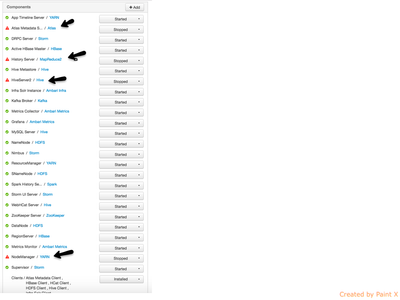
HDP2.4.3::Ambari 2.4.1.0 ::HiveServer2, History Server and NodeManager Not Starting
- Labels:
-
Apache Atlas
-
Apache Hive


Created on 10-24-2016 08:01 PM - edited 08-18-2019 06:14 AM
- Mark as New
- Bookmark
- Subscribe
- Mute
- Subscribe to RSS Feed
- Permalink
- Report Inappropriate Content
Attached Out Logs: hiveserver2err.txt
HDP2.4.3::Ambari 2.4.1.0 ::HiveServer2, History Server and NodeManager Not Starting
I tried
-- Restarting CLuster
-- Safe Mode OFF
NameNode starts - stays up for some time, but silently goes down.
HiveServer2 - Never Started
HistoryServer: Never Started
Rest All - Started and Stayed up.
When I attempt to Start HiveServer2 or HistoryServer/MR - it will bring "NameNode" down.
History Server:
File "/usr/lib/python2.6/site-packages/resource_management/libraries/providers/hdfs_resource.py", line 179, in run_command
    _, out, err = get_user_call_output(cmd, user=self.run_user, logoutput=self.logoutput, quiet=False)
  File "/usr/lib/python2.6/site-packages/resource_management/libraries/functions/get_user_call_output.py", line 61, in get_user_call_output
    raise Fail(err_msg)
resource_management.core.exceptions.Fail: Execution of 'curl -sS -L -w '%{http_code}' -X PUT --data-binary @/usr/hdp/2.4.3.0-227/hadoop/mapreduce.tar.gz 'http://node09.example.com:50070/webhdfs/v1/hdp/apps/2.4.3.0-227/mapreduce/mapreduce.tar.gz?op=CREATE&user.name=hdfs&overwrite=True&permission=444' 1>/tmp/tmp4_0mSH 2>/tmp/tmpJCqPnb' returned 52. curl: (52) Empty reply from server
100
HiveServer2:
  File "/usr/lib/python2.6/site-packages/resource_management/libraries/functions/get_user_call_output.py", line 61, in get_user_call_output
    raise Fail(err_msg)
resource_management.core.exceptions.Fail: Execution of 'curl -sS -L -w '%{http_code}' -X PUT --data-binary @/usr/hdp/2.4.3.0-227/hadoop/mapreduce.tar.gz 'http://node09.example.com:50070/webhdfs/v1/hdp/apps/2.4.3.0-227/mapreduce/mapreduce.tar.gz?op=CREATE&user.name=hdfs&overwrite=True&permission=444' 1>/tmp/tmp9oruFg 2>/tmp/tmp6NevU5' returned 52. curl: (52) Empty reply from server
100
Created 11-05-2016 09:36 PM
- Mark as New
- Bookmark
- Subscribe
- Mute
- Subscribe to RSS Feed
- Permalink
- Report Inappropriate Content
*WORKED*
1: su - hdfs
hdfs dfs -put /usr/hdp/2.4.3.0-227/hadoop/mapreduce.tar.gz /hdp/apps/2.4.3.0-227/mapreduce/
3: su - atlas
cp /usr/hdp/2.4.3.0-227/etc/atlas/conf.dist/client.properties /etc/atlas/conf/
Created 10-24-2016 08:42 PM
- Mark as New
- Bookmark
- Subscribe
- Mute
- Subscribe to RSS Feed
- Permalink
- Report Inappropriate Content
Some History:
My Cluster: Single Node 16Core/32GB RAM/1TB HDD. Name: Node109
This Node (Node109) was part of a 3 Node Cluster running HDP2.2.
Since we are running behind on Server Procurement, I had to cut down 3 Node to 2 Node cluster. Took 109 out of the 3 Node cluster. I Performed Move all services of 109 to other 2 server and Decommissioned & "Delete Host".
Then on 109, I had to remove each service manually "yum remove hdfs" .. etc like mentioned in:
-- Got latest Ambari Repo
-- Installed HDP 2.4.3 on it.

Created 10-24-2016 08:45 PM
- Mark as New
- Bookmark
- Subscribe
- Mute
- Subscribe to RSS Feed
- Permalink
- Report Inappropriate Content
Can you also provide the nodemanager log?
Created 10-25-2016 07:02 PM
- Mark as New
- Bookmark
- Subscribe
- Mute
- Subscribe to RSS Feed
- Permalink
- Report Inappropriate Content
Can you please give me the location.
I tried /var/log/hadoop/hdfs - I see
hadoop-hdfs-namenode-node09.example.com.log
hadoop-hdfs-datanode-node09.example.com.log
gc.log
hdfs-audit.log
hadoop-hdfs-secondarynamenode-node09.example.com.log
Should I look at different location?
====================
[root@... hadoop]# cd /usr/hdp/
[root@... hdp]# ll
drwxr-xr-x 26 root root 4096 Oct 24 12:21 2.4.3.0-227
drwxr-xr-x 3 root root 4096 Oct 24 14:09 current
drwxr-xr-x 2 root root 4096 Oct 24 00:24 share
==================
[root@node09 hdp]# find . -name *manager*
./2.4.3.0-227/atlas/bridge/hive/hadoop-yarn-server-resourcemanager-2.7.1.2.4.3.0-227.jar
./2.4.3.0-227/hadoop-yarn/hadoop-yarn-server-resourcemanager-2.7.1.2.4.3.0-227.jar
./2.4.3.0-227/hadoop-yarn/hadoop-yarn-server-sharedcachemanager.jar
./2.4.3.0-227/hadoop-yarn/hadoop-yarn-server-nodemanager-2.7.1.2.4.3.0-227.jar
./2.4.3.0-227/hadoop-yarn/hadoop-yarn-server-resourcemanager.jar
./2.4.3.0-227/hadoop-yarn/hadoop-yarn-server-nodemanager.jar
./2.4.3.0-227/hadoop-yarn/hadoop-yarn-server-sharedcachemanager-2.7.1.2.4.3.0-227.jar
./2.4.3.0-227/zookeeper/lib/maven-artifact-manager-2.2.1.jar
./current/hadoop-yarn-resourcemanager
./current/hadoop-yarn-nodemanager
[root@node09 hdp]# cd current/hadoop-yarn-nodemanager/
-rw-r--r-- 1 root root 748594 Sep 9 18:09 hadoop-yarn-server-nodemanager-2.7.1.2.4.3.0-227.jar
Created 10-26-2016 01:26 PM
- Mark as New
- Bookmark
- Subscribe
- Mute
- Subscribe to RSS Feed
- Permalink
- Report Inappropriate Content
Please see my NodeManager and NodeManager+HiveServer2 Logs
Created 10-26-2016 01:55 PM
- Mark as New
- Bookmark
- Subscribe
- Mute
- Subscribe to RSS Feed
- Permalink
- Report Inappropriate Content
maybe I've not had enough coffee yet, but I'm not seeing where you attached the nodemanager log?
Created 10-26-2016 01:56 PM
- Mark as New
- Bookmark
- Subscribe
- Mute
- Subscribe to RSS Feed
- Permalink
- Report Inappropriate Content
Sorry @Todd Wilson. I did not find NodeManager logs exclusively. So I added Ambari-Agent and Server logs below. Please see my 2 Replies to Artem's request.
Created 10-26-2016 02:54 PM
- Mark as New
- Bookmark
- Subscribe
- Mute
- Subscribe to RSS Feed
- Permalink
- Report Inappropriate Content
@sun pepper More than likely /var/log/hadoop-yarn/yarn/*nodemanager*.log
Created 10-26-2016 09:11 PM
- Mark as New
- Bookmark
- Subscribe
- Mute
- Subscribe to RSS Feed
- Permalink
- Report Inappropriate Content
Here is the file: yarn-yarn-nodemanager-node09examplecomlog.txt
Please check the attached.
{code}
2016-10-26 16:08:03,700 FATAL containermanager.AuxServices (AuxServices.java:serviceInit(145)) - Failed to initialize spark_shuffle
java.lang.RuntimeException: java.lang.RuntimeException: java.lang.ClassNotFoundException: Class org.apache.spark.network.yarn.YarnShuffleService not found
at org.apache.hadoop.conf.Configuration.getClass(Configuration.java:2240)
at org.apache.hadoop.yarn.server.nodemanager.containermanager.AuxServices.serviceInit(AuxServices.java:121)
at org.apache.hadoop.service.AbstractService.init(AbstractService.java:163)
at org.apache.hadoop.service.CompositeService.serviceInit(CompositeService.java:107)
at org.apache.hadoop.yarn.server.nodemanager.containermanager.ContainerManagerImpl.serviceInit(ContainerManagerImpl.java:245)
at org.apache.hadoop.service.AbstractService.init(AbstractService.java:163)
at org.apache.hadoop.service.CompositeService.serviceInit(CompositeService.java:107)
at org.apache.hadoop.yarn.server.nodemanager.NodeManager.serviceInit(NodeManager.java:292)
at org.apache.hadoop.service.AbstractService.init(AbstractService.java:163)
at org.apache.hadoop.yarn.server.nodemanager.NodeManager.initAndStartNodeManager(NodeManager.java:547)
at org.apache.hadoop.yarn.server.nodemanager.NodeManager.main(NodeManager.java:595)
Caused by: java.lang.RuntimeException: java.lang.ClassNotFoundException: Class org.apache.spark.network.yarn.YarnShuffleService not found
at org.apache.hadoop.conf.Configuration.getClass(Configuration.java:2208)
at org.apache.hadoop.conf.Configuration.getClass(Configuration.java:2232)
... 10 more
Caused by: java.lang.ClassNotFoundException: Class org.apache.spark.network.yarn.YarnShuffleService not found
at org.apache.hadoop.conf.Configuration.getClassByName(Configuration.java:2114)
at org.apache.hadoop.conf.Configuration.getClass(Configuration.java:2206)
{code}
Created 10-26-2016 10:36 PM
- Mark as New
- Bookmark
- Subscribe
- Mute
- Subscribe to RSS Feed
- Permalink
- Report Inappropriate Content
*Sandbox*
[root@sandbox hdp]# grep -r "YarnShuffleService" *
Binary file 2.4.0.0-169/spark/lib/spark-1.6.0.2.4.0.0-169-yarn-shuffle.jar matches
Binary file 2.4.0.0-169/spark/lib/spark-assembly-1.6.0.2.4.0.0-169-hadoop2.7.1.2.4.0.0-169.jar matches
*HDP2.4 Cluster* - Installed using Ambari Automated Install
[root@node09 hdp]# grep -r "YarnShuffleService" *
Binary file 2.4.3.0-227/spark/lib/spark-assembly-1.6.2.2.4.3.0-227-hadoop2.7.1.2.4.3.0-227.jar matches
Some LIB's are missing.
Sandbox:
[root@sandbox hdp]# find . -name *.jar | wc -l
4402
Cluster-Node:
[root@node09 hdp]# find . -name *.jar | wc -l
1675
Difference could be - some services are not ON yet in the Cluster. I got that. But the "yarn-shuffle" scares me. Why wouldnt it install?
STEPS:
#1 Manual: copied over from HDP2.4 sandbox to HDP2.4 Cluster.
>cp ~/spark-1.6.0.2.4.0.0-169-yarn-shuffle.jar .
>mv spark-1.6.0.2.4.0.0-169-yarn-shuffle.jar spark-1.6.2.2.4.3.0-227-yarn-shuffle.jar
#2: Add the following properties to the spark-defaults.conf file associated with your Spark installation. (For general Spark applications, this file typically resides at$SPARK_HOME/conf/spark-defaults.conf.)
- Set
spark.dynamicAllocation.enabledtotrue - Set
spark.shuffle.service.enabledtotrue
#3: I manually restarted all components. It sort of Worked briefly. However it went DOWN again.
"Background Operations Running" --> Showed as if - it is UP. However when I went back to Ambari -> Hosts -> Summary - it shows down. Logs complaint the same missing class.


