Our Community is getting an upgrade! To get everything ready for the relaunch, we’ll be placing the site in read-only mode starting September 21st.
We really appreciate your understanding while we get things set up behind the scenes. Catch up on all the exciting details about the move here.
Need help or have questions? Drop us a line at [email protected]

Archives of Support Questions (Read Only)

This is an archived board for historical reference. Information and links may no longer be available or relevant
Announcements
This board is archived and read-only for historical reference. To ask a new question, please post a new topic on the appropriate active board.

Hadoop Installation Directory on HDP 2.4

avatar
New Member

Hi,

Can any body let me know where is Hadoop installed on hdp 2.4?

How can i access sqoop exported files using winscp?

I exported a table from teradata using sqoop using root user. Using "hadoop fs -find" command, its shows dir as "/user/root/tableDirName", but I dont see this dir in winscp. How can I access this directory in winscp?

Thanks

1 ACCEPTED SOLUTION

avatar

@Ahmed Bilal

You can copy the data to edge node and from there you can do winscp

hadoop fs -get:

  • Copies/Downloads files from HDFS to the local file system
<code># Usage:# hdfs dfs -get <hdfs_src> <localdst>
or 
hdfs dfs [-copyToLocal [-p] [-ignoreCrc] [-crc] <src> ... <localdst>]
or
hdfs dfs [-moveToLocal <src> <localdst>]
# Example: hdfs dfs -get/user/hadoop/dir1/popularNames.txt /home/

enter image description here

2.

By giving this hdfs fsck we can know where are block are located.

hdfs fsck /user/root/tableDirName/filename -files -locations -blocks -racks

3.

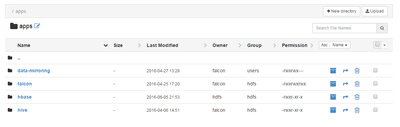
Even you can use FileView UI to download data which is much user-friendly

5825-fileview.png

View solution in original post

1 REPLY 1

avatar

@Ahmed Bilal

You can copy the data to edge node and from there you can do winscp

hadoop fs -get:

  • Copies/Downloads files from HDFS to the local file system
<code># Usage:# hdfs dfs -get <hdfs_src> <localdst>
or 
hdfs dfs [-copyToLocal [-p] [-ignoreCrc] [-crc] <src> ... <localdst>]
or
hdfs dfs [-moveToLocal <src> <localdst>]
# Example: hdfs dfs -get/user/hadoop/dir1/popularNames.txt /home/

enter image description here

2.

By giving this hdfs fsck we can know where are block are located.

hdfs fsck /user/root/tableDirName/filename -files -locations -blocks -racks

3.

Even you can use FileView UI to download data which is much user-friendly

5825-fileview.png