
Our Community is getting an upgrade! To get everything ready for the relaunch, we’ll be placing the site in read-only mode starting September 21st.
We really appreciate your understanding while we get things set up behind the scenes. Catch up on all the exciting details about the move here.
Need help or have questions? Drop us a line at [email protected]

Archives of Support Questions (Read Only)
- Cloudera Community
- Board Archive
- Archives of Support Questions (Read Only)
- Heartbeat Lost after upgrading from Ambari 2.4.2 t...
- Subscribe to RSS Feed
- Mark Question as New
- Mark Question as Read
- Float this Question for Current User
- Bookmark
- Subscribe
- Mute
- Printer Friendly Page
- Subscribe to RSS Feed
- Mark Question as New
- Mark Question as Read
- Float this Question for Current User
- Bookmark
- Subscribe
- Mute
- Printer Friendly Page
Heartbeat Lost after upgrading from Ambari 2.4.2 to Ambari 2.5
- Labels:
-
Apache Ambari


Created on 05-11-2017 07:48 AM - edited 08-17-2019 06:21 PM
- Mark as New
- Bookmark
- Subscribe
- Mute
- Subscribe to RSS Feed
- Permalink
- Report Inappropriate Content
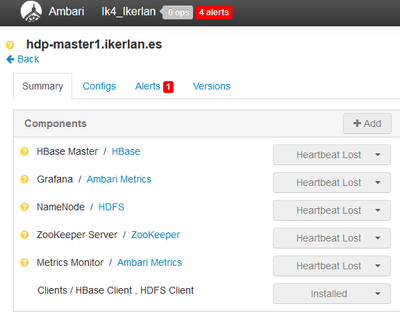
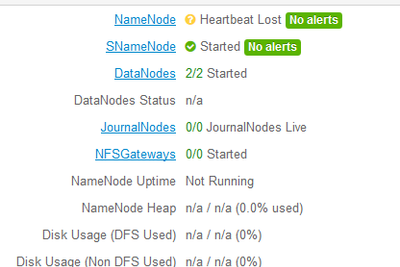
I upgrade the ambari server and agents version from the 2.4.2 to the 2.5. After upgradring I access to the ambari dashboard:
http://hdp-master1.ikerlan.es:8080, and some services are on Heartbeat Lost status. The services of the ambari-server are on that status, but for example it works when I access to HDFS: hdp-master1.ikerlan.es:50070.



Created 05-11-2017 08:35 AM
- Mark as New
- Bookmark
- Subscribe
- Mute
- Subscribe to RSS Feed
- Permalink
- Report Inappropriate Content
First check Is your ambari-agent running on your host or not by,
ambari-agent status
If it is running fine then check your versions of ambari-server and ambari-agent on the host. Also check the entry in properties file of ambari,
yum list installed | grep ambari
Configuration file:-
/etc/ambari-agent/conf/ambari-agent.ini
[server]
hostname=Ambari-server Hostname
Created 05-11-2017 08:35 AM
- Mark as New
- Bookmark
- Subscribe
- Mute
- Subscribe to RSS Feed
- Permalink
- Report Inappropriate Content
First check Is your ambari-agent running on your host or not by,
ambari-agent status
If it is running fine then check your versions of ambari-server and ambari-agent on the host. Also check the entry in properties file of ambari,
yum list installed | grep ambari
Configuration file:-
/etc/ambari-agent/conf/ambari-agent.ini
[server]
hostname=Ambari-server Hostname
Created on 05-11-2017 08:45 AM - edited 08-17-2019 06:21 PM
- Mark as New
- Bookmark
- Subscribe
- Mute
- Subscribe to RSS Feed
- Permalink
- Report Inappropriate Content
@nshelke Really thanks
Updating all the services it works:
This is my yum list installed on server:
yum list installed | grep ambari

ambari-agent.x86_64                         2.5.0.3-7               @ambari-2.5.0.3
ambari-metrics-grafana.x86_64               2.5.0.3-7               @ambari-2.5.0.3
ambari-metrics-hadoop-sink.x86_64           2.5.0.3-7               @ambari-2.5.0.3
ambari-metrics-monitor.x86_64               2.5.0.3-7               @ambari-2.5.0.3
ambari-server.x86_64                        2.5.0.3-7               @ambari-2.5.0.3
This is my yum list installed on agents:
yum list installed | grep ambari

ambari-agent.x86_64                         2.5.0.3-7               @ambari-2.5.0.3
ambari-metrics-hadoop-sink.x86_64           2.5.0.3-7               @ambari-2.5.0.3
ambari-metrics-monitor.x86_64               2.5.0.3-7               @ambari-2.5.0.3
Created 05-11-2017 09:21 AM
- Mark as New
- Bookmark
- Subscribe
- Mute
- Subscribe to RSS Feed
- Permalink
- Report Inappropriate Content
Looking at you snapshots, I found some inconsistencies like,
You have not upgrade ambari-agent package on ambari-server host and other packages also, see
yum list installed | grep ambari

	ambari-agent.x86_64  2.4.2.0-136  @Updates-ambari-2.4.2.0
	ambari-metrics-grafana.x86_64  2.4.2.0-136  @Updates-ambari-2.4.2.0
	ambari-metrics-hadoop-sink.x86_64  2.4.2.0-136  @Updates-ambari-2.4.2.0
	ambari-metrics-monitor.x86_64  2.4.2.0-136  @Updates-ambari-2.4.2.0
all have version 2.4.2.0-136, You have to upgrade all these component as well.
Also on ambari-agent host,
yum list installed | grep ambari
ambari-metrics-hadoop-sink.x86_64  2.4.2.0-136  @Updates-ambari-2.4.2.0
ambari-metrics-monitor.x86_64  2.4.2.0-136  @Updates-ambari-2.4.2.0
Here also you need to upgrade these two packages to 2.5.0.3-7.
Then restart the ambari-agent, This will solve your problem.
Created 05-11-2017 09:33 AM
- Mark as New
- Bookmark
- Subscribe
- Mute
- Subscribe to RSS Feed
- Permalink
- Report Inappropriate Content
Yes it was this, I just update all the services and it works 🙂 Really thanks @nshelke
Created 05-11-2017 10:11 AM
- Mark as New
- Bookmark
- Subscribe
- Mute
- Subscribe to RSS Feed
- Permalink
- Report Inappropriate Content
Thanks.


