
Our Community is getting an upgrade! To get everything ready for the relaunch, we’ll be placing the site in read-only mode starting September 21st.
We really appreciate your understanding while we get things set up behind the scenes. Catch up on all the exciting details about the move here.
Need help or have questions? Drop us a line at [email protected]

Archives of Support Questions (Read Only)
- Cloudera Community
- Board Archive
- Archives of Support Questions (Read Only)
- Hello..I am installing Hortonworks sandbox on orac...
- Subscribe to RSS Feed
- Mark Question as New
- Mark Question as Read
- Float this Question for Current User
- Bookmark
- Subscribe
- Mute
- Printer Friendly Page
- Subscribe to RSS Feed
- Mark Question as New
- Mark Question as Read
- Float this Question for Current User
- Bookmark
- Subscribe
- Mute
- Printer Friendly Page
Hello..I am installing Hortonworks sandbox on oracle VM virtual box. after I click start it gives an error VT-x is disabled in bios..how can I resolve this error?


Created 04-09-2016 11:24 AM
- Mark as New
- Bookmark
- Subscribe
- Mute
- Subscribe to RSS Feed
- Permalink
- Report Inappropriate Content


Created on 04-09-2016 11:30 AM - edited 08-18-2019 04:35 AM
- Mark as New
- Bookmark
- Subscribe
- Mute
- Subscribe to RSS Feed
- Permalink
- Report Inappropriate Content
1. You need to reboot your system and go in bios and enable it from there which is required for Virtual Machine to run.
http://www.howtogeek.com/213795/how-to-enable-intel-vt-x-in-your-computers-bios-or-uefi-firmware/
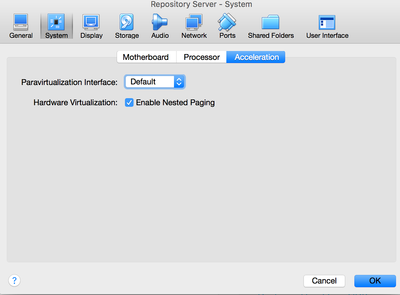
2. In virtual machine click on VM Settings -> System -> you will see "Hardware Virtualization"
pls enable it.
Created on 04-09-2016 11:30 AM - edited 08-18-2019 04:35 AM
- Mark as New
- Bookmark
- Subscribe
- Mute
- Subscribe to RSS Feed
- Permalink
- Report Inappropriate Content
1. You need to reboot your system and go in bios and enable it from there which is required for Virtual Machine to run.
http://www.howtogeek.com/213795/how-to-enable-intel-vt-x-in-your-computers-bios-or-uefi-firmware/
2. In virtual machine click on VM Settings -> System -> you will see "Hardware Virtualization"
pls enable it.
Created 04-09-2016 12:05 PM
- Mark as New
- Bookmark
- Subscribe
- Mute
- Subscribe to RSS Feed
- Permalink
- Report Inappropriate Content
Thanks for your time .. I just wanna ask one more thing..I have 4 GB RAM..and I read that min 8 GB RAM is needed to properly work with hortonworks.. will it be ok?



Created 04-09-2016 02:45 PM
- Mark as New
- Bookmark
- Subscribe
- Mute
- Subscribe to RSS Feed
- Permalink
- Report Inappropriate Content
@Inam Ur Rehman - You wont be able to run latest version of sandbox with 4G RAM. You can try older version though


