
Our Community is getting an upgrade! To get everything ready for the relaunch, we’ll be placing the site in read-only mode starting September 21st.
We really appreciate your understanding while we get things set up behind the scenes. Catch up on all the exciting details about the move here.
Need help or have questions? Drop us a line at [email protected]

Archives of Support Questions (Read Only)
- Cloudera Community
- Board Archive
- Archives of Support Questions (Read Only)
- Re: How can I check Ambari start services commands...
- Subscribe to RSS Feed
- Mark Question as New
- Mark Question as Read
- Float this Question for Current User
- Bookmark
- Subscribe
- Mute
- Printer Friendly Page
- Subscribe to RSS Feed
- Mark Question as New
- Mark Question as Read
- Float this Question for Current User
- Bookmark
- Subscribe
- Mute
- Printer Friendly Page
How can I check Ambari start services commands?
- Labels:
-
Apache Ambari
-
Apache Hive


Created 05-24-2016 12:27 PM
- Mark as New
- Bookmark
- Subscribe
- Mute
- Subscribe to RSS Feed
- Permalink
- Report Inappropriate Content
Hi,
following the still pending issue: https://community.hortonworks.com/questions/34749/cant-start-hiveserver2-beeline-error-error-could-n...
I would like to know how can I check what commands ambari running when its starting services through the GUI ? when I start the hive service manually: /usr/bin/hive --service hiveserver2 --hiveconf hive.root.logger=DEBUG,console it starts without any problems, but when i try to start via Ambari it fails (details in the link above).
I would like to know where can i find the Ambari run commands that starts the different services, specifically Hiveserver2 so i can run it manually and maybe then i can pinpoint the problem.
Thanks.


Created 05-24-2016 12:50 PM
- Mark as New
- Bookmark
- Subscribe
- Mute
- Subscribe to RSS Feed
- Permalink
- Report Inappropriate Content
Did you also looked inside /var/log/hive/hive-server2.out file after starting HS2 from Ambari? if nothing is there then lets try to restart the agent on that node once and start HS2 again.


Created 05-24-2016 12:39 PM
- Mark as New
- Bookmark
- Subscribe
- Mute
- Subscribe to RSS Feed
- Permalink
- Report Inappropriate Content
Try starting/stoping services services from Ambari UI.
screen-shot-2016-05-24-at-73650-am.png
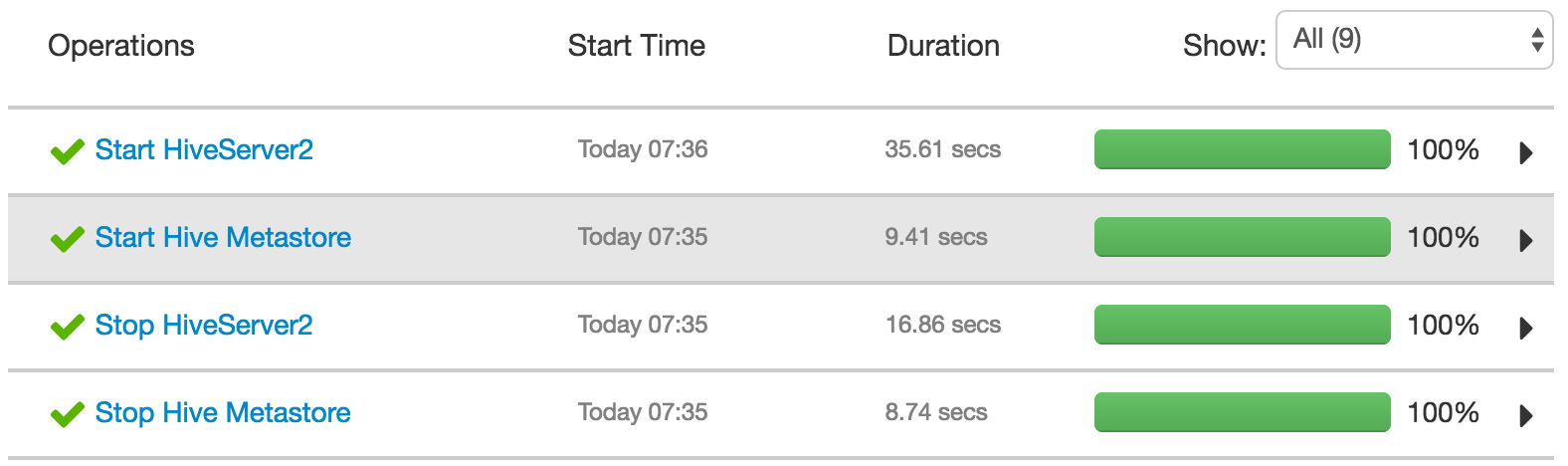
And then go to link to see the commands Ambari executes.

Created 05-24-2016 12:50 PM
- Mark as New
- Bookmark
- Subscribe
- Mute
- Subscribe to RSS Feed
- Permalink
- Report Inappropriate Content
Did you also looked inside /var/log/hive/hive-server2.out file after starting HS2 from Ambari? if nothing is there then lets try to restart the agent on that node once and start HS2 again.
Created 05-24-2016 02:07 PM
- Mark as New
- Bookmark
- Subscribe
- Mute
- Subscribe to RSS Feed
- Permalink
- Report Inappropriate Content
Can you run below command and share the console output?
HIVE_CONF_DIR=/usr/hdp/current/hive-server2/conf/conf.server /usr/hdp/current/hive-server2/bin/hiveserver2 -hiveconf hive.metastore.uris=" " -hiveconf hive.root.logger=DEBUG,console
Created 05-24-2016 02:31 PM
- Mark as New
- Bookmark
- Subscribe
- Mute
- Subscribe to RSS Feed
- Permalink
- Report Inappropriate Content
@Jitendra Yadav there is no output.. co console messages or anything. I checked /usr/hdp/current/hive-server2/bin/hiveserver2 content, its just setting different paths and jar files, i dont think its were the services is running from.
Created 05-24-2016 02:44 PM
- Mark as New
- Bookmark
- Subscribe
- Mute
- Subscribe to RSS Feed
- Permalink
- Report Inappropriate Content
Well it is showing debug logs on my cluster, so something might be messed up while installating HS2.
HIVE_CONF_DIR=/usr/hdp/current/hive-server2/conf/conf.server /usr/hdp/current/hive-server2/bin/hiveserver2 -hiveconf hive.metastore.uris=" " -hiveconf hive.root.logger=DEBUG,console
WARNING: Use "yarn jar" to launch YARN applications.
16/05/24 04:39:12 [main]: DEBUG common.LogUtils: Using hive-site.xml found on CLASSPATH at /etc/hive/hdp/conf.server/hive-site.xml
16/05/24 04:39:12 [main]: DEBUG server.HiveServer2:
Logging initialized using configuration in file:/etc/hive/hdp/conf.server/hive-log4j.properties
16/05/24 04:39:12 [main]: INFO server.HiveServer2: STARTUP_MSG:
/************************************************************
STARTUP_MSG: Starting HiveServer2
STARTUP_MSG:   host = ey.example.com/240.0.0.11
STARTUP_MSG:   args = [--hiveconf, hive.aux.jars.path=file:///usr/hdp/current/hive-webhcat/share/hcatalog/hive-hcatalog-core.jar, -hiveconf, hive.metastore.uris= , -hiveconf, hive.root.logger=DEBUG,console]
STARTUP_MSG:   version = 1.2.1000.2.4.2.0-258
......
....
6/05/24 04:39:12 [main]: INFO server.HiveServer2: Starting HiveServer2
16/05/24 04:39:12 [main]: DEBUG lib.MutableMetricsFactory: field org.apache.hadoop.metrics2.lib.MutableRate org.apache.hadoop.security.UserGroupInformation$UgiMetrics.loginSuccess with annotation @org.apache.hadoop.metrics2.annotation.Metric(value=[Rate of successful kerberos logins and latency (milliseconds)], about=, valueName=Time, type=DEFAULT, always=false, sampleName=Ops)
16/05/24 04:39:12 [main]: DEBUG lib.MutableMetricsFactory: field org.apache.hadoop.metrics2.lib.MutableRate org.apache.hadoop.security.UserGroupInformation$UgiMetrics.loginFailure with annotation @org.apache.hadoop.metrics2.annotation.Metric(value=[Rate of failed kerberos logins and latency (milliseconds)], about=, valueName=Time, type=DEFAULT, always=false, sampleName=Ops)
16/05/24 04:39:12 [main]: DEBUG lib.MutableMetricsFactory: field org.apache.hadoop.metrics2.lib.MutableRate org.apache.hadoop.security.UserGroupInformation$UgiMetrics.getGroups with annotation @org.apache.hadoop.metrics2.annotation.Metric(value=[GetGroups], about=, valueName=Time, type=DEFAULT, always=false, sampleName=Ops)
16/05/24 04:39:12 [main]: DEBUG impl.MetricsSystemImpl: UgiMetrics, User and group related metrics
16/05/24 04:39:12 [main]: DEBUG security.Groups:  Creating new Groups object
16/05/24 04:39:12 [main]: DEBUG util.NativeCodeLoader: Trying to load the custom-built native-hadoop library...
16/05/24 04:39:12 [main]: DEBUG util.NativeCodeLoader: Loaded the native-hadoop library
16/05/24 04:39:12 [main]: DEBUG security.JniBasedUnixGroupsMapping: Using JniBasedUnixGroupsMapping for Group resolution
16/05/24 04:39:12 [main]: DEBUG security.JniBasedUnixGroupsMappingWithFallback: Group mapping impl=org.apache.hadoop.security.JniBasedUnixGroupsMapping
16/05/24 04:39:12 [main]: DEBUG security.Groups: Group mapping impl=org.apache.hadoop.security.JniBasedUnixGroupsMappingWithFallback; cacheTimeout=300000; warningDeltaMs=5000
16/05/24 04:39:12 [main]: DEBUG session.SessionState: SessionState user: null
16/05/24 04:39:12 [main]: DEBUG security.UserGroupInformation: hadoop login
16/05/24 04:39:12 [main]: DEBUG security.UserGroupInformation: hadoop login commit
16/05/24 04:39:12 [main]: DEBUG security.UserGroupInformation: using local user:UnixPrincipal: root
16/05/24 04:39:12 [main]: DEBUG security.UserGroupInformation: Using user: "UnixPrincipal: root" with name root
16/05/24 04:39:12 [main]: DEBUG security.UserGroupInformation: User entry: "root"
16/05/24 04:39:12 [main]: DEBUG security.UserGroupInformation: UGI loginUser:root (auth:SIMPLE)
Created 05-24-2016 03:02 PM
- Mark as New
- Bookmark
- Subscribe
- Mute
- Subscribe to RSS Feed
- Permalink
- Report Inappropriate Content
thanks to your example I went to recheck /usr/hdp/current/hive-server2/bin/hiveserver2 file. I cross checked it will a working staging environment I have, and what do you know... the following line in the end was missing: exec "${HIVE_HOME}/bin/hiveserver2.distro" "$@"
I modified the file with the missing line and now the service is starting without a problem.
Thanks again!!!
Created 05-24-2016 03:12 PM
- Mark as New
- Bookmark
- Subscribe
- Mute
- Subscribe to RSS Feed
- Permalink
- Report Inappropriate Content
Yeah..so /usr/hdp/current/hive-server2/bin/hiveserver2 was the culprit :). Do you know how that line got removed? ideally we don't change these files manually.
Created 05-24-2016 01:02 PM
- Mark as New
- Bookmark
- Subscribe
- Mute
- Subscribe to RSS Feed
- Permalink
- Report Inappropriate Content
yes, I've already looked there and restarted ambari-agent and even ambari-server.
I am checking for HiveServer2 logs (in /var/log/hive) but the problem is that the logs there are empty. for example the metastore logs are there and if I restart it the logs updates with information successfully.
I know for a fact that its the right log location because when I restart HiveServer2 through ambari, the timestamp on those logs updates and corresponds to the time I try to start the service in ambari but the logs still show up as empty and don't provide any information.
btw in the from the ambari-agent log:
INFO 2016-05-24 16:04:21,115 RecoveryManager.py:217 - HIVE_SERVER needs recovery.
INFO 2016-05-24 16:04:21,180 Controller.py:260 - Heartbeat response received (id = 9)
INFO 2016-05-24 16:04:21,181 RecoveryManager.py:217 - HIVE_SERVER needs recovery.
INFO 2016-05-24 16:04:31,183 Heartbeat.py:78 - Building Heartbeat: {responseId = 9, timestamp = 1464095071182, commandsInProgress = False, componentsMapped = True}
INFO 2016-05-24 16:04:31,189 Controller.py:260 - Heartbeat response received (id = 10)
INFO 2016-05-24 16:04:31,189 RecoveryManager.py:217 - HIVE_SERVER needs recovery
hope that explains my situation.
Created 05-24-2016 01:49 PM
- Mark as New
- Bookmark
- Subscribe
- Mute
- Subscribe to RSS Feed
- Permalink
- Report Inappropriate Content
perfect, thats exactly what i was looking for. while going over the log, the intresting bit is the follows:
016-05-24 16:05:43,261 - File['/etc/security/limits.d/hive.conf'] {'content': Template('hive.conf.j2'), 'owner': 'root', 'group': 'root', 'mode': 0644}
2016-05-24 16:05:43,261 - File['/usr/lib/ambari-agent/DBConnectionVerification.jar'] {'content': DownloadSource('http://HOSTNAME:8080/resources/DBConnectionVerification.jar'), 'mode': 0644}
2016-05-24 16:05:43,262 - Not downloading the file from http://HOSTNAME:8080/resources/DBConnectionVerification.jar, because /var/lib/ambari-agent/tmp/DBConnectionVerification.jar already exists
2016-05-24 16:05:43,263 - File['/var/lib/ambari-agent/tmp/start_hiveserver2_script'] {'content': Template('startHiveserver2.sh.j2'), 'mode': 0755}
2016-05-24 16:05:43,263 - Directory['/var/run/hive'] {'owner': 'hive', 'mode': 0755, 'group': 'hadoop', 'recursive': True, 'cd_access': 'a'}
2016-05-24 16:05:43,264 - Directory['/var/log/hive'] {'owner': 'hive', 'mode': 0755, 'group': 'hadoop', 'recursive': True, 'cd_access': 'a'}
2016-05-24 16:05:43,264 - Directory['/var/lib/hive'] {'owner': 'hive', 'mode': 0755, 'group': 'hadoop', 'recursive': True, 'cd_access': 'a'}
2016-05-24 16:05:43,264 - Ranger admin not installed
2016-05-24 16:05:43,265 - call['ambari-sudo.sh su hive -l -s /bin/bash -c 'hive --config /usr/hdp/current/hive-server2/conf/conf.server --service metatool -listFSRoot' 2>/dev/null | grep hdfs:// | cut -f1,2,3 -d '/' | grep -v 'hdfs://HOSTNAME:8020' | head -1'] {}
2016-05-24 16:05:47,240 - call returned (0, '')
2016-05-24 16:05:47,241 - Execute['/var/lib/ambari-agent/tmp/start_hiveserver2_script /var/log/hive/hive-server2.out /var/log/hive/hive-server2.log /var/run/hive/hive-server.pid /usr/hdp/current/hive-server2/conf/conf.server /var/log/hive'] {'environment': {'HIVE_BIN': 'hive', 'JAVA_HOME': '/usr/java/default', 'HADOOP_HOME': '/usr/hdp/current/hadoop-client'}, 'not_if': "ls /var/run/hive/hive-server.pid >/dev/null 2>&1 && ps -p `ambari-sudo.sh su hive -l -s /bin/bash -c 'cat /var/run/hive/hive-server.pid'` >/dev/null 2>&1", 'user': 'hive', 'path': ['/usr/sbin:/sbin:/usr/lib/ambari-server/*:/usr/sbin:/sbin:/usr/lib/ambari-server/*:/usr/lib64/qt-3.3/bin:/usr/local/sbin:/usr/local/bin:/sbin:/bin:/usr/sbin:/usr/bin:/root/bin:/var/lib/ambari-agent:/var/lib/ambari-agent:/usr/hdp/current/hive-server2/bin:/usr/hdp/current/hadoop-client/bin']}
2016-05-24 16:05:47,372 - Execute['/usr/java/default/bin/java -cp /usr/lib/ambari-agent/DBConnectionVerification.jar:/usr/hdp/current/hive-server2/lib/mysql-connector-java.jar org.apache.ambari.server.DBConnectionVerification 'jdbc:mysql://HOSTNAME/hive?createDatabaseIfNotExist=true' hive [PROTECTED] com.mysql.jdbc.Driver'] {'path': ['/usr/sbin:/sbin:/usr/local/bin:/bin:/usr/bin'], 'tries': 5, 'try_sleep': 10}
but I dont have any errors, and when checking /var/lib/ambari-agent/tmp/start_hiveserver2_script, the content is: HIVE_SERVER2_OPTS=" -hiveconf hive.log.file=hiveserver2.log -hiveconf hive.log.dir=$5" HIVE_CONF_DIR=$4 /usr/hdp/current/hive-server2/bin/hiveserver2 -hiveconf hive.metastore.uris=" " ${HIVE_SERVER2_OPTS} > $1 2> $2 & echo $!|cat>$3
which translates to:
HIVE_SERVER2_OPTS=" -hiveconf hive.log.file=hiveserver2.log -hiveconf hive.log.dir=/var/log/hive"
HIVE_CONF_DIR=/usr/hdp/current/hive-server2/conf/conf.server /usr/hdp/current/hive-server2/bin/hiveserver2 -hiveconf hive.metastore.uris=" "  -hiveconf hive.log.file=hiveserver2.log -hiveconf hive.log.dir=/var/log/hive > /var/log/hive/hive-server2.out 2> /var/log/hive/hive-server2.log &
echo $!|cat>$3
I tried running it manually and nothing happens, but I still nowhere where its calling the actual service itself, something like /usr/bin/hive --service hiveserver2. what am I missing here?


