
Our Community is getting an upgrade! To get everything ready for the relaunch, we’ll be placing the site in read-only mode starting September 21st.
We really appreciate your understanding while we get things set up behind the scenes. Catch up on all the exciting details about the move here.
Need help or have questions? Drop us a line at [email protected]

Archives of Support Questions (Read Only)
- Cloudera Community
- Board Archive
- Archives of Support Questions (Read Only)
- How can I enable S3 request logging?
- Subscribe to RSS Feed
- Mark Question as New
- Mark Question as Read
- Float this Question for Current User
- Bookmark
- Subscribe
- Mute
- Printer Friendly Page
- Subscribe to RSS Feed
- Mark Question as New
- Mark Question as Read
- Float this Question for Current User
- Bookmark
- Subscribe
- Mute
- Printer Friendly Page
How can I enable S3 request logging?
- Labels:
-
Apache Spark
-
Apache Zeppelin


Created 12-20-2016 02:22 AM
- Mark as New
- Bookmark
- Subscribe
- Mute
- Subscribe to RSS Feed
- Permalink
- Report Inappropriate Content
Hello,
I am using Zeppelin and Spark to run query data sitting on Amazon S3. The code itself is so simple which is something like querying Hive external table on S3 with SparkSQL.
Here I have some difficulty with it and suspecting I am exceeding S3 rate limit as described here: http://docs.aws.amazon.com/AmazonS3/latest/dev/request-rate-perf-considerations.html If so that could be confirmed by error message from S3 which says 'rate limit exceeded' with HTTP Status Code: 503. So I would like to enable logging in aws java sdk which is used in Spark.
I put the line below in my log4j.properties of Spark according to the AWS document: http://docs.aws.amazon.com/sdk-for-java/v1/developer-guide/java-dg-logging.html
log4j.logger.com.amazonaws.request=DEBUG
I'm assuming logs can be found in container(executor)'s log so would be aggregated by YARN's log aggregation services, but it's not emitted in that log.
Where can I find these logs? Or Am I going wrong way?


Created on 12-22-2016 11:36 PM - edited 08-18-2019 04:34 AM
- Mark as New
- Bookmark
- Subscribe
- Mute
- Subscribe to RSS Feed
- Permalink
- Report Inappropriate Content
You can edit spark configs in ambari and add the following lines.
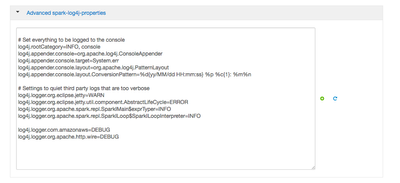
- Restart spark/zeppelin services.
- Run a simple query in S3 via zeppelin notebook
- Note down the yarn application launched for Zeppelin ("yarn top" from cli) can help identify that.
- S3 debug messages would be available in the yarn logs. You might have to stop zeppelin for the app to finish and ensure you have permission to view yarn logs via "yarn logs -applicationId <appId>" for this application.
e.g messages
16/12/22 23:30:25 DEBUG AmazonWebServiceClient: Internal logging succesfully configured to commons logger: true 16/12/22 23:30:25 DEBUG AwsSdkMetrics: Admin mbean registered under com.amazonaws.management:type=AwsSdkMetrics
...
16/12/22 23:30:26 DEBUG requestId: x-amzn-RequestId: not available 16/12/22 23:30:26 DEBUG request: Received successful response: 200, AWS Request ID:...
Created on 12-22-2016 11:36 PM - edited 08-18-2019 04:34 AM
- Mark as New
- Bookmark
- Subscribe
- Mute
- Subscribe to RSS Feed
- Permalink
- Report Inappropriate Content
You can edit spark configs in ambari and add the following lines.
- Restart spark/zeppelin services.
- Run a simple query in S3 via zeppelin notebook
- Note down the yarn application launched for Zeppelin ("yarn top" from cli) can help identify that.
- S3 debug messages would be available in the yarn logs. You might have to stop zeppelin for the app to finish and ensure you have permission to view yarn logs via "yarn logs -applicationId <appId>" for this application.
e.g messages
16/12/22 23:30:25 DEBUG AmazonWebServiceClient: Internal logging succesfully configured to commons logger: true 16/12/22 23:30:25 DEBUG AwsSdkMetrics: Admin mbean registered under com.amazonaws.management:type=AwsSdkMetrics
...
16/12/22 23:30:26 DEBUG requestId: x-amzn-RequestId: not available 16/12/22 23:30:26 DEBUG request: Received successful response: 200, AWS Request ID:...
Created 12-27-2016 02:16 AM
- Mark as New
- Bookmark
- Subscribe
- Mute
- Subscribe to RSS Feed
- Permalink
- Report Inappropriate Content
@Rajesh Balamohan Thanks! It works as expected.


