
Our Community is getting an upgrade! To get everything ready for the relaunch, we’ll be placing the site in read-only mode starting September 21st.
We really appreciate your understanding while we get things set up behind the scenes. Catch up on all the exciting details about the move here.
Need help or have questions? Drop us a line at [email protected]

Archives of Support Questions (Read Only)
- Cloudera Community
- Board Archive
- Archives of Support Questions (Read Only)
- Re: How can find a nifi process group id by Nifi r...
- Subscribe to RSS Feed
- Mark Question as New
- Mark Question as Read
- Float this Question for Current User
- Bookmark
- Subscribe
- Mute
- Printer Friendly Page
- Subscribe to RSS Feed
- Mark Question as New
- Mark Question as Read
- Float this Question for Current User
- Bookmark
- Subscribe
- Mute
- Printer Friendly Page
How can find a nifi process group id by Nifi rest api
- Labels:
-
Apache NiFi


Created 07-19-2017 03:28 PM
- Mark as New
- Bookmark
- Subscribe
- Mute
- Subscribe to RSS Feed
- Permalink
- Report Inappropriate Content
I have a project that try to connect nifi-api and import-export templates programatically. I can upload and delete templates succesfully but when i tried to delete related connections and controller services i realise that i don't have target process group id.
I need make some belowed calls:
- /process-groups/{id}/controller-services
- /process-groups/{id}/connections
- /flow/controller/controller-services
- /process-groups/{id} (delete)
and some other calls.
I have just xml template at first and i dont know how i can find process group {id}.
Any idea please?



Created 08-10-2017 03:48 PM
- Mark as New
- Bookmark
- Subscribe
- Mute
- Subscribe to RSS Feed
- Permalink
- Report Inappropriate Content
hi @nzr ytmn
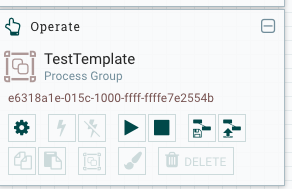
When you are creating a process group, you usually provide a name for it. In the API results that come back from the /process-groups/root/ call, you could look for your name, and that would provide you with the process group ID associated with it. I just created a process group in NiFi and named it "TestTemplate". I then uploaded a template from my hard drive into the process group, and made the API call. The API results show this snippet:
{"id":"e6318a1e-015c-1000-ffff-ffffe7e2554b","name":"TestTemplate", .... }
As extra validation, if I go to the NiFi UI, I can see my process group and validate that the ID matches. Therefore I think you can use the API call I suggested above if I've understood your scenario correctly.
Created 08-09-2017 05:31 PM
- Mark as New
- Bookmark
- Subscribe
- Mute
- Subscribe to RSS Feed
- Permalink
- Report Inappropriate Content
Hi @nzr ytmn
Is it not in the information returned when you call the root? Something along the lines of: http://127.0.0.1:19090/nifi-api/flow/process-groups/root/status?recursive=true
Created 08-10-2017 11:32 AM
- Mark as New
- Bookmark
- Subscribe
- Mute
- Subscribe to RSS Feed
- Permalink
- Report Inappropriate Content
@Sonu Sahi thanks for information, but still i am not sure how i can relate my template with process groups. I can use name of template file and compare with name of process group; but i am not sure this is good idea.


Created 05-26-2020 04:13 PM
- Mark as New
- Bookmark
- Subscribe
- Mute
- Subscribe to RSS Feed
- Permalink
- Report Inappropriate Content
This will work
https://localhost:8080/nifi-api/process-groups/root/process-groups
This will print all the groups found in the main canvas
Created on 05-26-2020 04:17 PM - edited 05-26-2020 04:39 PM
- Mark as New
- Bookmark
- Subscribe
- Mute
- Subscribe to RSS Feed
- Permalink
- Report Inappropriate Content
Use Case 1
How to get all the groups in the main canvas programmatically?
Answer:
url="https://localhost:8080/nifi-api/"
url="https://localhost:8080/nifi-api/"


Created 07-18-2022 05:29 PM
- Mark as New
- Bookmark
- Subscribe
- Mute
- Subscribe to RSS Feed
- Permalink
- Report Inappropriate Content
Is there a single rest api call to get all process groups across all canvases?
Created 07-18-2022 05:30 PM
- Mark as New
- Bookmark
- Subscribe
- Mute
- Subscribe to RSS Feed
- Permalink
- Report Inappropriate Content

Created 08-09-2017 08:01 PM
- Mark as New
- Bookmark
- Subscribe
- Mute
- Subscribe to RSS Feed
- Permalink
- Report Inappropriate Content
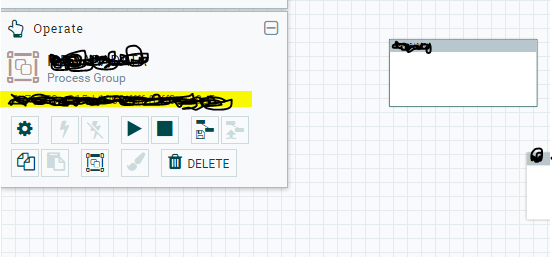
When you select a processor group, the "Operate Palette" is populated with the process-group id. I've highlighted the location in the attached png.
,
When you clickon a process-group, the "Operate Palette" will populate the process-group id. I've highlighted it in the attached png.
Created 08-10-2017 11:19 AM
- Mark as New
- Bookmark
- Subscribe
- Mute
- Subscribe to RSS Feed
- Permalink
- Report Inappropriate Content
@khadijah celestine i mean find a process group id of a template programmatically with nifi api requests.
Created 08-10-2017 03:48 PM
- Mark as New
- Bookmark
- Subscribe
- Mute
- Subscribe to RSS Feed
- Permalink
- Report Inappropriate Content
hi @nzr ytmn
When you are creating a process group, you usually provide a name for it. In the API results that come back from the /process-groups/root/ call, you could look for your name, and that would provide you with the process group ID associated with it. I just created a process group in NiFi and named it "TestTemplate". I then uploaded a template from my hard drive into the process group, and made the API call. The API results show this snippet:
{"id":"e6318a1e-015c-1000-ffff-ffffe7e2554b","name":"TestTemplate", .... }
As extra validation, if I go to the NiFi UI, I can see my process group and validate that the ID matches. Therefore I think you can use the API call I suggested above if I've understood your scenario correctly.


