
Our Community is getting an upgrade! To get everything ready for the relaunch, we’ll be placing the site in read-only mode starting September 21st.
We really appreciate your understanding while we get things set up behind the scenes. Catch up on all the exciting details about the move here.
Need help or have questions? Drop us a line at [email protected]

Archives of Support Questions (Read Only)
- Cloudera Community
- Board Archive
- Archives of Support Questions (Read Only)
- Re: How do I get the full parcel version running c...
- Subscribe to RSS Feed
- Mark Question as New
- Mark Question as Read
- Float this Question for Current User
- Bookmark
- Subscribe
- Mute
- Printer Friendly Page
- Subscribe to RSS Feed
- Mark Question as New
- Mark Question as Read
- Float this Question for Current User
- Bookmark
- Subscribe
- Mute
- Printer Friendly Page
How do I get the full parcel version running currently on a CDH cluster?


Created on 07-15-2015 08:06 AM - edited 09-16-2022 02:34 AM
- Mark as New
- Bookmark
- Subscribe
- Mute
- Subscribe to RSS Feed
- Permalink
- Report Inappropriate Content
I using version 10 of the python CM API and am having issues getting the reference to the correct parcel in our cluster. Currently, we have 4 or 5 parcels located in the cluster and I am not able to select the correct one. I see the ApiCluster method :
get_parcel(self, product, version)
, but I don't know where to find the full parcel version to pass into this method using other API calls. A version string = "5.4.0" is not specific enough to find the correct parcel.
Thanks,
Tyler



Created on 07-16-2015 09:17 AM - edited 07-16-2015 10:12 AM
- Mark as New
- Bookmark
- Subscribe
- Mute
- Subscribe to RSS Feed
- Permalink
- Report Inappropriate Content
Hi Tyler,
Here are various ways to identify the full parcel version -
Identifying by the parcel filename:
http://archive.cloudera.com/cdh5/parcels/latest/CDH-5.3.5-1.cdh5.3.5.p0.4-el6.parcel
CDH is the product
5.3.5-1.cdh5.3.5.p0.4 is the version
el6 is the distribution that the parcel is intended to be deployed on
In the manifest.json eg: http://archive.cloudera.com/cdh5/parcels/latest/manifest.json
...
"parcelName": "CDH-5.3.5-1.cdh5.3.5.p0.4-el6.parcel",
...
and in Cloudera Manager Web UI / http://CM-SERVER:7180/cmf/parcel/status the highlighted in yellow is the full version.
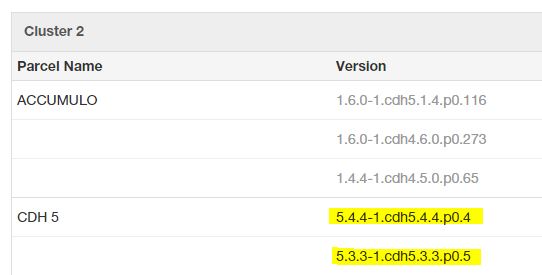
example CM API usage, using python regex:
https://github.com/gdgt/cmapi/blob/master/cmxDeploy.py#L35-L37
Hope this helps,
Michalis
Created on 07-16-2015 09:17 AM - edited 07-16-2015 10:12 AM
- Mark as New
- Bookmark
- Subscribe
- Mute
- Subscribe to RSS Feed
- Permalink
- Report Inappropriate Content
Hi Tyler,
Here are various ways to identify the full parcel version -
Identifying by the parcel filename:
http://archive.cloudera.com/cdh5/parcels/latest/CDH-5.3.5-1.cdh5.3.5.p0.4-el6.parcel
CDH is the product
5.3.5-1.cdh5.3.5.p0.4 is the version
el6 is the distribution that the parcel is intended to be deployed on
In the manifest.json eg: http://archive.cloudera.com/cdh5/parcels/latest/manifest.json
...
"parcelName": "CDH-5.3.5-1.cdh5.3.5.p0.4-el6.parcel",
...
and in Cloudera Manager Web UI / http://CM-SERVER:7180/cmf/parcel/status the highlighted in yellow is the full version.
example CM API usage, using python regex:
https://github.com/gdgt/cmapi/blob/master/cmxDeploy.py#L35-L37
Hope this helps,
Michalis
Created 07-23-2015 05:03 AM
- Mark as New
- Bookmark
- Subscribe
- Mute
- Subscribe to RSS Feed
- Permalink
- Report Inappropriate Content
Thanks Michalis.
I was able to get the current activated parcel by searching for the product "CDH" and selecting the one who's stage ="ACTIVATED" using the CM API.


