
Our Community is getting an upgrade! To get everything ready for the relaunch, we’ll be placing the site in read-only mode starting September 21st.
We really appreciate your understanding while we get things set up behind the scenes. Catch up on all the exciting details about the move here.
Need help or have questions? Drop us a line at [email protected]

Archives of Support Questions (Read Only)
- Cloudera Community
- Board Archive
- Archives of Support Questions (Read Only)
- How do I remove these dead jobs from my queue?
- Subscribe to RSS Feed
- Mark Question as New
- Mark Question as Read
- Float this Question for Current User
- Bookmark
- Subscribe
- Mute
- Printer Friendly Page
- Subscribe to RSS Feed
- Mark Question as New
- Mark Question as Read
- Float this Question for Current User
- Bookmark
- Subscribe
- Mute
- Printer Friendly Page
How do I remove these dead jobs from my queue?
- Labels:
-
Apache YARN


Created on 12-14-2015 07:17 PM - edited 08-19-2019 05:36 AM
- Mark as New
- Bookmark
- Subscribe
- Mute
- Subscribe to RSS Feed
- Permalink
- Report Inappropriate Content
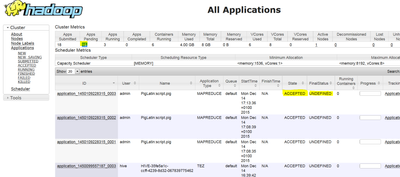
I somehow chrashed my job scheduler - I have a lot of jobs now that are accepted but undefined - new job will not start because of this as they are queued behind the jobs that are in status undefinded. It seems I can't solve this issue via Ambari.


Created 12-14-2015 07:22 PM
- Mark as New
- Bookmark
- Subscribe
- Mute
- Subscribe to RSS Feed
- Permalink
- Report Inappropriate Content
You can kill the jobs that you want to remove from the queue:
yarn application -kill <applicationId>
Created 12-14-2015 07:22 PM
- Mark as New
- Bookmark
- Subscribe
- Mute
- Subscribe to RSS Feed
- Permalink
- Report Inappropriate Content
You can kill the jobs that you want to remove from the queue:
yarn application -kill <applicationId>

Created 08-31-2016 02:09 PM
- Mark as New
- Bookmark
- Subscribe
- Mute
- Subscribe to RSS Feed
- Permalink
- Report Inappropriate Content
Hi. And is it possible to delete/remove these applications to free space on virtual machine ? Thanks Valery.


