Our Community is getting an upgrade! To get everything ready for the relaunch, we’ll be placing the site in read-only mode starting September 21st.
We really appreciate your understanding while we get things set up behind the scenes. Catch up on all the exciting details about the move here.
Need help or have questions? Drop us a line at [email protected]

Archives of Support Questions (Read Only)
- Cloudera Community
- Board Archive
- Archives of Support Questions (Read Only)
- How do I send a mail in Oozie by mentioning the St...
- Subscribe to RSS Feed
- Mark Question as New
- Mark Question as Read
- Float this Question for Current User
- Bookmark
- Subscribe
- Mute
- Printer Friendly Page
- Subscribe to RSS Feed
- Mark Question as New
- Mark Question as Read
- Float this Question for Current User
- Bookmark
- Subscribe
- Mute
- Printer Friendly Page
How do I send a mail in Oozie by mentioning the Start Time and End Time in the mail body ?
- Labels:
-
Apache Oozie


Created 07-25-2016 11:57 AM
- Mark as New
- Bookmark
- Subscribe
- Mute
- Subscribe to RSS Feed
- Permalink
- Report Inappropriate Content
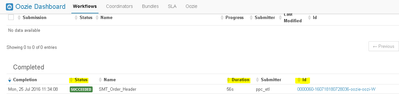
I need to capture the job status, Start time and End Time of the work and mail it using the mail action in Oozie.



Created 07-26-2016 04:35 AM
- Mark as New
- Bookmark
- Subscribe
- Mute
- Subscribe to RSS Feed
- Permalink
- Report Inappropriate Content
There are no direct variables to get start time and end time in oozie. '${timestamp()}' can return current timestamp in UTC. I would suggest to use another approach, start and end your oozie workflow with an email action, in this way, you will receive 2 emails, one when your oozie workflow will start and another when your job will end. If you want more better solution then I would suggest to write a script which will fetch start time, end time from oozie commands or from oozie database and have script to send an email for multiple jobs at once in a tabular format.
Hope this information helps.
Created 07-25-2016 12:07 PM
- Mark as New
- Bookmark
- Subscribe
- Mute
- Subscribe to RSS Feed
- Permalink
- Report Inappropriate Content

Created 07-25-2016 09:42 PM
- Mark as New
- Bookmark
- Subscribe
- Mute
- Subscribe to RSS Feed
- Permalink
- Report Inappropriate Content
You can do this by setting a parameter with start and end time.
For example
<property>
<name>the_timestamp</name>
<value>${timestamp()}</value>
<property>
Set that to start time and another to end time when you hit a action.
For information on oozie emails here:
https://oozie.apache.org/docs/3.3.0/DG_EmailActionExtension.html
Created 07-26-2016 05:42 AM
- Mark as New
- Bookmark
- Subscribe
- Mute
- Subscribe to RSS Feed
- Permalink
- Report Inappropriate Content
Thanks, but I am not looking for timestamp, I need the job status and execution time. In short, I need to mail the output of this command, oozie job -oozie {SERVER_DETAILS} -info ${job_id}
Created 07-26-2016 04:35 AM
- Mark as New
- Bookmark
- Subscribe
- Mute
- Subscribe to RSS Feed
- Permalink
- Report Inappropriate Content
There are no direct variables to get start time and end time in oozie. '${timestamp()}' can return current timestamp in UTC. I would suggest to use another approach, start and end your oozie workflow with an email action, in this way, you will receive 2 emails, one when your oozie workflow will start and another when your job will end. If you want more better solution then I would suggest to write a script which will fetch start time, end time from oozie commands or from oozie database and have script to send an email for multiple jobs at once in a tabular format.
Hope this information helps.
Created 07-26-2016 05:42 AM
- Mark as New
- Bookmark
- Subscribe
- Mute
- Subscribe to RSS Feed
- Permalink
- Report Inappropriate Content
@Kuldeep Kulkarni Is there a way where I can execute this command inside the mail action in oozie ?
oozie job -oozie {SERVER_DETAILS} -info ${job_id}
Created 07-26-2016 04:34 PM
- Mark as New
- Bookmark
- Subscribe
- Mute
- Subscribe to RSS Feed
- Permalink
- Report Inappropriate Content
@Sai ram - No you cann't. But you can write a shell action and in shell script you can execute this command as well as mail command
Created on 07-26-2016 05:40 AM - edited 08-18-2019 06:27 AM
- Mark as New
- Bookmark
- Subscribe
- Mute
- Subscribe to RSS Feed
- Permalink
- Report Inappropriate Content
I need to capture the highlighted fields in the screenshot.