Archives of Support Questions (Read Only)

This is an archived board for historical reference. Information and links may no longer be available or relevant
Announcements
This board is archived and read-only for historical reference. To ask a new question, please post a new topic on the appropriate active board.

How to check the total amount of data present on a hdp Cluster?

avatar
Rising Star

How to check the total amount of data present on a hdp Cluster?

1 ACCEPTED SOLUTION

avatar

@ANSARI FAHEEM AHMED

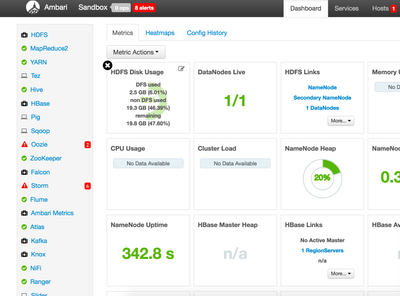
1) If you hover your mouse over the "HDFS Disk Usage" widget (upper left hand corner) in the Ambari Dashboard it will show you the following details:

DFS Used: Storage used for data

Non-DFS Used: Storage used for things such as logs, shuffle writes, etc...

Remaining: Remaining storage

5904-screen-shot-2016-07-20-at-42443-pm.png

2) From the command line you can also run "sudo -u hdfs hdfs dfsadmin -report", which will generate a full report of hdfs storage usage.

3) Finally, if you would like to check the disk usage for a particular folder (and sub folders), then you can use commands like "hadoop fsck", "hadoop fs -dus" or "hadoop fs -count -q". For an explanation of the differences between these commands as well as how to read the results please take a look at this post:

http://www.michael-noll.com/blog/2011/10/20/understanding-hdfs-quotas-and-hadoop-fs-and-fsck-tools/

View solution in original post

1 REPLY 1

avatar

@ANSARI FAHEEM AHMED

1) If you hover your mouse over the "HDFS Disk Usage" widget (upper left hand corner) in the Ambari Dashboard it will show you the following details:

DFS Used: Storage used for data

Non-DFS Used: Storage used for things such as logs, shuffle writes, etc...

Remaining: Remaining storage

5904-screen-shot-2016-07-20-at-42443-pm.png

2) From the command line you can also run "sudo -u hdfs hdfs dfsadmin -report", which will generate a full report of hdfs storage usage.

3) Finally, if you would like to check the disk usage for a particular folder (and sub folders), then you can use commands like "hadoop fsck", "hadoop fs -dus" or "hadoop fs -count -q". For an explanation of the differences between these commands as well as how to read the results please take a look at this post:

http://www.michael-noll.com/blog/2011/10/20/understanding-hdfs-quotas-and-hadoop-fs-and-fsck-tools/