
Our Community is getting an upgrade! To get everything ready for the relaunch, we’ll be placing the site in read-only mode starting September 21st.
We really appreciate your understanding while we get things set up behind the scenes. Catch up on all the exciting details about the move here.
Need help or have questions? Drop us a line at [email protected]

Archives of Support Questions (Read Only)
- Cloudera Community
- Board Archive
- Archives of Support Questions (Read Only)
- How to configure ambari to install HDP using the L...
- Subscribe to RSS Feed
- Mark Question as New
- Mark Question as Read
- Float this Question for Current User
- Bookmark
- Subscribe
- Mute
- Printer Friendly Page
- Subscribe to RSS Feed
- Mark Question as New
- Mark Question as Read
- Float this Question for Current User
- Bookmark
- Subscribe
- Mute
- Printer Friendly Page
How to configure ambari to install HDP using the LDAP user accounts ?
- Labels:
-
Apache Ambari


Created 11-14-2016 10:00 AM
- Mark as New
- Bookmark
- Subscribe
- Mute
- Subscribe to RSS Feed
- Permalink
- Report Inappropriate Content


Created on 11-14-2016 05:18 PM - edited 08-18-2019 03:24 AM
- Mark as New
- Bookmark
- Subscribe
- Mute
- Subscribe to RSS Feed
- Permalink
- Report Inappropriate Content
You configure your service with LDAP before that you need to follow couple of sets:
1. You need to configure all your accounts in LDAP and make sure that service account id bounded to appropriate groups. Link
2. Follow this link to creating cache mechanism. Link
3. If you are installing freshly you can configure accounts at Customize services step by clicking on the misc tab as shown in the screenshot.
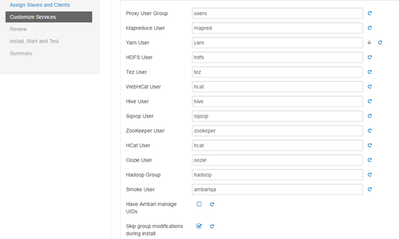
4. If you want to change in the existing cluster, I suggest you to better contact Hortonworks support and do in their premises.
Hope this helped you.
Created on 11-14-2016 05:18 PM - edited 08-18-2019 03:24 AM
- Mark as New
- Bookmark
- Subscribe
- Mute
- Subscribe to RSS Feed
- Permalink
- Report Inappropriate Content
You configure your service with LDAP before that you need to follow couple of sets:
1. You need to configure all your accounts in LDAP and make sure that service account id bounded to appropriate groups. Link
2. Follow this link to creating cache mechanism. Link
3. If you are installing freshly you can configure accounts at Customize services step by clicking on the misc tab as shown in the screenshot.
4. If you want to change in the existing cluster, I suggest you to better contact Hortonworks support and do in their premises.
Hope this helped you.
Created 11-15-2016 12:24 PM
- Mark as New
- Bookmark
- Subscribe
- Mute
- Subscribe to RSS Feed
- Permalink
- Report Inappropriate Content
Thanq @SBandaru By unchecking Skip group modifications during install, I am able to install and configure using LDAP.


