
Our Community is getting an upgrade! To get everything ready for the relaunch, we’ll be placing the site in read-only mode starting September 21st.
We really appreciate your understanding while we get things set up behind the scenes. Catch up on all the exciting details about the move here.
Need help or have questions? Drop us a line at [email protected]

Archives of Support Questions (Read Only)
- Cloudera Community
- Board Archive
- Archives of Support Questions (Read Only)
- How to configure standalone Ambari Files View to a...
- Subscribe to RSS Feed
- Mark Question as New
- Mark Question as Read
- Float this Question for Current User
- Bookmark
- Subscribe
- Mute
- Printer Friendly Page
- Subscribe to RSS Feed
- Mark Question as New
- Mark Question as Read
- Float this Question for Current User
- Bookmark
- Subscribe
- Mute
- Printer Friendly Page
How to configure standalone Ambari Files View to another cluster with NameNode HA
- Labels:
-
Apache Ambari


Created on 11-24-2015 02:09 AM - edited 09-16-2022 02:50 AM
- Mark as New
- Bookmark
- Subscribe
- Mute
- Subscribe to RSS Feed
- Permalink
- Report Inappropriate Content
Someone recently asked me how to configure a standalone Ambari Server with the Files View to point correctly to a server running NameNode HA.
Whenever active/standby NameNodes switch roles, the Files View can correctly handle the transition.
Created on 11-24-2015 02:17 AM - edited 08-19-2019 05:46 AM
- Mark as New
- Bookmark
- Subscribe
- Mute
- Subscribe to RSS Feed
- Permalink
- Report Inappropriate Content
On the cluster with the NameNodes, set these properties in HDFS for custom core-site,
hadoop.proxyuser.root.groups=*
hadoop.proxyuser.root.hosts=*
Navigate to http://server:8080/api/v1/clusters/$name/configurations?type=hdfs-site
click on the last config, and take note of several of the properties
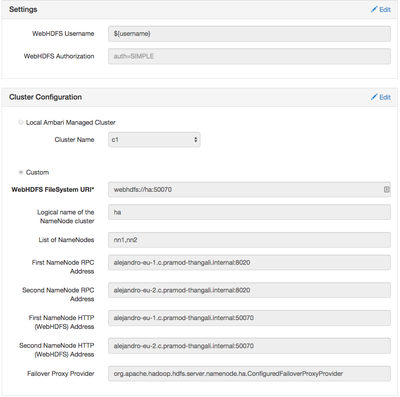
On the standalone Ambari Server hosting the Views, create the Files View and configure it as follows,
- WebHDFS FileSystem URI: webhdfs://$nameservice:50070
- List of NameNodes: Value from dfs.ha.namenodes.$nameservice E.g., "nn1,nn2"
- NameNode RPC Address: fqdn:8020 (comes from dfs.namenode.rpc-address.$nameservice.$nodename )
- NameNdoe HTTP (WebHDFS) Address: fqdn:50070 (comes from dfs.namenode.http-address.$nameservice.$nodename )
- Failover Proxy Provider: Value from dfs.client.failover.proxy.provider.$nameservice E.g., "org.apache.hadoop.hdfs.server.namenode.ha.ConfiguredFailoverProxyProvider"
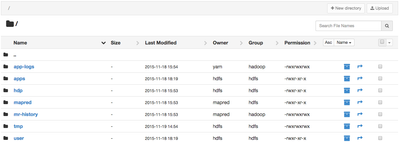
Voila,
Created on 11-24-2015 02:17 AM - edited 08-19-2019 05:46 AM
- Mark as New
- Bookmark
- Subscribe
- Mute
- Subscribe to RSS Feed
- Permalink
- Report Inappropriate Content
On the cluster with the NameNodes, set these properties in HDFS for custom core-site,
hadoop.proxyuser.root.groups=*
hadoop.proxyuser.root.hosts=*
Navigate to http://server:8080/api/v1/clusters/$name/configurations?type=hdfs-site
click on the last config, and take note of several of the properties
On the standalone Ambari Server hosting the Views, create the Files View and configure it as follows,
- WebHDFS FileSystem URI: webhdfs://$nameservice:50070
- List of NameNodes: Value from dfs.ha.namenodes.$nameservice E.g., "nn1,nn2"
- NameNode RPC Address: fqdn:8020 (comes from dfs.namenode.rpc-address.$nameservice.$nodename )
- NameNdoe HTTP (WebHDFS) Address: fqdn:50070 (comes from dfs.namenode.http-address.$nameservice.$nodename )
- Failover Proxy Provider: Value from dfs.client.failover.proxy.provider.$nameservice E.g., "org.apache.hadoop.hdfs.server.namenode.ha.ConfiguredFailoverProxyProvider"
Voila,


