
Our Community is getting an upgrade! To get everything ready for the relaunch, we’ll be placing the site in read-only mode starting September 21st.
We really appreciate your understanding while we get things set up behind the scenes. Catch up on all the exciting details about the move here.
Need help or have questions? Drop us a line at [email protected]

Archives of Support Questions (Read Only)
- Cloudera Community
- Board Archive
- Archives of Support Questions (Read Only)
- How to define a NIFI processor that will unzip a ...
- Subscribe to RSS Feed
- Mark Question as New
- Mark Question as Read
- Float this Question for Current User
- Bookmark
- Subscribe
- Mute
- Printer Friendly Page
- Subscribe to RSS Feed
- Mark Question as New
- Mark Question as Read
- Float this Question for Current User
- Bookmark
- Subscribe
- Mute
- Printer Friendly Page
How to define a NIFI processor that will unzip a file that contains files in a directory tree
- Labels:
-
Apache NiFi
-
Apache Storm


Created on 10-11-2018 09:56 PM - edited 09-16-2022 06:48 AM
- Mark as New
- Bookmark
- Subscribe
- Mute
- Subscribe to RSS Feed
- Permalink
- Report Inappropriate Content
I've used the GetHTTP processor to get a zip file from the internet.. I then use PutFile to put this into the file system. I then need to unzip the file .. and preserve the directory structure that the zip file specifies. Can I do this unzip with a NIFI processor? Once unzipped, I will then need to do additional nifi processing on specific files within the original zip file. I tried to use UnpackContent, however its output was a set of flowfiles that lost the directory structure.
Would I need a custom script for this (e.g. use ExecuteScript processor)? Or perhaps I should integrate "Storm" with NIFI to facilitate such an unzip.. that seems overly complex.. and i dont even know that its a proper task for a Storm process..
Please advise.. I'd think a simple unzip file action.. is .. well simple.


Created on 10-12-2018 12:47 PM - edited 08-17-2019 07:50 PM
- Mark as New
- Bookmark
- Subscribe
- Mute
- Subscribe to RSS Feed
- Permalink
- Report Inappropriate Content
-
The link example you provided in your comment is trying to deal with a zip that contains zipped files (a zip of zips).
If you are talking about a single zip that contains a directory tree with subfiles, this is relatively easy to do.
-
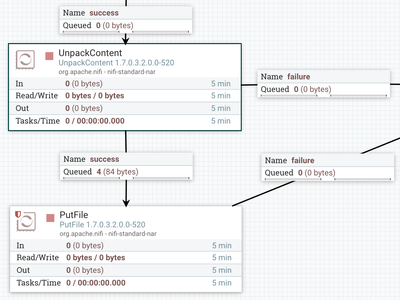
After ingesting your zip file via GetHTTP feed it to an "UnpackContent" processor and then to a "PutFile" processor.
-
When the "UnpackContent" processor unzips the source file, it will create a new FlowFile for each unique file found. A variety of FlowFile attributes will be set on each of those generated FlowFiles. This includes the "path"
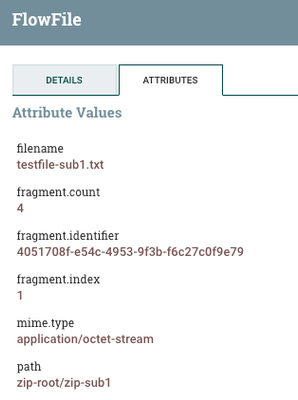
In the above example I created a directory named "zip-root" and created 4 sub-directories within that zip-root directory. I then created one file in each of those subdirectories. I then zipped (zip -r zip-root.zip zip-root) up the zip-root directory named zip-root.zip. The above screenshots shows just one of those unpacked files.
-
After "UnpackContent" executed, it produced 4 new FlowFile (one for each file found in those sub-directories with in the zip).
-
The "path" FlowFile attribute on each of these generated FlowFiles can be used to maintain the original directory structure when writing out the FlowFiles vi "PutFile" as follows:
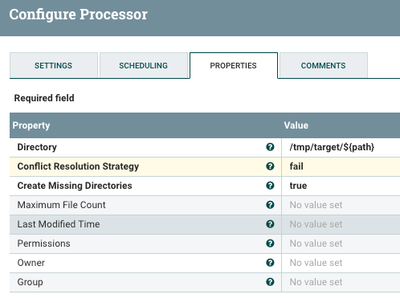
You can see form above configuration that as each FlowFile is processed by the PutFile processor it will place in a directory based on the value assigned to the "path" attribute set on each incoming FlowFile. Here i decide that my target base directory should be /tmp/target/ and then I preserve/generate the original zipped files directory beneath there.
-
Thank you,
Matt
-
If you found this answer addressed your question, please take a moment to login in and click the "ACCEPT" link.
Created 10-12-2018 10:37 AM
- Mark as New
- Bookmark
- Subscribe
- Mute
- Subscribe to RSS Feed
- Permalink
- Report Inappropriate Content
Come on NIFI gurus.. properly unzipping (without losing the zipped directory structure) should be a simple and easy thing to do in NIFI.
I cant imagine that its as complex as it seems to be here:
Please advise.
Created on 10-12-2018 12:47 PM - edited 08-17-2019 07:50 PM
- Mark as New
- Bookmark
- Subscribe
- Mute
- Subscribe to RSS Feed
- Permalink
- Report Inappropriate Content
-
The link example you provided in your comment is trying to deal with a zip that contains zipped files (a zip of zips).
If you are talking about a single zip that contains a directory tree with subfiles, this is relatively easy to do.
-
After ingesting your zip file via GetHTTP feed it to an "UnpackContent" processor and then to a "PutFile" processor.
-
When the "UnpackContent" processor unzips the source file, it will create a new FlowFile for each unique file found. A variety of FlowFile attributes will be set on each of those generated FlowFiles. This includes the "path"
In the above example I created a directory named "zip-root" and created 4 sub-directories within that zip-root directory. I then created one file in each of those subdirectories. I then zipped (zip -r zip-root.zip zip-root) up the zip-root directory named zip-root.zip. The above screenshots shows just one of those unpacked files.
-
After "UnpackContent" executed, it produced 4 new FlowFile (one for each file found in those sub-directories with in the zip).
-
The "path" FlowFile attribute on each of these generated FlowFiles can be used to maintain the original directory structure when writing out the FlowFiles vi "PutFile" as follows:
You can see form above configuration that as each FlowFile is processed by the PutFile processor it will place in a directory based on the value assigned to the "path" attribute set on each incoming FlowFile. Here i decide that my target base directory should be /tmp/target/ and then I preserve/generate the original zipped files directory beneath there.
-
Thank you,
Matt
-
If you found this answer addressed your question, please take a moment to login in and click the "ACCEPT" link.
Created 10-12-2018 01:03 PM
- Mark as New
- Bookmark
- Subscribe
- Mute
- Subscribe to RSS Feed
- Permalink
- Report Inappropriate Content
Thank you. I like your answer very much. I do think the referenced example was not focused on a zip of zip (just a simple zip of a directory tree).. Yet I think your answer is proper.. The "path" attribute does the job. I'll try this.. and thanks.


