Archives of Support Questions (Read Only)

This is an archived board for historical reference. Information and links may no longer be available or relevant
Announcements
This board is archived and read-only for historical reference. To ask a new question, please post a new topic on the appropriate active board.

How to find Workflow

avatar

Hi.


Please, tell me how to find any WF from all wf-list in Hue's file browser?

I have name and id of my workflow. I go to "/user/hue/oozie/workspaces" and try to find it, but... There are only strange names like "hue-oozie-1503584643.04": it's not name or id. So i can't find my wf in this nameless heep of WFs.


How can i find it?

1 ACCEPTED SOLUTION

avatar
Super Guru

Hi,

The directory that contains the list of workflows won't have the name you defined, they are system generated names.


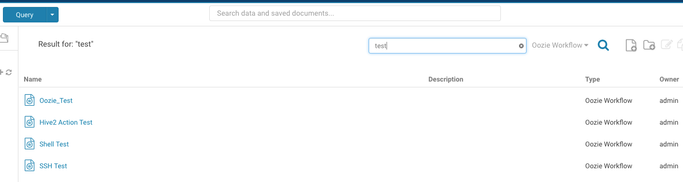
You will need to go to the Oozie Workflow List in Hue, search by the name and check the workflow's location, then

go to that directory in HDFS.


Like below:


Screen Shot 2018-12-31 at 10.16.15 am.png


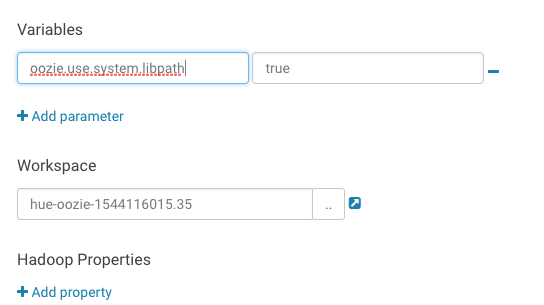
Then check the workspace name:


Screen Shot 2018-12-31 at 10.16.43 am.png

View solution in original post

1 REPLY 1

avatar
Super Guru

Hi,

The directory that contains the list of workflows won't have the name you defined, they are system generated names.


You will need to go to the Oozie Workflow List in Hue, search by the name and check the workflow's location, then

go to that directory in HDFS.


Like below:


Screen Shot 2018-12-31 at 10.16.15 am.png


Then check the workspace name:


Screen Shot 2018-12-31 at 10.16.43 am.png