
Our Community is getting an upgrade! To get everything ready for the relaunch, we’ll be placing the site in read-only mode starting September 21st.
We really appreciate your understanding while we get things set up behind the scenes. Catch up on all the exciting details about the move here.
Need help or have questions? Drop us a line at [email protected]

Archives of Support Questions (Read Only)
- Cloudera Community
- Board Archive
- Archives of Support Questions (Read Only)
- How to make sure output from splitContent comes in...
- Subscribe to RSS Feed
- Mark Question as New
- Mark Question as Read
- Float this Question for Current User
- Bookmark
- Subscribe
- Mute
- Printer Friendly Page
- Subscribe to RSS Feed
- Mark Question as New
- Mark Question as Read
- Float this Question for Current User
- Bookmark
- Subscribe
- Mute
- Printer Friendly Page
How to make sure output from splitContent comes in the right order splitting hql code
- Labels:
-
Apache NiFi


Created on 06-15-2017 08:15 PM - edited 08-17-2019 07:35 PM
- Mark as New
- Bookmark
- Subscribe
- Mute
- Subscribe to RSS Feed
- Permalink
- Report Inappropriate Content
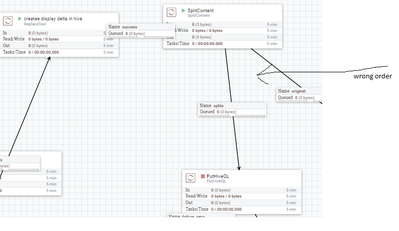
I am generating my hql dynamically, but PutHiveQL can only executing one statement at the time so i have to split my hql op in separate flowfiles.
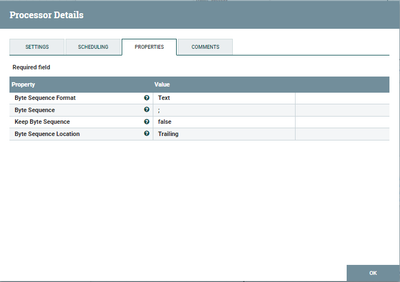
I do that by splitting following hql code on semicolon which gives my every hql step in each flowfile which i direct to PutHiveQL processor
My problem is that it does not sorts it in the order original hql steps was written.
It tries to create the table1_t2 before it tries to create table1_his and errors out.
Can i do something to make sure that my hql flowfiles comes in the right order ?.
my hql
CREATE EXTERNAL  TABLE IF NOT EXISTS table1
(
    col1       STRING,
 col2       STRING,
 col3       STRING,
 col4       STRING
 )
 COMMENT 'some Data '
    ROW FORMAT DELIMITED
    FIELDS TERMINATED BY '\011'
    STORED AS TEXTFILE
    location '/datapath';


drop table if exists table1_his;
create table archive_shared_csrp.table1_his STORED AS ORC location '/databank/work/work_ekapital/' as
 select  cpr_nr
       ,csrp_koersel_dto
       ,lag (csrp_koersel_dto,1,date '9999-12-31') over w                     as ETL_EXPIRATION_DATE
       ,case when row_number () over w = 1 then 'yes' else 'no' end     as ETL_ACTIVE
from    table1
window  w as (partition by cpr_nr order by csrp_koersel_dto desc)
;


drop table if exists table1_t2;
create table table1_t2 STORED AS ORC  location '/datapath/T2' as
        select csrp.* ,his.ETL_EXPIRATION_DATE,ETL_ACTIVE,cast(TO_DATE(FROM_UNIXTIME( UNIX_TIMESTAMP() ) ) as string) as ETL_LOAD_DATE, csrp.INPUT__FILE__NAME AS ETL_FILENAME
        from table1 csrp
        inner join archive_shared_csrp.table1_his his on his.cpr_nr = csrp.cpr_nr and his.csrp_koersel_dto = csrp.csrp_koersel_dto;


drop table if exists table1_t1;
create table table1_t1 STORED AS ORC  location '/datapath/T1' as
select *
         from table1_t2 csrp_t2
  where ETL_EXPIRATION_DATE = '9999-12-31' and ETL_ACTIVE = 'yes';

DROP TABLE IF EXISTS table1_delta;
CREATE EXTERNAL TABLE table1_delta
(
    col1       STRING,
 col2       STRING,
 col3       STRING,
 col4       STRING
 )
 COMMENT 'Data fra CSRP '
    ROW FORMAT DELIMITED
    FIELDS TERMINATED BY '\011'
    STORED AS TEXTFILE
    location '/datapath/current';

 drop table if exists table1_delta_base;
create table table1_delta_base STORED AS ORC  location '/datapath/DELTA' as
 select *
 ,cast(TO_DATE(FROM_UNIXTIME( UNIX_TIMESTAMP() ) ) as string) as ETL_LOAD_DATE
  ,INPUT__FILE__NAME AS ETL_FILENAME
 from table1_delta
part of flow
SpliContent Configuration


Created 06-15-2017 10:41 PM
- Mark as New
- Bookmark
- Subscribe
- Mute
- Subscribe to RSS Feed
- Permalink
- Report Inappropriate Content
What version of NiFi/HDF are you using? As of NiFi 1.2.0 or HDF 3.0.0, PutHiveQL supports multiple statements (via NIFI-3031) and there is also an EnforceOrder processor (via NIFI-3414), the latter of which could be configured to use the fragment.index attribute for the Order Attribute property and ${fragment.identifier} for the Group Identifier property.
Prior to NiFi 1.2.0, you can try adding an UpdateAttribute processor between SplitContent and PutHiveQL, setting the "priority" attribute to ${fragment.index}. Then use a PriorityAttributePrioritizer on the connections between the SplitContent -> UpdateAttribute -> PutHiveQL. I'm not sure if this works as-is because the documentation suggests the priority comparator is lexicographical and not numeric. If that's the case, you'd need some Expression Language functions or an ExecuteScript processor to left-pad the fragment.index values with zeros to make them all the same length.
Created 06-15-2017 10:41 PM
- Mark as New
- Bookmark
- Subscribe
- Mute
- Subscribe to RSS Feed
- Permalink
- Report Inappropriate Content
What version of NiFi/HDF are you using? As of NiFi 1.2.0 or HDF 3.0.0, PutHiveQL supports multiple statements (via NIFI-3031) and there is also an EnforceOrder processor (via NIFI-3414), the latter of which could be configured to use the fragment.index attribute for the Order Attribute property and ${fragment.identifier} for the Group Identifier property.
Prior to NiFi 1.2.0, you can try adding an UpdateAttribute processor between SplitContent and PutHiveQL, setting the "priority" attribute to ${fragment.index}. Then use a PriorityAttributePrioritizer on the connections between the SplitContent -> UpdateAttribute -> PutHiveQL. I'm not sure if this works as-is because the documentation suggests the priority comparator is lexicographical and not numeric. If that's the case, you'd need some Expression Language functions or an ExecuteScript processor to left-pad the fragment.index values with zeros to make them all the same length.
Created 06-19-2017 09:23 AM
- Mark as New
- Bookmark
- Subscribe
- Mute
- Subscribe to RSS Feed
- Permalink
- Report Inappropriate Content
Hi Matt, We are running HDF-2.1.2 planning to upgrade ASAP thanks for your anwser


