
Our Community is getting an upgrade! To get everything ready for the relaunch, we’ll be placing the site in read-only mode starting September 21st.
We really appreciate your understanding while we get things set up behind the scenes. Catch up on all the exciting details about the move here.
Need help or have questions? Drop us a line at [email protected]

Archives of Support Questions (Read Only)
- Cloudera Community
- Board Archive
- Archives of Support Questions (Read Only)
- How to put Json data as a Json format in HBase
- Subscribe to RSS Feed
- Mark Question as New
- Mark Question as Read
- Float this Question for Current User
- Bookmark
- Subscribe
- Mute
- Printer Friendly Page
- Subscribe to RSS Feed
- Mark Question as New
- Mark Question as Read
- Float this Question for Current User
- Bookmark
- Subscribe
- Mute
- Printer Friendly Page
How to put Json data as a Json format in HBase
- Labels:
-
Apache HBase
-
Apache NiFi


Created 03-21-2018 11:08 AM
- Mark as New
- Bookmark
- Subscribe
- Mute
- Subscribe to RSS Feed
- Permalink
- Report Inappropriate Content
Please tell me how to store json multiple line data in hbase from NiFi.


Created on 03-22-2018 09:42 AM - edited 08-17-2019 11:29 PM
- Mark as New
- Bookmark
- Subscribe
- Mute
- Subscribe to RSS Feed
- Permalink
- Report Inappropriate Content
You can use PutHbasecell processor for this use case and keep the Row Identifier as UUID then you can get json format message inserted for the uuid.
Example:-
my input json document is
{"id":"1334134","name":"Apparel Fabric","path":"Arts, Crafts & Sewing/Fabric/Apparel Fabric"}PutHbasecell configs:-
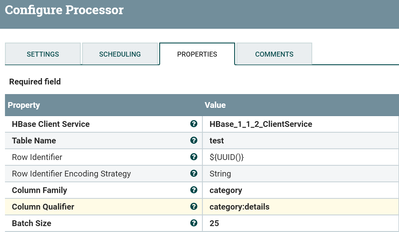
as you can see in the above screenshot i'm having Row Identifier as ${UUID()} because this uuid is unique for each flowfile in NiFi so that we are not overwriting any existing data in hbase table.
Output:-
hbase(main):008:0> scan 'test'
ROW                                             COLUMN+CELL
 c7ca74ad-4933-4340-a9c7-e55370a4501b           column=category:category:details, timestamp=1521711352302, value={"id" : "1334134","name" : "Apparel Fabric","path" : "Arts, Crafts & Sewin
                                                g/Fabric/Apparel Fabric"}
1 row(s) in 0.1130 seconds
Case2:-
If your input json document is
{"id":"1334134","name":"Apparel Fabric","path":"Arts, Crafts & Sewing/Fabric/Apparel Fabric"},
{"id":"412","name":"Apparel Fabric","path":"Arts, Crafts & Sewing/Fabric/Apparel Fabric"}
Then in hbase the document looks like




Created 03-22-2018 04:28 AM
- Mark as New
- Bookmark
- Subscribe
- Mute
- Subscribe to RSS Feed
- Permalink
- Report Inappropriate Content
Can you please share some more details about your use case?
Created 03-22-2018 06:50 AM
- Mark as New
- Bookmark
- Subscribe
- Mute
- Subscribe to RSS Feed
- Permalink
- Report Inappropriate Content
Here is the sample json data @Shu
{"id" : "1334134","name" : "Apparel Fabric","path" : "Arts, Crafts & Sewing/Fabric/Apparel Fabric"},
{"id" : "412","name" : "Apparel Fabric","path" : "Arts, Crafts & Sewing/Fabric/Apparel Fabric"}
Created 03-22-2018 09:06 AM
- Mark as New
- Bookmark
- Subscribe
- Mute
- Subscribe to RSS Feed
- Permalink
- Report Inappropriate Content
Could you please mention how you are expecting to see the above record in hbase.
i.e same row key for both json data?
Created on 03-22-2018 09:19 AM - edited 08-17-2019 11:29 PM
- Mark as New
- Bookmark
- Subscribe
- Mute
- Subscribe to RSS Feed
- Permalink
- Report Inappropriate Content
{"id":"412","name":"Apparel Fabric","path":"Arts, Crafts & Sewing/Fabric/Apparel Fabric"},{"id":"604","name":"Apparel Fabric","path":"Arts, Crafts & Sewing/Fabric/Apparel Fabric"}
I'm expecting this type of output for above json data

Created on 03-22-2018 09:42 AM - edited 08-17-2019 11:29 PM
- Mark as New
- Bookmark
- Subscribe
- Mute
- Subscribe to RSS Feed
- Permalink
- Report Inappropriate Content
You can use PutHbasecell processor for this use case and keep the Row Identifier as UUID then you can get json format message inserted for the uuid.
Example:-
my input json document is
{"id":"1334134","name":"Apparel Fabric","path":"Arts, Crafts & Sewing/Fabric/Apparel Fabric"}PutHbasecell configs:-
as you can see in the above screenshot i'm having Row Identifier as ${UUID()} because this uuid is unique for each flowfile in NiFi so that we are not overwriting any existing data in hbase table.
Output:-
hbase(main):008:0> scan 'test'
ROW                                             COLUMN+CELL
 c7ca74ad-4933-4340-a9c7-e55370a4501b           column=category:category:details, timestamp=1521711352302, value={"id" : "1334134","name" : "Apparel Fabric","path" : "Arts, Crafts & Sewin
                                                g/Fabric/Apparel Fabric"}
1 row(s) in 0.1130 seconds
Case2:-
If your input json document is
{"id":"1334134","name":"Apparel Fabric","path":"Arts, Crafts & Sewing/Fabric/Apparel Fabric"},
{"id":"412","name":"Apparel Fabric","path":"Arts, Crafts & Sewing/Fabric/Apparel Fabric"}
Then in hbase the document looks like
Created on 03-22-2018 09:57 AM - edited 08-17-2019 11:28 PM
- Mark as New
- Bookmark
- Subscribe
- Mute
- Subscribe to RSS Feed
- Permalink
- Report Inappropriate Content
My input is like case 2 and want output should be

I have used PutHbaseCell processor but it store two ids in one row.i want to store on different row
Created on 03-22-2018 11:17 AM - edited 08-17-2019 11:28 PM
- Mark as New
- Bookmark
- Subscribe
- Mute
- Subscribe to RSS Feed
- Permalink
- Report Inappropriate Content
I think your input json messages are enclosed in an array [] like
[{"id":"1334134","name":"Apparel Fabric","path":"Arts, Crafts & Sewing/Fabric/Apparel Fabric"},{"id":"412","name":"Apparel Fabric","path":"Arts, Crafts & Sewing/Fabric/Apparel Fabric"}]In this case use Split Json processor before PutHbasecell processor with below configs
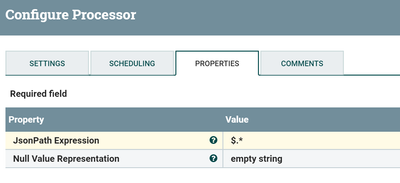
Use Splits relation from splitjson processor to PutHbase cell processor in this case Split json processor splits array of json messages to individual messages.
Input:-
[{"id":"1334134","name":"Apparel Fabric","path":"Arts, Crafts & Sewing/Fabric/Apparel Fabric"},{"id":"412","name":"Apparel Fabric","path":"Arts, Crafts & Sewing/Fabric/Apparel Fabric"}]Output:-
flowfile1:-
{"id":"1334134","name":"Apparel Fabric","path":"Arts, Crafts & Sewing/Fabric/Apparel Fabric"}
Flowfile2:-
{"id":"412","name":"Apparel Fabric","path":"Arts, Crafts & Sewing/Fabric/Apparel Fabric"}
Created 03-22-2018 11:33 AM
- Mark as New
- Bookmark
- Subscribe
- Mute
- Subscribe to RSS Feed
- Permalink
- Report Inappropriate Content
I have tried this solution but it inserts only last record i.e record with "id":412
Created 03-22-2018 11:38 AM
- Mark as New
- Bookmark
- Subscribe
- Mute
- Subscribe to RSS Feed
- Permalink
- Report Inappropriate Content
Are you using UUID as Row Identifier?
Could you please share your PutHbaseCell processor configs..


