
Our Community is getting an upgrade! To get everything ready for the relaunch, we’ll be placing the site in read-only mode starting September 21st.
We really appreciate your understanding while we get things set up behind the scenes. Catch up on all the exciting details about the move here.
Need help or have questions? Drop us a line at [email protected]

Archives of Support Questions (Read Only)
- Cloudera Community
- Board Archive
- Archives of Support Questions (Read Only)
- How to remove folder and everything inside that fo...
- Subscribe to RSS Feed
- Mark Question as New
- Mark Question as Read
- Float this Question for Current User
- Bookmark
- Subscribe
- Mute
- Printer Friendly Page
- Subscribe to RSS Feed
- Mark Question as New
- Mark Question as Read
- Float this Question for Current User
- Bookmark
- Subscribe
- Mute
- Printer Friendly Page
How to remove folder and everything inside that folder in Apache Nifi?
- Labels:
-
Apache NiFi


Created 05-11-2018 07:52 AM
- Mark as New
- Bookmark
- Subscribe
- Mute
- Subscribe to RSS Feed
- Permalink
- Report Inappropriate Content
How to remove folder and everything inside that folder in Apache Nifi?


Created on 05-11-2018 01:18 PM - edited 08-18-2019 01:10 AM
- Mark as New
- Bookmark
- Subscribe
- Mute
- Subscribe to RSS Feed
- Permalink
- Report Inappropriate Content
By using Execute Stream Command processor we can pass the argument as the directory path that need to delete and by using rm -rf command we can delete folder and everything inside the folder.
Example:-
I'm having del_nifi directory in tmp directory and nifi having access to delete this folder
[bash tmp]$ ll
drwxr-xr-x 2 nifi       hadoop        29 May 11 09:04 del_nifi
[bash tmp]$ cd del_nifi
[bash del_nifi]$ ll
-rw-r--r-- 1 nifi hadoop 20 May 11 09:04 6728259595979699
Flow:-
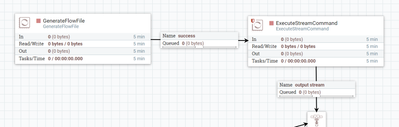
GenerateFlowFile Configs:-
Added new property called directory with /tmp/del_nifi with the value.
ExecuteStreamCommand Configs:-
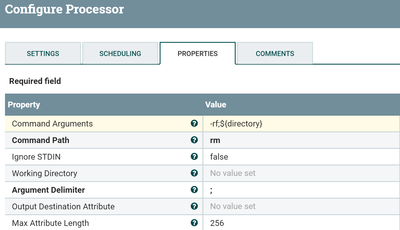
Command Arguments
-rf;${directory} //we are passing directory attribute and -rf as arguments to rm commandCommand Path
rm
Now ExecuteStreamCommand processor will delete the directory/subdirectories/files in the directory.
-
More info regarding rm command
[bash tmp]$ rm --help
-r, -R, --recursive   remove directories and their contents recursively
-f, --force           ignore nonexistent files and arguments, never prompt
Created on 05-11-2018 01:18 PM - edited 08-18-2019 01:10 AM
- Mark as New
- Bookmark
- Subscribe
- Mute
- Subscribe to RSS Feed
- Permalink
- Report Inappropriate Content
By using Execute Stream Command processor we can pass the argument as the directory path that need to delete and by using rm -rf command we can delete folder and everything inside the folder.
Example:-
I'm having del_nifi directory in tmp directory and nifi having access to delete this folder
[bash tmp]$ ll
drwxr-xr-x 2 nifi       hadoop        29 May 11 09:04 del_nifi
[bash tmp]$ cd del_nifi
[bash del_nifi]$ ll
-rw-r--r-- 1 nifi hadoop 20 May 11 09:04 6728259595979699
Flow:-
GenerateFlowFile Configs:-
Added new property called directory with /tmp/del_nifi with the value.
ExecuteStreamCommand Configs:-
Command Arguments
-rf;${directory} //we are passing directory attribute and -rf as arguments to rm commandCommand Path
rm
Now ExecuteStreamCommand processor will delete the directory/subdirectories/files in the directory.
-
More info regarding rm command
[bash tmp]$ rm --help
-r, -R, --recursive   remove directories and their contents recursively
-f, --force           ignore nonexistent files and arguments, never prompt
Created 05-12-2018 01:10 PM
- Mark as New
- Bookmark
- Subscribe
- Mute
- Subscribe to RSS Feed
- Permalink
- Report Inappropriate Content
We are not able execute commands in ExecuteStreamCommand processor like
[bash] cat <filename>|grep <search string>
(or)
[bash] ls |wc -l
But you can use QueryRecord processor and write the sql query(to filter or count..) then the query is going to be executed on the contents of the flowfile.
Take a look into this link for more details regarding Query Record processor.
Created 05-12-2018 10:08 AM
- Mark as New
- Bookmark
- Subscribe
- Mute
- Subscribe to RSS Feed
- Permalink
- Report Inappropriate Content
Thanks, it is a good answer, may I know how to run a command Execute Stream Command processor with pipeline "|" ?


