
Our Community is getting an upgrade! To get everything ready for the relaunch, we’ll be placing the site in read-only mode starting September 21st.
We really appreciate your understanding while we get things set up behind the scenes. Catch up on all the exciting details about the move here.
Need help or have questions? Drop us a line at [email protected]

Archives of Support Questions (Read Only)
- Cloudera Community
- Board Archive
- Archives of Support Questions (Read Only)
- Re: How to resolve Pig view errors on kerbereized...
- Subscribe to RSS Feed
- Mark Question as New
- Mark Question as Read
- Float this Question for Current User
- Bookmark
- Subscribe
- Mute
- Printer Friendly Page
- Subscribe to RSS Feed
- Mark Question as New
- Mark Question as Read
- Float this Question for Current User
- Bookmark
- Subscribe
- Mute
- Printer Friendly Page
How to resolve Pig view errors on kerbereized cluster?
- Labels:
-
Apache Ambari
-
Apache Pig


Created 11-21-2017 04:44 PM
- Mark as New
- Bookmark
- Subscribe
- Mute
- Subscribe to RSS Feed
- Permalink
- Report Inappropriate Content
Hello,
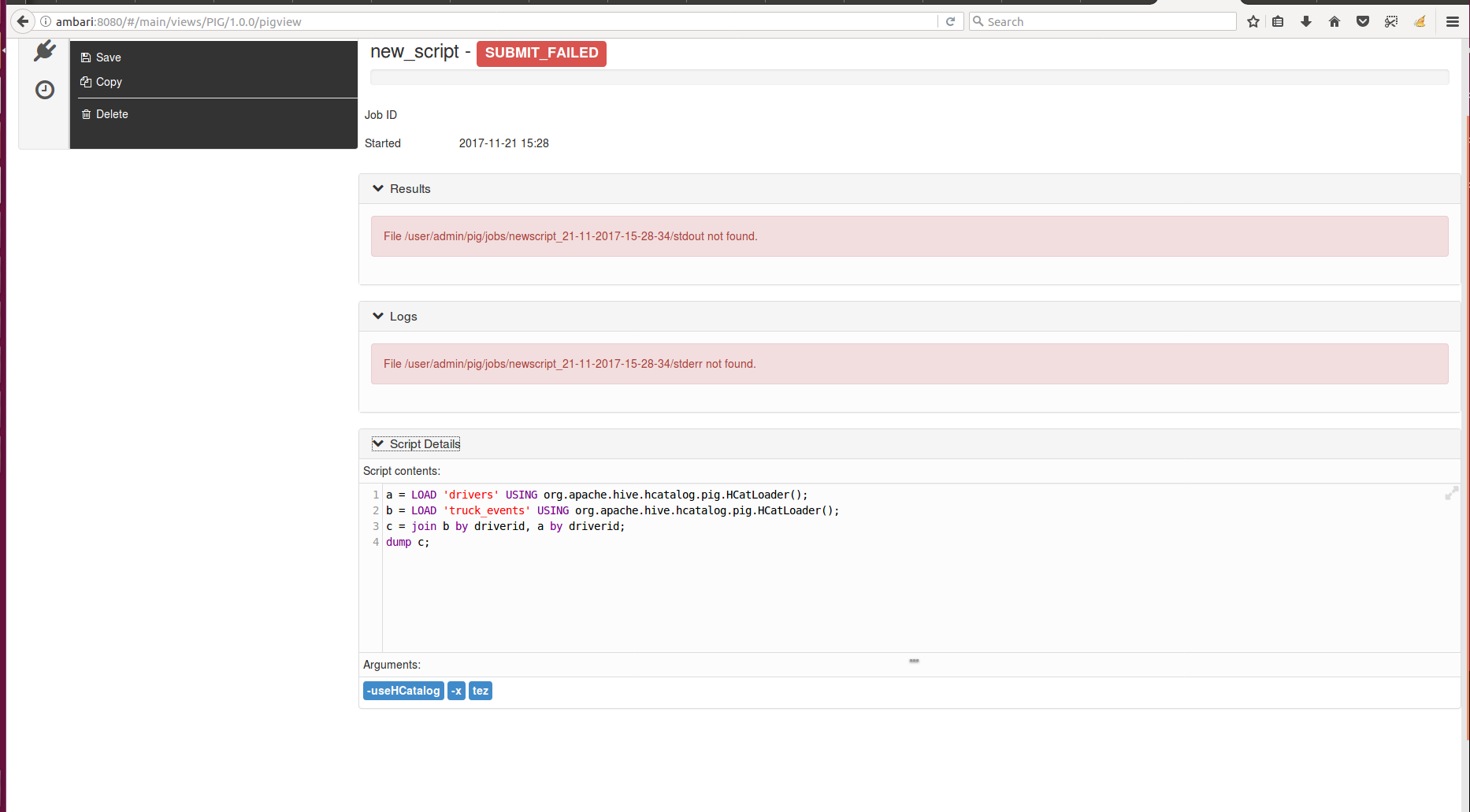
I need to test a script through Pig View on my kerbereized cluster.
I attached my script details in script.png.
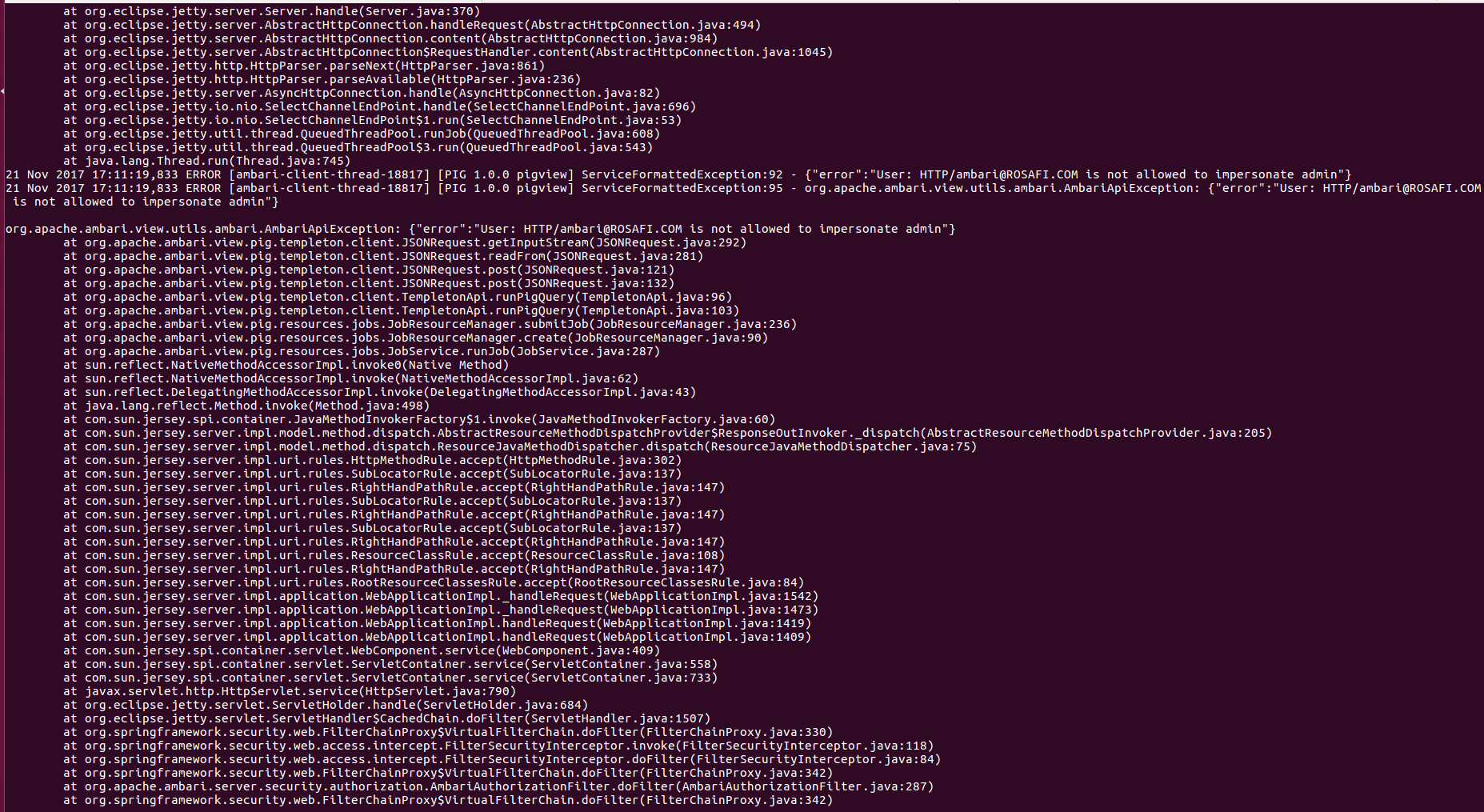
When i run this script i got the error mentioned in error.png through /var/log/ambari-server/pig-view/pig-view.log.
I access to Ambari UI with admin as username.
How can i resolve this issue?
I'll be really grateful if someone could help me.



Created 11-22-2017 09:41 AM
- Mark as New
- Bookmark
- Subscribe
- Mute
- Subscribe to RSS Feed
- Permalink
- Report Inappropriate Content
Based on your "/etc/ambari-server/conf/krb5JAASLogin.conf" file setting "principal" we see that your ambari server principal name is "[email protected]" hence your PigView Auth setting should be something like following, Which is correctly set in your case.
auth=KERBEROS;proxyuser=root
.
But we noticed the following error inside your "error.png" image saying that
org.apache.ambari.view.utils.ambari.AmbariApiException: {"error":"User: HTTP/[email protected] is not allowed to impersonate admin"} .
Suggestion:
Which indicates that you have not set the following property properly inside the hadoop core-site.xml inside the proxyuser settings:
hadoop.proxyuser.HTTP.hosts=*
hadoop.proxyuser.HTTP.group=*
So can you please try adding the above two properties and then try again. Also please do a kinit as following isnide ambari server host and then restart ambari-server once.
# kdestroy
# kinit -kt /etc/security/keytabs/root.server.keytab  [email protected]
# klist
# ambari-server stop
# ambari-server start
.
Then try to access the ambari UI again.
.
Created 11-21-2017 06:23 PM
- Mark as New
- Bookmark
- Subscribe
- Mute
- Subscribe to RSS Feed
- Permalink
- Report Inappropriate Content
- Which version of ambari are you using? There is a "auth" property which is only needed if the view is Custom Configured or Ambari Server is Kerberized before 2.4.0.
- If you are using prior version of ambari then can you please check if you have set the ambari-server principal to your pig view for auth? You can refer to the following doc to get more detailed information about it: https://docs.hortonworks.com/HDPDocuments/Ambari-2.6.0.0/bk_ambari-views/content/section_pig_view_ke...
auth=KERBEROS;proxyuser=<ambari-principal-name>
You can find the ambariserver principal name inside the following file "/etc/ambari-server/conf/krb5JAASLogin.conf"
Example:
# cat /etc/ambari-server/conf/krb5JAASLogin.conf
com.sun.security.jgss.krb5.initiate {
        com.sun.security.auth.module.Krb5LoginModule required
        renewTGT=false
        doNotPrompt=true
        useKeyTab=true
        keyTab="/etc/security/keytabs/ambari.server.keytab"
        principal="[email protected]"
        storeKey=true
        useTicketCache=false;
    };
.
Also please check if you have configured the "hadoop.proxyuser" property set properly for the "HDFS" and "WebHCAT" as described in the following doc: https://docs.hortonworks.com/HDPDocuments/Ambari-2.6.0.0/bk_ambari-views/content/configuring_your_cl...
Created 11-22-2017 08:39 AM
- Mark as New
- Bookmark
- Subscribe
- Mute
- Subscribe to RSS Feed
- Permalink
- Report Inappropriate Content
Thank you very much for your reply.
- My ambari version is Version 2.5.1.0.
- My ambari server is running with root user. So,i resecured my cluster with the principal "[email protected]" and made all the necessary configurations by following this link:
The output of file "/etc/ambari-server/conf/krb5JAASLogin.conf" is:
com.sun.security.jgss.krb5.initiate {
    com.sun.security.auth.module.Krb5LoginModule required
    renewTGT=false
    doNotPrompt=true
    useKeyTab=true
    keyTab="/etc/security/keytabs/root.server.keytab"
    principal="[email protected]"
    storeKey=true
    useTicketCache=false;
};
- I've also made the necessary configuration in Pig view as mentioned in pig-auth.png.

- I've set "hadoop.proxyuser" in HDFS as shown in proxyuser.png.

I'm really stuck. Please help me understanding the cause of this issue.
Created 11-22-2017 09:41 AM
- Mark as New
- Bookmark
- Subscribe
- Mute
- Subscribe to RSS Feed
- Permalink
- Report Inappropriate Content
Based on your "/etc/ambari-server/conf/krb5JAASLogin.conf" file setting "principal" we see that your ambari server principal name is "[email protected]" hence your PigView Auth setting should be something like following, Which is correctly set in your case.
auth=KERBEROS;proxyuser=root
.
But we noticed the following error inside your "error.png" image saying that
org.apache.ambari.view.utils.ambari.AmbariApiException: {"error":"User: HTTP/[email protected] is not allowed to impersonate admin"} .
Suggestion:
Which indicates that you have not set the following property properly inside the hadoop core-site.xml inside the proxyuser settings:
hadoop.proxyuser.HTTP.hosts=*
hadoop.proxyuser.HTTP.group=*
So can you please try adding the above two properties and then try again. Also please do a kinit as following isnide ambari server host and then restart ambari-server once.
# kdestroy
# kinit -kt /etc/security/keytabs/root.server.keytab  [email protected]
# klist
# ambari-server stop
# ambari-server start
.
Then try to access the ambari UI again.
.
Created 11-22-2017 10:30 AM
- Mark as New
- Bookmark
- Subscribe
- Mute
- Subscribe to RSS Feed
- Permalink
- Report Inappropriate Content


