
Our Community is getting an upgrade! To get everything ready for the relaunch, we’ll be placing the site in read-only mode starting September 21st.
We really appreciate your understanding while we get things set up behind the scenes. Catch up on all the exciting details about the move here.
Need help or have questions? Drop us a line at [email protected]

Archives of Support Questions (Read Only)
- Cloudera Community
- Board Archive
- Archives of Support Questions (Read Only)
- Re: How to restart hive-server2
- Subscribe to RSS Feed
- Mark Question as New
- Mark Question as Read
- Float this Question for Current User
- Bookmark
- Subscribe
- Mute
- Printer Friendly Page
- Subscribe to RSS Feed
- Mark Question as New
- Mark Question as Read
- Float this Question for Current User
- Bookmark
- Subscribe
- Mute
- Printer Friendly Page
How to restart hive-server2


Created on 07-18-2016 04:37 PM - edited 08-19-2019 02:06 AM
- Mark as New
- Bookmark
- Subscribe
- Mute
- Subscribe to RSS Feed
- Permalink
- Report Inappropriate Content
While I was having issue setting up the RHive package in HDP 2.4, I was advised to restart hive-server2 after I made some changes in the hive-site.xml file. According to the hortonworks doc, I can do that on the Ambari UI with the "Service Actions" dropdown menu, but I could not find it anywhere on the UI. I've attached a screenshot of my Ambari page as well as a screenshot from the doc.
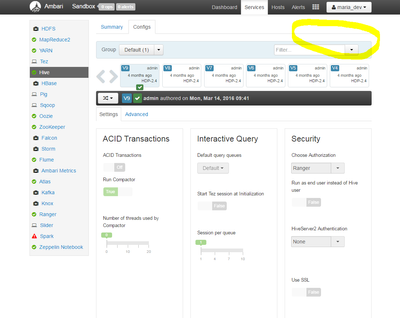
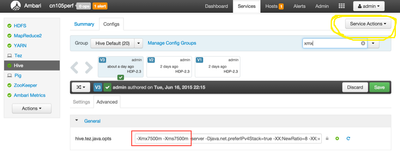
Any idea what's going on here? Or ways to restart hive-server2 with command line? Thanks in advance!



Created 07-18-2016 04:42 PM
- Mark as New
- Bookmark
- Subscribe
- Mute
- Subscribe to RSS Feed
- Permalink
- Report Inappropriate Content
can you try login with admin user.
Created 07-18-2016 04:42 PM
- Mark as New
- Bookmark
- Subscribe
- Mute
- Subscribe to RSS Feed
- Permalink
- Report Inappropriate Content
can you try login with admin user.
Created 07-18-2016 04:52 PM
- Mark as New
- Bookmark
- Subscribe
- Mute
- Subscribe to RSS Feed
- Permalink
- Report Inappropriate Content
I wasn't able to log in as admin with the same username and password that I used to log into sandbox as root...
Created 07-18-2016 05:00 PM
- Mark as New
- Bookmark
- Subscribe
- Mute
- Subscribe to RSS Feed
- Permalink
- Report Inappropriate Content
@jj
@JJ Yang after ssh into the box you can set the password for admin by running this command
ambari-admin-password-reset
Created 07-18-2016 05:39 PM
- Mark as New
- Bookmark
- Subscribe
- Mute
- Subscribe to RSS Feed
- Permalink
- Report Inappropriate Content
It worked! Even though did not resolve my problem, but I was able to restart Hive. Thank you for the help!


Created 07-18-2016 04:56 PM
- Mark as New
- Bookmark
- Subscribe
- Mute
- Subscribe to RSS Feed
- Permalink
- Report Inappropriate Content
maria_dev has only read_only access for Ambari. Either log in as admin/admin or follow the link and 2.2 SETUP AMBARI ADMIN PASSWORD MANUALLY

Created on 07-18-2016 04:57 PM - edited 08-19-2019 02:06 AM
- Mark as New
- Bookmark
- Subscribe
- Mute
- Subscribe to RSS Feed
- Permalink
- Report Inappropriate Content
Hi @JJ Yang
On the Ambari UI, when you select hive component, go to summary tab. You will see services like the ones below:
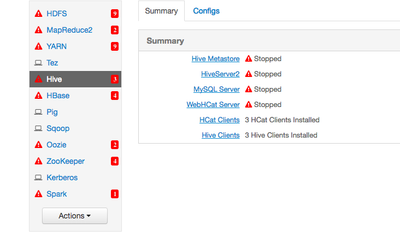
Then click on Hiverserver2 , it will take you to the following :
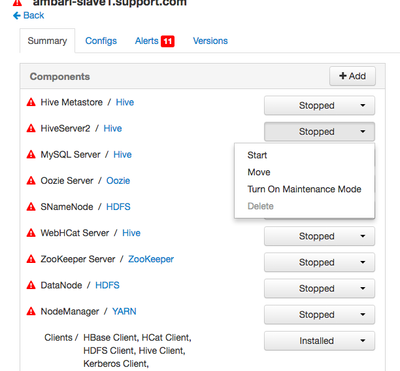
You can restart the service from here.
Hope this helps.


Created 07-18-2016 05:00 PM
- Mark as New
- Bookmark
- Subscribe
- Mute
- Subscribe to RSS Feed
- Permalink
- Report Inappropriate Content


